
如何使用PaginatedDataTable更改列的背景色
如何使用PaginatedDataTable更改列的背景色
提问于 2021-10-08 06:44:55
我使用PaginatedDataTable创建了一个表,但现在我想添加列的背景色。这是代码
class _PaginationDataTableState extends State<PaginationDataTable> {

  var dts=DTS();
  int rowPerPage=PaginatedDataTable.defaultRowsPerPage;
  @override
  Widget build(BuildContext context) {
    return Scaffold(
      backgroundColor: Colors.pink,
      body: SafeArea(
        child: SingleChildScrollView(
          child: PaginatedDataTable(
            arrowHeadColor: Colors.red,
            header: Text("Counter data"),
            columns: [
              DataColumn(label: Text("Col 1")),
              DataColumn(label: Text("Col 2")),
              DataColumn(label: Text("Col 3")),
              DataColumn(label: Text("Col 4")),
            ],
            source:dts,
            onRowsPerPageChanged: (r){
              setState(() {
                rowPerPage=r!;
              });
            },
            rowsPerPage:rowPerPage

          ),
        ),
      ),

    );
  }
}

class DTS extends DataTableSource{

  DataRow getRow(int index){
    return DataRow.byIndex(index:index,cells: [
      DataCell(Text("#cell1$index")),
      DataCell(Text("#cell2$index")),
      DataCell(Text("#cell3$index")),
      DataCell(Text("#cell4$index"))
    ]);
  }

  @override
  // TODO: implement isRowCountApproximate
  bool get isRowCountApproximate => true;

  @override
  // TODO: implement rowCount
  int get rowCount =>100;

  @override
  // TODO: implement selectedRowCount
  int get selectedRowCount => 0;

}
输出:
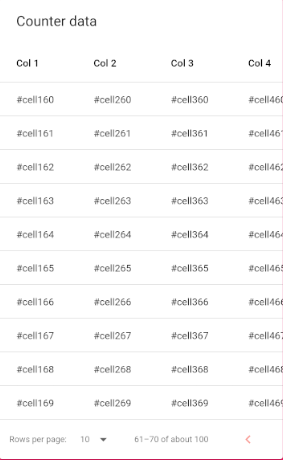
如果有人知道怎么做,请帮忙。
回答 2
Stack Overflow用户
发布于 2021-10-08 19:24:10
尝试下面的代码,希望它对你有帮助。
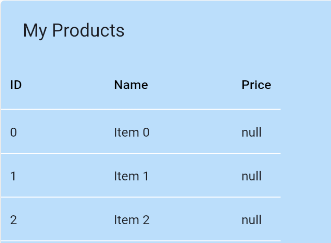
如果您更改了整个表的背景色,请尝试如下
 Theme(
            data: Theme.of(context).copyWith(
              cardColor: Colors.blue[100],
              dividerColor: Colors.white,
            ),
            child: PaginatedDataTable(),
          ),
结果屏幕->
Stack Overflow用户
发布于 2022-09-28 17:08:36
在接受的答案的基础上,您可以使用PaginatedDataTable包装器自定义否则无法访问的Theme属性。
例如:
    return Theme(
      data: Theme.of(context).copyWith(
        cardTheme: CardTheme(
          elevation: 0, // remove shadow
          margin: const EdgeInsets.all(0), // reset margin
          shape: RoundedRectangleBorder(
            borderRadius: BorderRadius.circular(16), // Change radius
          ),
        ),
      ),
      child: Padding(
        padding: const EdgeInsets.all(16),
        child: PaginatedDataTable(
          // ...
        ),
      ),
);页面原文内容由Stack Overflow提供。腾讯云小微IT领域专用引擎提供翻译支持
原文链接:
https://stackoverflow.com/questions/69491609
复制相关文章
相似问题
腾讯云开发者

Copyright © 2013 - 2026 Tencent Cloud. All Rights Reserved. 腾讯云 版权所有
深圳市腾讯计算机系统有限公司 ICP备案/许可证号:粤B2-20090059  粤公网安备44030502008569号
腾讯云计算(北京)有限责任公司 京ICP证150476号 | 京ICP备11018762号