
重复水印文本
重复水印文本
提问于 2021-09-24 07:38:34
我使用PDF4NET在pdf页面上绘制水印。现在,我想在平铺模式下在整个页面上重复水印文本。就像这样的水印。
下面是我重复水印文本的方法:
var text= string.Concat(Enumerable.Repeat("Sample   ", 800));
PDFTextFormatOptions format= new PDFTextFormatOptions();
format.Align = PDFTextAlign.TopLeft;
// -----
// ....
page.Canvas.DrawTextBox(text, fontText, null, redBrush, 0, 0, page.Width, page.Height, format);
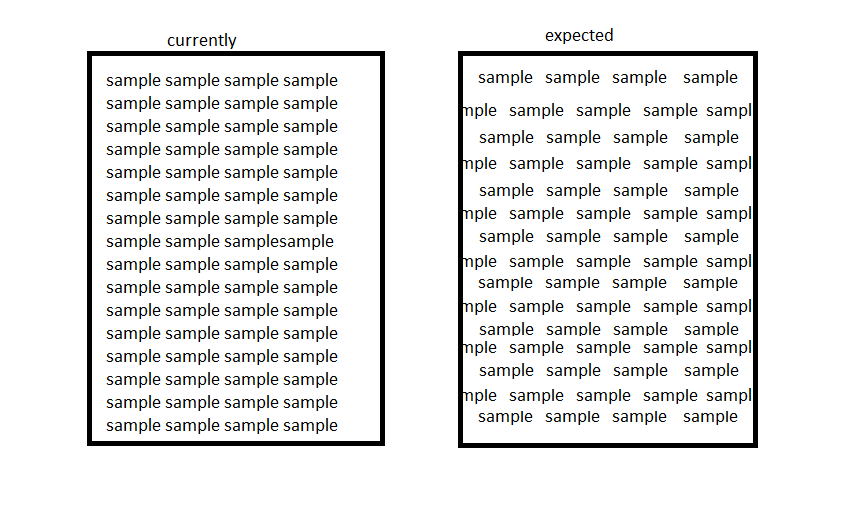
如何使文本显示在平铺模式下,而不考虑文本的字体大小和长度?
回答 2
Stack Overflow用户
回答已采纳
发布于 2021-09-24 09:06:44
无法自动生成预期的布局。
下面的代码显示了获取所需布局的可能方法。您可以使用X,Y来根据需要调整输出。
PDFFixedDocument document = new PDFFixedDocument();
PDFPage page = document.Pages.Add();

PDFBrush lightGrayBrush = new PDFBrush(PDFRgbColor.LightGray);
PDFStandardFont helvetica = new PDFStandardFont(PDFStandardFontFace.Helvetica, 12);
string watermarkText = "Sample Watermark";
double watermarkTextWidth = PDFTextEngine.MeasureString(watermarkText, helvetica).Width;

double y = 0;
double startX = watermarkTextWidth / 2;
int sign = -1;
while (y < page.Height)
{
    double x = startX;

    while (x < page.Width)
    {
        page.Canvas.DrawString(watermarkText, helvetica, lightGrayBrush, x, y);
        x = x + watermarkTextWidth + watermarkTextWidth / 4;
    }

    startX = startX + sign * watermarkTextWidth / 2;
    sign = -sign;

    y = y + 2 * helvetica.Size;
}

document.Save("InterleavedWatermak.pdf");
输出文件如下:

免责声明:我为开发PDF4NET库的公司工作。
Stack Overflow用户
发布于 2022-07-03 03:22:34
可以使用imagemagick:
magick convert input.jpg -alpha set ( -background none -fill #fff7 -pointsize 16 label:Watermark -rotate -45 +repage +write mpr:tile +delete ) ( -clone 0 -resize 300% -colorize 100 -tile mpr:tile -draw "color 0,0 reset" -rotate 45 -chop 50%x50% ) -compose over -composite output.jpg
页面原文内容由Stack Overflow提供。腾讯云小微IT领域专用引擎提供翻译支持
原文链接:
https://stackoverflow.com/questions/69311264
复制相关文章
相似问题
腾讯云开发者

Copyright © 2013 - 2026 Tencent Cloud. All Rights Reserved. 腾讯云 版权所有
深圳市腾讯计算机系统有限公司 ICP备案/许可证号:粤B2-20090059  粤公网安备44030502008569号
腾讯云计算(北京)有限责任公司 京ICP证150476号 | 京ICP备11018762号