
无法使用c#运行azcopy工具
无法使用c#运行azcopy工具
提问于 2021-09-06 14:30:48
我编写了一个控制台应用程序以编程方式调用AZcopy工具,但我无法调用azcopy工具。你能帮我重订可行的来源吗?我下载了azcopy_windows_amd64_10.12.1并将azcopy.exe放到C:\Windows\System32\azcopy.exe位置
static void Main(string[] args)
    {
        string strCmdText = @"AzCopy.exe sync ""D:\temp"" ""https://myhubforazcopy.blob.core.windows.net/myhubforazcopy1?sp=racwdl&st=2021-09-05T17:19:11Z&se=2021-09-06T01:19:11Z&spr=https&sv=2020-08-04&sr=c&sig=MAraJ0PxqJMDdYuWzrOUEwYda%2BkXEukP%2Fs%3D"" --destination-delete=true";

        CallProcess(strCmdText);
    }

public static void CallProcess(string strCmdText)
    {

        //C:\Windows\System32\azcopy.exe
        var process = new Process();
        ProcessStartInfo startInfo = new ProcessStartInfo
        {
            FileName = @"C:\Windows\System32\cmd.exe",
            RedirectStandardInput = true,
            RedirectStandardOutput = true,
            Arguments = strCmdText,
            UseShellExecute = false,
            CreateNoWindow = false,
            WorkingDirectory = @"D:\AzCopy\bin\Debug\"
        };


        process.StartInfo = startInfo;

        process.Start();

        process.StandardInput.Flush();
        process.StandardInput.Close();
        process.WaitForExit();
        Console.WriteLine(process.StandardOutput.ReadToEnd());
}回答 2
Stack Overflow用户
回答已采纳
发布于 2021-09-06 14:53:44
使用要执行的程序启动cmd,因为参数实际上并不运行该程序,您需要在/c标志之后传递整个参数(您的程序),如下所示:
string strCmdText = @"/c AzCopy.exe sync ""D:\temp"" ...确保AzCopy在您的PATH中,或者指定到它的精确路径。
但是,如果您只是直接运行AzCopy而不是启动命令提示符(然后启动AzCopy ),这样做会更好,如下所示:
// Notice how the 'azcopy' at the start is gone
var arguments = @"""D:\temp"" ""https://myhubforazcopy.blob ..."

var process = new Process();
ProcessStartInfo startInfo = new ProcessStartInfo
{
    FileName = @"C:\Windows\System32\azcopy.exe",
    RedirectStandardInput = true,
    RedirectStandardOutput = true,
    Arguments = arguments,
    UseShellExecute = false,
    CreateNoWindow = false,
    WorkingDirectory = @"D:\AzCopy\bin\Debug\"
};Stack Overflow用户
发布于 2021-09-06 16:24:15
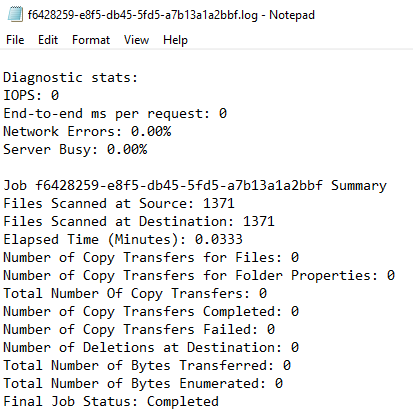
解决方案:
static void Main(string[] args)
    {
        string strCmdText = @"/c azcopy.exe sync ""D:\temp"" ""https://myhubforazcopy.blob.core.windows.net/myhubforazcopy1?sp=racwdl&st=2021-09-05T17:19:11Z&se=2021-09-06T01:19:11Z&spr=https&sv=2020-08-04&sr=c&sig=MAraJ0PxqJMDdYuWzrOUEwYda%2BkXEukP%2Fs%3D"" --delete-destination=true";

        CallProcess(strCmdText);
    }

 public static void CallProcess(string strCmdText)
    {
        var process = new Process();
        ProcessStartInfo startInfo = new ProcessStartInfo
        {
            FileName = @"cmd.exe",
            RedirectStandardInput = true,
            RedirectStandardOutput = true,
            Arguments = strCmdText,
            UseShellExecute = false,
            CreateNoWindow = false,
            WorkingDirectory = Path.GetDirectoryName(Assembly.GetExecutingAssembly().Location)
        };


        process.StartInfo = startInfo;

        process.Start();

        process.StandardInput.Flush();
        process.StandardInput.Close();
        process.WaitForExit();
        Console.WriteLine(process.StandardOutput.ReadToEnd());
    }
页面原文内容由Stack Overflow提供。腾讯云小微IT领域专用引擎提供翻译支持
原文链接:
https://stackoverflow.com/questions/69076220
复制相关文章
相似问题
腾讯云开发者

Copyright © 2013 - 2026 Tencent Cloud. All Rights Reserved. 腾讯云 版权所有
深圳市腾讯计算机系统有限公司 ICP备案/许可证号:粤B2-20090059  粤公网安备44030502008569号
腾讯云计算(北京)有限责任公司 京ICP证150476号 | 京ICP备11018762号