
当我使用自动填充铬时,背景变成白色
当我使用自动填充铬时,背景变成白色
提问于 2021-09-02 03:57:55
我设计了一个表单字段,如图中所示
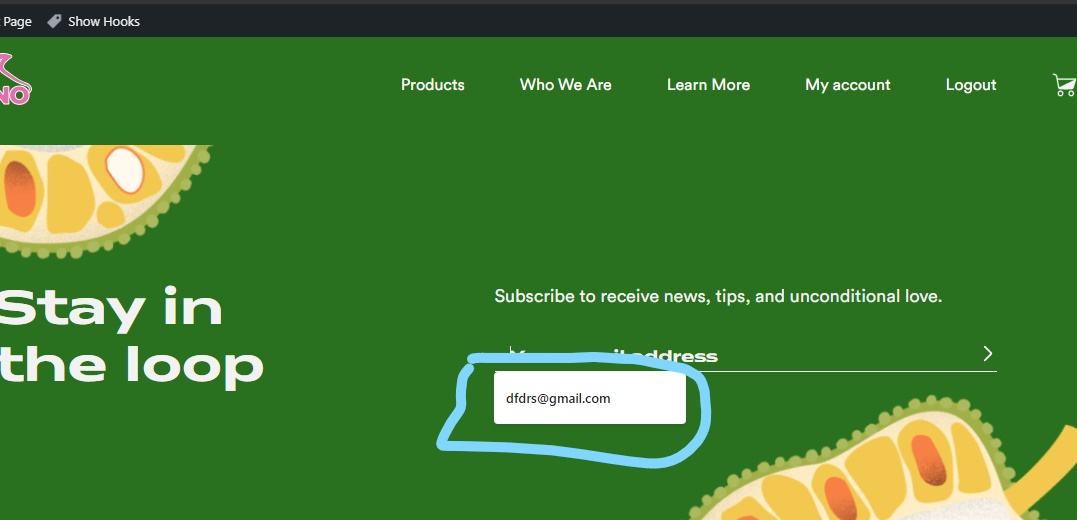
但是当我使用“自动填充”时,在蓝色框中,背景和文本的颜色会发生类似的变化。
我的SCSS代码
.email__wrapper{

@include respond-to('small') {
    padding: 30px 10px;
}
.pork__container{
    padding: 146px 100px;
    background-color: color(darkerGreen);
    border-radius: 54px;
    background-image: url(./img/Fruit__CTA.png);
    background-position: center center;
    background-size: cover;
    @include respond-to('medium') {
        background-image: url(./Assets/Images/Submit_BG_Mob.png);
    }

    @include respond-to('medium') {
        flex-direction: column;
    }

    @include respond-to('small') {
        padding: 60px 22px;
    }
}


&__heading__wrapper {
    width: 100%
}

&__form__wrapper{
    width: 100%
}

&__heading{
    color: color(lightWhite);
    max-width: 296px;
    @include respond-to('medium') {
        text-align: center;
        margin: auto;
    }
}

&__paragraph{
    color: color(lightWhite);
    @include respond-to('medium') {
        text-align: center;
        margin-top: 47px;
    }
}

&__field {
    width: 100%;
    background-color: transparent;
    color: color(lightWhite);
    border: none;


    &::placeholder{
        color: color(lightWhite);
    }

    &:focus {
        outline: none;
    }


    &__wrapper{
        display:flex;
        border-bottom: 1px solid white;
    }
}


&__submit{
    background-color: transparent;
    border:none;
    background-image: url(./img/submit_BG.svg);
    background-repeat: no-repeat;
    background-size: contain;
    padding: 9px;
    transform: scale(0.5);

}
.mc4wp-response, .mc4wp-response a{
    color: color(lightWhite);
}
.mc4wp-form-fields{
    margin-top: 30px;
    @include respond-to('medium') {
        margin-top: 47px;
        margin-bottom: 0px;
    }
}

.mc4wp-alert {
    margin-top: 20px;
    @include respond-to('medium') {
        text-align: center;
    }
}

}
我怎么才能解决这个问题?我也尝试过添加透明的背景和其他东西。但什么都没起作用。提前感谢
回答 2
Stack Overflow用户
回答已采纳
发布于 2021-09-02 05:00:31
背景不工作的自动填充尝试下面的CSS技巧
.email__wrapper__field {
    box-shadow: 0 60px 0px inset #29711e;
    -webkit-text-fill-color: #fff !important;
}Stack Overflow用户
发布于 2021-09-02 04:13:27
从链接中我看到你将背景颜色改为绿色。
.email__wrapper__field {
    width: 100%;
    background-color: #29711E;
    color: #F2F2F2;
    border: none;
}
把它改成
.email__wrapper__field {
    width: 100%;
    background-color: transparent;
    color: #F2F2F2;
    border: none;
}
希望能帮上忙。
页面原文内容由Stack Overflow提供。腾讯云小微IT领域专用引擎提供翻译支持
原文链接:
https://stackoverflow.com/questions/69023978
复制相关文章
相似问题
腾讯云开发者

Copyright © 2013 - 2026 Tencent Cloud. All Rights Reserved. 腾讯云 版权所有
深圳市腾讯计算机系统有限公司 ICP备案/许可证号:粤B2-20090059  粤公网安备44030502008569号
腾讯云计算(北京)有限责任公司 京ICP证150476号 | 京ICP备11018762号