
SwiftUI - LazyVGrid间距
我有一个类似于LazyVGrid的SearchView.swift文件
let layout = [
    GridItem(.flexible()),
    GridItem(.flexible())
]

NavigationView {
     ZStack {
        VStack {
           ....Some other stuff here
           ScrollView (showsIndicators: false) {
                    LazyVGrid(columns: layout) {
                        ForEach(searchViewModel.allUsers, id: \.uid) { user in
                            NavigationLink(destination: ProfileDetailedView(userData: user)) {
                                profileCard(profileURL: user.profileURL, username: user.username, age: user.age, country: user.city)
                            }
                        }
                    }
                }
           }
      }
}
我的profileCard.swift看起来像:
var body: some View {
    ZStack {
        Image.image(urlString: profileURL,
                 content:  {
                    $0.image
                        .resizable()
                        .aspectRatio(contentMode: .fill)

                 }
        )
        .frame(width: 185, height: 250)
        .overlay(
            LinearGradient(gradient: Gradient(colors: [.clear, .black]), startPoint: .center, endPoint: .bottom)
        )
        .overlay(
            VStack (alignment: .leading) {
                Text("\(username.trimmingCharacters(in: .whitespacesAndNewlines)), ")
                    .font(.custom("Roboto-Bold", size:14))
                    .foregroundColor(Color.white)
                + Text("\(age)")
                    .font(.custom("Roboto-Light", size:14))
                    .foregroundColor(Color.white)
                HStack {
                    Text("\(country)")
                        .font(.custom("Roboto-Light", size:14))
                        .foregroundColor(.white)
                }
            }
            .padding(.leading, 15)
            .padding(.bottom, 15)
            ,alignment: .bottomLeading
        )
        .cornerRadius(12)
    }
}
这将在不同屏幕大小上产生两个不同的空间:
iPhone 12:
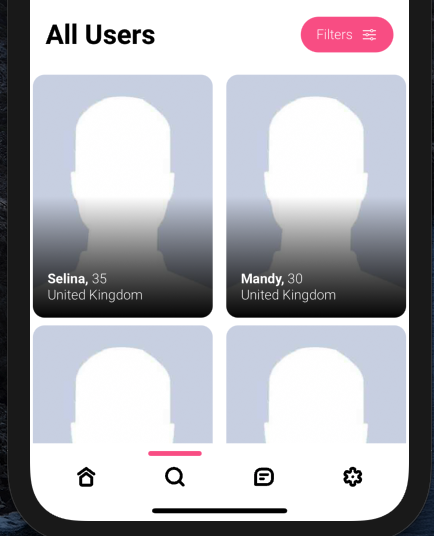
iPhone 12 Pro Max
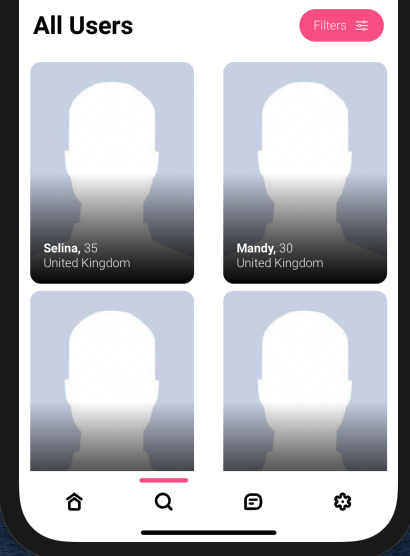
我试图得到相同的数量之间的卡(水平和垂直)和周围卡的所有设备,有帮助实现这一点吗?
更新
按照@Adrien的例子,我更接近这个问题,但是当我使用一个图像时,结果会完全改变
let columns = Array(repeating: GridItem(.flexible(), spacing: 20, alignment: .center), count: 2)

ScrollView (showsIndicators: false) {
                LazyVGrid(columns: columns, spacing: 20) {
                    ForEach(searchViewModel.allUsers, id: \.uid) { user in
                        NavigationLink(destination: ProfileDetailedView(userData: user)) {

                                HStack {
                                    Image("placeholder-avatar")
                                         .resizable()
                                              .aspectRatio(contentMode: .fill)

                                        }
                                        .frame(maxWidth: .infinity, minHeight: 240) // HERE 1
                                        .background(Color.black)
                                        .cornerRadius(25)
                                }
                            }
                        }.padding(20)
                    }
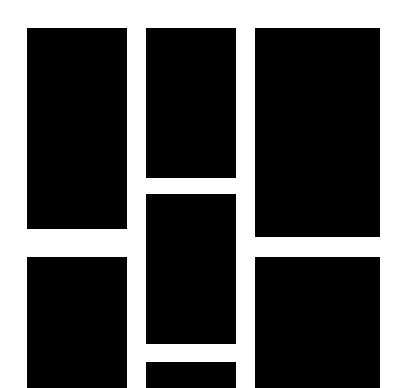
回答 2
Stack Overflow用户
发布于 2021-08-17 20:19:23
GridItem数组只修复每个单元格容器的行为。在这里,它是灵活的,但这并不意味着它将修改其内容。
它包含的View可以有三种不同的行为:
它适应于它的容器:像Rectangle,Image().resizable(),或者任何带有.frame(maxWidth: .infinity, maxHeight: .infinity))修饰符的视图。
- 适应它的内容(比如
Text,或者有一个固定的大小(就像.frame(width: 185, height: 250))的情况一样)
如果您希望单元格之间的间距(垂直和水平)相同,无论设备是什么,ProfileDetailedView的内容都必须适应其容器:
您必须修改您的单元格,使其采用行为1.。
- 您可以使用您的
GridItem(水平间距)和LazyVGrid(垂直)的spacing参数。
示例:
struct SwiftUIView5: View {
    let columns = Array(repeating: GridItem(.flexible(), spacing: 20, alignment: .center), count: 2)  // HERE 2
    var body: some View {
        ScrollView {
            LazyVGrid(columns: columns, spacing: 20) {  // HERE 2
                ForEach((1...10), id: \.self) { number in
                    HStack {
                        Text(number.description)
                            .foregroundColor(.white)
                            .font(.largeTitle)
                    }
                    .frame(maxWidth: .infinity, minHeight: 200) // HERE 1
                    .background(Color.black)
                    .cornerRadius(25)
                }
            }
            .padding(20)  // HERE 2
        }
    }
}
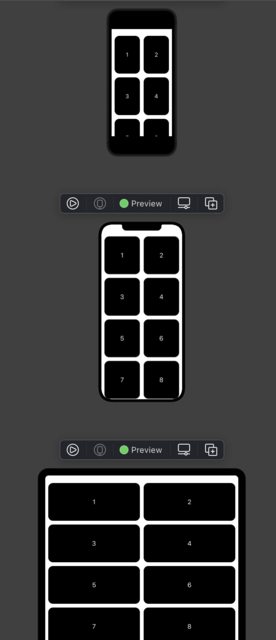
Stack Overflow用户
发布于 2021-08-17 16:59:15
实际上,在您的情况下,间距是屏幕大小的函数。你有硬编码的卡的大小(185x250),所以间距是预期的,更小的屏幕更紧,更通风的大屏幕。
请注意,垂直间距与预期一致。这似乎是合乎逻辑的,因为没有垂直大小约束。
顺便说一句,这两个截图的大小不一样,否则这个方面会更明显。
如果你想保持卡的大小固定,也许你至少可以保持它们之间的水平空间不变,但你会有更大的边距。
或者您可以动态地调整卡的大小。查看GeometryReader,它将帮助您访问运行时屏幕大小。
https://stackoverflow.com/questions/68820537
复制相似问题
腾讯云开发者

Copyright © 2013 - 2026 Tencent Cloud. All Rights Reserved. 腾讯云 版权所有
深圳市腾讯计算机系统有限公司 ICP备案/许可证号:粤B2-20090059  粤公网安备44030502008569号
腾讯云计算(北京)有限责任公司 京ICP证150476号 | 京ICP备11018762号