
TUI (Toast UI)日历渲染问题
最近,我尝试将TUI (Toast UI)日历实现到我的Blazor项目中。不幸的是,按照指南和文档,我面临一些渲染问题。
填充的日历如下所示:

虽然它应该是这样的:
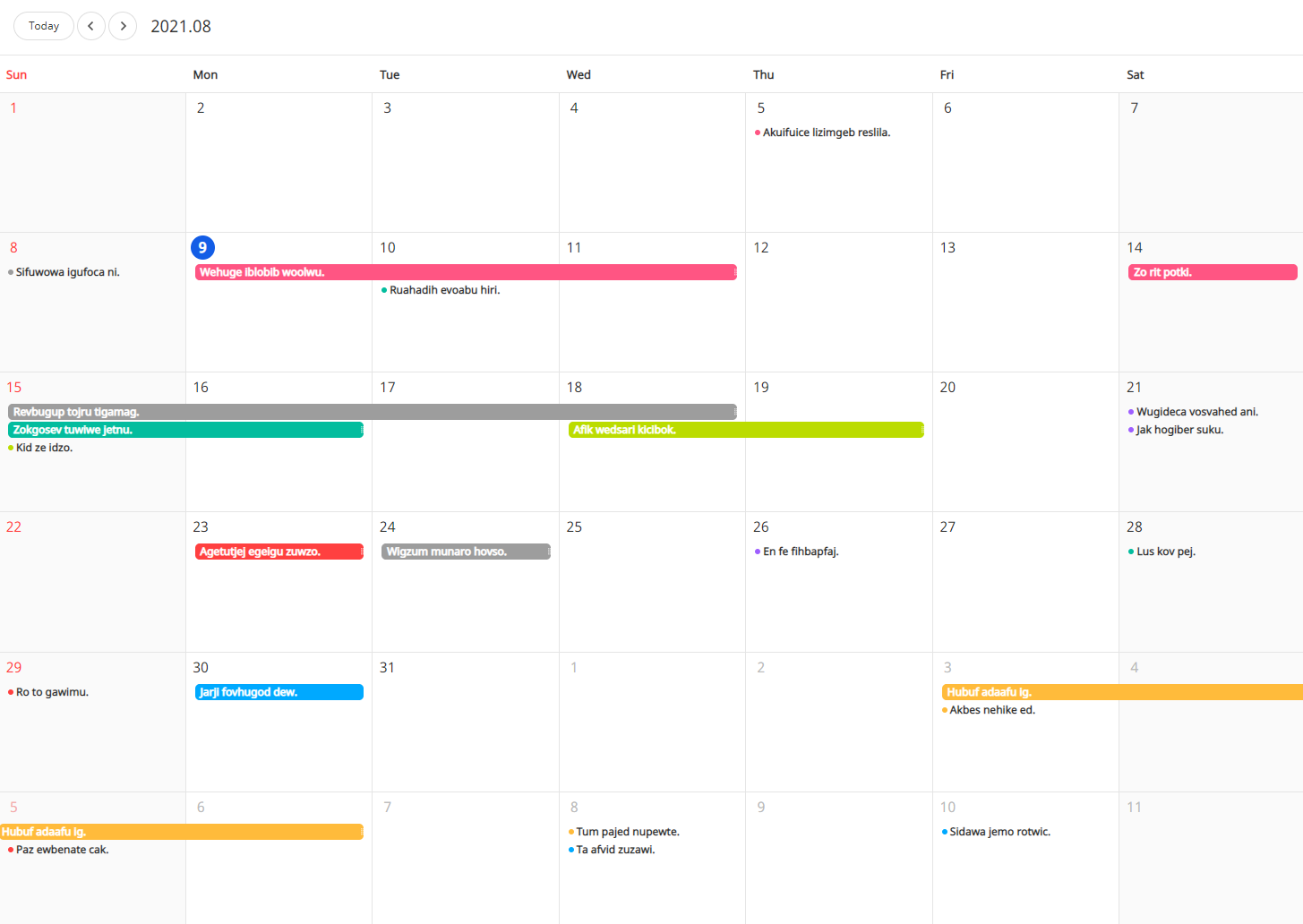
JS部分:
var Calendar = require('tui-calendar'); /* CommonJS */
require("tui-calendar/dist/tui-calendar.css");

// If you use the default popups, use this.
require("tui-date-picker/dist/tui-date-picker.css");
require("tui-time-picker/dist/tui-time-picker.css");

window.InitCalendar = function () {
var MONTHLY_CUSTOM_THEME = {
    // month header 'dayname'
    'month.dayname.height': '42px',
    'month.dayname.borderLeft': 'none',
    'month.dayname.paddingLeft': '8px',
    'month.dayname.paddingRight': '0',
    'month.dayname.fontSize': '13px',
    'month.dayname.backgroundColor': 'inherit',
    'month.dayname.fontWeight': 'normal',
    'month.dayname.textAlign': 'left',

    // month day grid cell 'day'
    'month.holidayExceptThisMonth.color': '#f3acac',
    'month.dayExceptThisMonth.color': '#bbb',
    'month.weekend.backgroundColor': '#fafafa',
    'month.day.fontSize': '16px',

    // month schedule style
    'month.schedule.borderRadius': '5px',
    'month.schedule.height': '18px',
    'month.schedule.marginTop': '2px',
    'month.schedule.marginLeft': '10px',
    'month.schedule.marginRight': '10px',

    // month more view
    'month.moreView.boxShadow': 'none',
    'month.moreView.paddingBottom': '0',
    'month.moreView.border': '1px solid #9a935a',
    'month.moreView.backgroundColor': '#f9f3c6',
    'month.moreViewTitle.height': '28px',
    'month.moreViewTitle.marginBottom': '0',
    'month.moreViewTitle.backgroundColor': '#f4f4f4',
    'month.moreViewTitle.borderBottom': '1px solid #ddd',
    'month.moreViewTitle.padding': '0 10px',
    'month.moreViewList.padding': '10px'
};

var calendar = new Calendar('#calendar', {
    defaultView: 'month', // monthly view option
    theme: MONTHLY_CUSTOM_THEME
});

calendar.createSchedules([
    {
        id: 11035,
        calendarId: "1",
        category: "time",
        title: "Vendor 1",
        start: "2021-08-04",
        end: "2021-08-19",
    },
    {
        id: 11036,
        calendarId: "2",
        category: "time",
        title: "Vendor 2",
        start: "2021-08-09",
        end: "2021-08-09",
    },
    {
        id: 11039,
        calendarId: "3",
        category: "time",
        title: "Vendor 3",
        start: "2021-08-04",
        end: "2021-08-04",
    },
    {
        id: 11030,
        calendarId: "4",
        category: "time",
        title: "Vendor 4",
        start: "2021-08-13",
        end: "2021-08-14",
    },
]);
剃须刀:
@page "/personal/calendar"
@using System.Net.Http.Json
@inject IJSRuntime JsRuntime
<h1>Kalendarz</h1>
<div id="menu">
<span id="menu-navi">
    <button type="button" class="btn btn-default btn-sm move-today" data-action="move-today">Today</button>
    <button type="button" class="btn btn-default btn-sm move-day" data-action="move-prev">
        <i class="calendar-icon ic-arrow-line-left" data-action="move-prev"></i>
    </button>
    <button type="button" class="btn btn-default btn-sm move-day" data-action="move-next">
        <i class="calendar-icon ic-arrow-line-right" data-action="move-next"></i>
    </button>
</span>
<span id="renderRange" class="render-range"></span>
</div>
<div id="calendar"></div>
@code{
protected override async Task OnAfterRenderAsync(bool firstRender)
{
    if (firstRender)
    {
        await JsRuntime.InvokeVoidAsync("InitCalendar");
    }
}
}
对于Blazor来说,我是个新手,我正在寻找一些洞察力,因为我无法证实这个问题:
附带注意--我尝试过使用日历,但我的实现和提供的演示只提供了404 s和NullReferenceExceptions。
回答 1
Stack Overflow用户
发布于 2022-02-17 23:32:39
我知道我在派对上迟到了,但万一你还有这个问题:我在使用gismofx包装器时遇到了同样的问题,所以你选择了自己的路线并创建了自己的包装。您遇到的问题是日历的.css文件没有被加载。
如果您正在使用WebPack,您将需要包括以下npm包:‘css-加载程序’,‘迷你-css-提取-插件’,和‘风格-加载程序’。这将使您能够从Toast UI npm包中提取css文件。
使用类似于以下配置的配置将webpack.config.js文件添加到初始化npm的同一个目录中:
const path = require('path');

const MiniCssExtractPlugin = require('mini-css-extract-plugin');

module.exports = {
    entry: './src/tuiCalendar.js',
    output: {
        path: path.resolve(__dirname, '../wwwroot/'),
        filename: 'tuiCalendar.bundle.js'
    },
    plugins: [
        new MiniCssExtractPlugin(
            {
                filename: 'tuiCalendar.css'
            })
    ],
    module: {
        rules: [
            {
                test: /\.css$/i,
                use: [MiniCssExtractPlugin.loader, 'css-loader'],
            },
        ]
    }
}
在我的示例中,我想导出的js文件是‘./src/tuiCaltim.js’,我正在提取css文件‘tuiCalport.css’。
一旦提取了css文件,您就需要按照标准在html或cshtml中添加对它的引用。在我的例子中,我创建了一个Razor类库,因此我引用它如下:
<link href="_content/TUICalendar_Blazor/js/tuiCalendar.css" rel="stylesheet" />这将指向项目名称'TUICalendar_Blazor',该文件位于该项目的wwwroot/js文件夹中。
第一次在这里张贴,所以希望这是好的,我已经帮助了某人,因为我已经得到了很多帮助,仅仅是通过潜伏。
https://stackoverflow.com/questions/68711134
复制相似问题
腾讯云开发者

Copyright © 2013 - 2026 Tencent Cloud. All Rights Reserved. 腾讯云 版权所有
深圳市腾讯计算机系统有限公司 ICP备案/许可证号:粤B2-20090059  粤公网安备44030502008569号
腾讯云计算(北京)有限责任公司 京ICP证150476号 | 京ICP备11018762号