
如何解决:在vs代码扩展开发中,"Uncaught :require$0未定义“
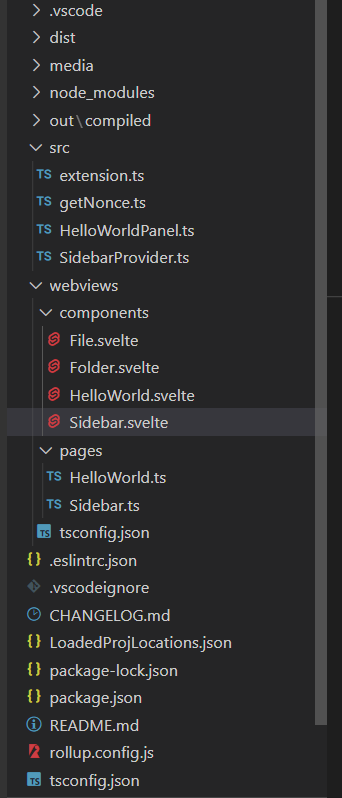
我正在创建vs代码扩展使用svelte。我跟随这了解了一些关于svelte的基本知识。我目前被错误的Uncaught ReferenceError: require$$0 is not defined困住了。当我导入"project"/out/compiled文件夹并使用这个fs读取本地机器中的文件时,这个错误显示在一个自动创建的文件中,这个文件名为sidebar.js (在import * as fs from "fs";文件夹中创建)。下面是这个项目的文件结构-
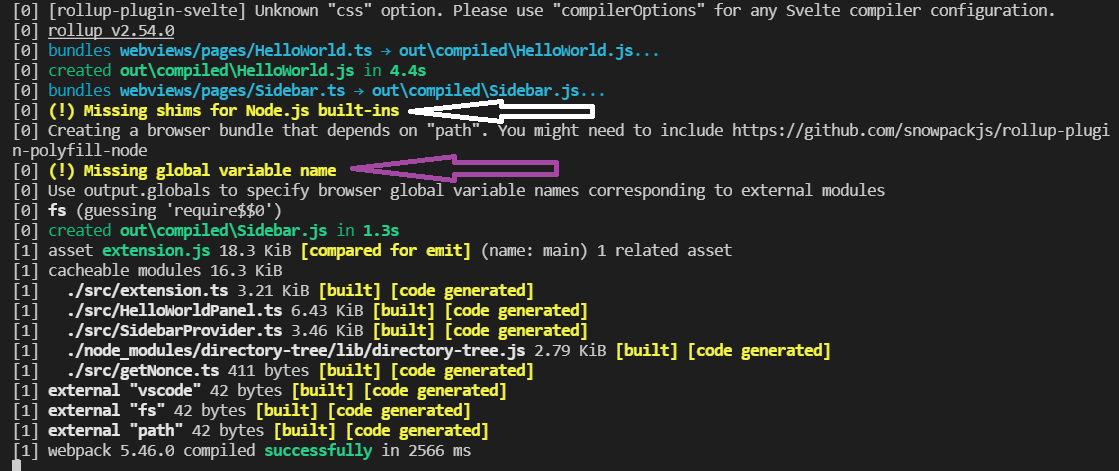
当我试图在Sidebar.svelte中导入这个fs (下面的完整代码)时,我的npm run watch中也有一个警告,它是-
我在这里要做的是-我想将文件LoadedProjLocations.json加载到文件Sidebar.svelte.中。为此,我需要
fs,我在导入它时遇到了一个错误。
下面是文件Sidebar.svelte
<script type="text/javascript">
    import Folder from "./Folder.svelte";
    import * as fs from "fs";

    var dirStruct = fs.readFile(
        getCWD(__dirname) + path.join("/") + "LoadedProjLocations.json"
    );

    console.log(dirStruct)

    function getCWD(path) {
        var res = "";
        for (let i = path.length - 1; i >= 0; i--) {
            const ch = path[i];
            if (ch == "/" || ch == "\\") {
                res = path.slice(0, i);
                break;
            }
        }
        return res;
    }
</script>

<Folder name="Home" children={root} expanded />下面是tsconfig.json文件(来自“project”/webview/tsconfig.json):
{
    "extends": "@tsconfig/svelte/tsconfig.json",
    "include": [
        "./**/*",
        "../src/*"
    ],
    "exclude": [
        "../node_modules/*"
    ],
    "compilerOptions": {
        "strict": true,
        "types": [
            "node",
            "svelte",
        ],
    }
}下面是tsconfig.json文件(来自"project"/tsconfig.json)
{
    "compilerOptions": {
        "module": "commonjs",
        "target": "es6",
        "outDir": "out",
        "lib": [
            "es6"
        ],
        "sourceMap": true,
        "rootDir": "src",
        "strict": true
    },
    "exclude": [
        "node_modules",
        ".vscode-test",
        "webviews"
    ]
}下面是rollup.config.js文件-
import svelte from "rollup-plugin-svelte";
import resolve from "@rollup/plugin-node-resolve";
import commonjs from "@rollup/plugin-commonjs";
import { terser } from "rollup-plugin-terser";
import sveltePreprocess from "svelte-preprocess";
import typescript from "@rollup/plugin-typescript";
import path from "path";
import fs from "fs";
import postcss from "rollup-plugin-postcss";

const production = !process.env.ROLLUP_WATCH;

export default fs
  .readdirSync(path.join(__dirname, "webviews", "pages"))
  .map((input) => {
    const name = input.split(".")[0];
    return {
      input: "webviews/pages/" + input,
      output: {
        sourcemap: true,
        format: "iife",
        name: "app",
        file: "out/compiled/" + name + ".js",
      },
      plugins: [
        svelte({
          // enable run-time checks when not in production
          dev: !production,
          // we'll extract any component CSS out into
          // a separate file - better for performance
          css: (css) => {
            css.write(name + ".css");
          },
          preprocess: sveltePreprocess(),
        }),

        postcss({
          extract: true,
          sourceMap: true,
          extract: path.resolve("out/compiled/" + name + ".css")
        }),

        // If you have external dependencies installed from
        // npm, you'll most likely need these plugins. In
        // some cases you'll need additional configuration -
        // consult the documentation for details:
        // https://github.com/rollup/plugins/tree/master/packages/commonjs
        resolve({
          browser: true,
          dedupe: ["svelte"],
        }),
        commonjs(),
        typescript({
          tsconfig: "webviews/tsconfig.json",
          sourceMap: !production,
          inlineSources: !production,
        }),

        // In dev mode, call `npm run start` once
        // the bundle has been generated
        // !production && serve(),

        // Watch the `public` directory and refresh the
        // browser on changes when not in production
        // !production && livereload("public"),

        // If we're building for production (npm run build
        // instead of npm run dev), minify
        production && terser(),
      ],
      watch: {
        clearScreen: false,
      },
    };
});下面是package.json依赖项-
"scripts": {
        "vscode:prepublish": "npm run package",
        "compile": "webpack",
        "watch": "concurrently \"rollup -c -w\" \"webpack --watch\"",
        "package": "webpack --mode production --devtool hidden-source-map",
        "test-compile": "tsc -p ./",
        "test-watch": "tsc -watch -p ./",
        "pretest": "npm run test-compile && npm run lint",
        "lint": "eslint src --ext ts",
        "test": "node ./out/test/runTest.js"
    },
    "devDependencies": {
        "@rollup/plugin-commonjs": "^19.0.2",
        "@rollup/plugin-node-resolve": "^13.0.4",
        "@rollup/plugin-typescript": "^8.2.3",
        "@tsconfig/svelte": "^2.0.1",
        "@types/glob": "^7.1.3",
        "@types/mocha": "^8.2.2",
        "@types/node": "14.x",
        "@types/vscode": "^1.58.0",
        "@typescript-eslint/eslint-plugin": "^4.26.0",
        "@typescript-eslint/parser": "^4.26.0",
        "concurrently": "^6.2.0",
        "directory-tree": "^2.2.9",
        "eslint": "^7.27.0",
        "glob": "^7.1.7",
        "mocha": "^8.4.0",
        "postcss": "^8.3.6",
        "rollup": "^2.54.0",
        "rollup-plugin-postcss": "^4.0.0",
        "rollup-plugin-svelte": "^7.1.0",
        "rollup-plugin-terser": "^7.0.2",
        "svelte": "^3.40.3",
        "svelte-check": "^2.2.3",
        "svelte-preprocess": "^4.7.4",
        "ts-loader": "^9.2.2",
        "typescript": "^4.3.2",
        "vscode-test": "^1.5.2",
        "webpack": "^5.38.1",
        "webpack-cli": "^4.7.0"
}回答 1
Stack Overflow用户
发布于 2021-08-05 06:41:03
fs只能用于服务器端,不能用于客户端,因此不能在svelte组件中使用。
如果要加载json文件,请使用rollup/plugin --它允许您只执行import data from './data.json';
https://stackoverflow.com/questions/68642285
复制相似问题
腾讯云开发者

Copyright © 2013 - 2026 Tencent Cloud. All Rights Reserved. 腾讯云 版权所有
深圳市腾讯计算机系统有限公司 ICP备案/许可证号:粤B2-20090059  粤公网安备44030502008569号
腾讯云计算(北京)有限责任公司 京ICP证150476号 | 京ICP备11018762号