
如何改变文本和背景色UIMenu \\ UIAction (Swift 5)
如何改变文本和背景色UIMenu \\ UIAction (Swift 5)
提问于 2021-07-21 20:08:08
请告诉我如何定制这个菜单?也许是另一种方法?
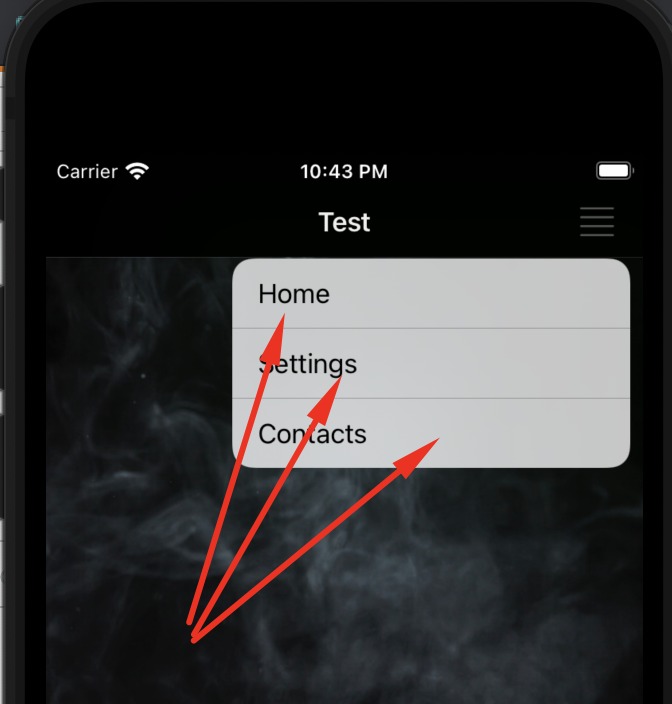
let barMenu = UIMenu(title: "", children: [
        UIAction(title: NSLocalizedString("menu_item_home", comment: "")){
                                action in
                                print("menu_item_home 1")
                            },
                            UIAction(title: NSLocalizedString("menu_item_settings", comment: "")){
                                action in
                                print("menu_item_settings 2")

                                 let settingsStoryboard = UIStoryboard(name: "Settings", bundle: nil)
                                 let settingsController = settingsStoryboard.instantiateViewController(withIdentifier: "SettingsScene") as! SettingsViewController
                                 controller.navigationController?.pushViewController(settingsController, animated: true)

                            },

                            UIAction(title: NSLocalizedString("menu_item_contacts", comment: "")){
                                action in
                                print("menu_item_contacts 3")


                            },

    ])

    let navBarMenu = UIBarButtonItem(image: UIImage(systemName: "text.justify"), menu: barMenu)
    navigationItem.rightBarButtonItem = navBarMenu
我需要向NavigationBar添加一个菜单并自定义它的外观。请指向正确的方向
回答 1
Stack Overflow用户
发布于 2022-10-10 13:01:00
不幸的是,UIMenu不是一个UIView,并且很少有自定义它的选项。没有办法改变背景或文本的颜色--至少在当前的iOS 15中是这样的,至少在不做一些愚蠢的解决办法的情况下。如果您需要在这个菜单中有一个不同的外观,那么也许您可以使用自定义的popover来创建类似的东西,而不是使用UIMenu。这将为您提供更多的定制选项。不完全是你要求的,但也许它会满足你的需要。基于popover的类似菜单的可能实现大致如下所示:
class MenuViewController: UITableViewController, UIPopoverPresentationControllerDelegate {
    private var actions: [UIAction] = [] // or perhaps something custom

    convenience init(actions: [UIAction]) {
        self.init(style: .plain)
        self.actions = actions
        modalPresentationStyle = .popover
        preferredContentSize = CGSize(width: 240, height: 40 * actions.count)
        presentationController?.delegate = self
        popoverPresentationController?.permittedArrowDirections = .up
    }

    override func viewDidLoad() {
        super.viewDidLoad()
        tableView.register(UITableViewCell.self, forCellReuseIdentifier: "UITableViewCell")
        tableView.rowHeight = 40
        tableView.separatorInset = .zero
    }

    override func tableView(_ tableView: UITableView, numberOfRowsInSection section: Int) -> Int {
        return actions.count
    }

    override func tableView(_ tableView: UITableView, cellForRowAt indexPath: IndexPath) -> UITableViewCell {
        let cell = tableView.dequeueReusableCell(withIdentifier: "UITableViewCell", for: indexPath)
        let action = actions[indexPath.row]
        cell.textLabel?.text = action.title
        cell.imageView?.image = action.image
        return cell
    }

    override func tableView(_ tableView: UITableView, didSelectRowAt indexPath: IndexPath) {
        // do something
    }

    func adaptivePresentationStyle(for controller: UIPresentationController, traitCollection: UITraitCollection) -> UIModalPresentationStyle {
        return .none
    }
}
然后将它从代码中呈现出来如下所示:
    let menuVC = MenuViewController(actions: [
        // actions
    ])
    menuVC.popoverPresentationController?.sourceView = mySourceView
    menuVC.popoverPresentationController?.sourceRect = mySourceView.bounds
present(menuVC, animated: true, completion: nil)页面原文内容由Stack Overflow提供。腾讯云小微IT领域专用引擎提供翻译支持
原文链接:
https://stackoverflow.com/questions/68475884
复制相关文章
相似问题
腾讯云开发者

Copyright © 2013 - 2026 Tencent Cloud. All Rights Reserved. 腾讯云 版权所有
深圳市腾讯计算机系统有限公司 ICP备案/许可证号:粤B2-20090059  粤公网安备44030502008569号
腾讯云计算(北京)有限责任公司 京ICP证150476号 | 京ICP备11018762号