
将TabView添加到ContentPage的中间
将TabView添加到ContentPage的中间
提问于 2021-07-07 10:56:29
我正在为我的应用程序使用Xamarin社区工具包TabView。我希望将静态StackLayout添加到页面顶部,然后将TabView底部添加到该视图,并将选项卡标题添加到页面底部。在Android系统中,它可以按我的意愿工作。但不是在iOS。TabView项被静态StackLayout隐藏。
我想要这样的东西。
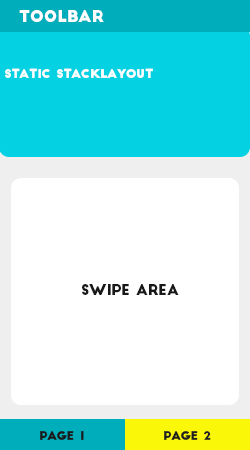
XAML..。
<?xml version="1.0" encoding="UTF-8"?>
<ContentPage xmlns="http://xamarin.com/schemas/2014/forms"
             xmlns:x="http://schemas.microsoft.com/winfx/2009/xaml"
             xmlns:yummy="clr-namespace:Xamarin.Forms.PancakeView;assembly=Xamarin.Forms.PancakeView"
             xmlns:xct="http://xamarin.com/schemas/2020/toolkit"
             x:Class="B_Connect_revamp.Challenges.General.GC2021.views.Tab1View">

    <ContentPage.ToolbarItems>
        <ToolbarItem  Name="Settings" Icon="iconSetting.png" Priority="0" Order="Primary" Clicked="Settings_Clicked" />
    </ContentPage.ToolbarItems>

    <ContentPage.Content>

        <Grid>

            <Grid>

                <StackLayout Orientation="Vertical">

                    <StackLayout Margin="0" Orientation="Vertical" IsVisible="{Binding hasData}">

                            <yummy:PancakeView BackgroundGradientStartPoint="0,0" BackgroundGradientEndPoint="0,1" VerticalOptions="Start" Padding="10" CornerRadius="0,0,15,15" HorizontalOptions="FillAndExpand">

                                <yummy:PancakeView.Shadow>

                                    <yummy:DropShadow Offset="0,1" Color="Gray">

                                        <yummy:DropShadow.Opacity>

                                            <OnPlatform x:TypeArguments="x:Single">

                                                <On Platform="Android" Value="0.1" />
                                                <On Platform="iOS" Value="0.1" />

                                            </OnPlatform>

                                        </yummy:DropShadow.Opacity>

                                    </yummy:DropShadow>

                                </yummy:PancakeView.Shadow>

                                <yummy:PancakeView.BackgroundGradientStops>

                                    <yummy:GradientStopCollection>

                                        <yummy:GradientStop Color="{StaticResource NavigationBarBackColor}" Offset="0"/>

                                        <yummy:GradientStop Color="{StaticResource NavigationBarBackColor}" Offset="0.5"/>

                                        <yummy:GradientStop Color="#00818c" Offset="1"/>

                                    </yummy:GradientStopCollection>

                                </yummy:PancakeView.BackgroundGradientStops>

                                <StackLayout Orientation="Vertical">

                                    <Label Text="{Binding agName}" FontFamily="{StaticResource RalewayM}" Margin="0,2,0,0" HorizontalOptions="CenterAndExpand" HorizontalTextAlignment="Center" FontSize="20" TextColor="White"/>

                                    <Label Text="{Binding agCategory}" FontFamily="{StaticResource quicksandsMedium}" Margin="0" HorizontalOptions="CenterAndExpand" FontSize="16" TextColor="White"/>

                                    </StackLayout>

                                </StackLayout>

                            </yummy:PancakeView>

                    </StackLayout>

                    <xct:TabView VerticalOptions="FillAndExpand" IsVisible="{Binding hasData}" IsSwipeEnabled="True" TabStripPlacement="Bottom">

                        <xct:TabViewItem Text="MONTHLY" TextColor="WhiteSmoke" TextColorSelected="#ff8478" BackgroundColor="#008A95">

                            <xct:TabViewItem.Content>

                                <Frame Padding="10,20,10,20" HasShadow="False" CornerRadius="15" Margin="10,0,10,5" BackgroundColor="#ECF0F1">

                                    <StackLayout Orientation="Vertical" Spacing="0">

                                        <Label Text="{Binding monthHeading}" FontSize="18" TextColor="Black" FontFamily="{StaticResource quicksandsMedium}" HorizontalTextAlignment="Center" HorizontalOptions="CenterAndExpand"/>

                                    </StackLayout>

                                </Frame>

                            </xct:TabViewItem.Content>

                        </xct:TabViewItem>

                        <xct:TabViewItem Text="SIX MONTH" TextColor="WhiteSmoke" TextColorSelected="#ff8478" BackgroundColor="#008A95">

                            <xct:TabViewItem.Content>

                                <Frame Padding="10,20,10,20" HasShadow="False" CornerRadius="15" Margin="10,0,10,5" BackgroundColor="#ECF0F1">

                                    <StackLayout Orientation="Vertical" Spacing="0">

                                        <Label Text="{Binding sixMonthHeading}" FontSize="18" TextColor="Black" FontFamily="{StaticResource quicksandsMedium}" HorizontalTextAlignment="Center" HorizontalOptions="CenterAndExpand"/>

                                    </StackLayout>

                                </Frame>

                            </xct:TabViewItem.Content>

                        </xct:TabViewItem>

                        <xct:TabViewItem Text="SUMMIT" TextColor="WhiteSmoke" TextColorSelected="#ff8478" BackgroundColor="#008A95">

                            <xct:TabViewItem.Content>

                                <Frame Padding="10,20,10,20" HasShadow="False" CornerRadius="15" Margin="10,0,10,5" BackgroundColor="#ECF0F1">

                                    <StackLayout Orientation="Vertical" Spacing="0">

                                        <Label Text="{Binding sixMonthHeading}" FontSize="18" TextColor="Black" FontFamily="{StaticResource quicksandsMedium}" HorizontalTextAlignment="Center" HorizontalOptions="CenterAndExpand"/>

                                        <Label Text="New business total" FontSize="15" Margin="0,15,0,0" HorizontalOptions="CenterAndExpand" FontFamily="{StaticResource quicksandsMedium}" TextColor="#546e7a"/>

                                    </StackLayout>

                                </Frame>

                            </xct:TabViewItem.Content>

                        </xct:TabViewItem>

                    </xct:TabView>

                    <StackLayout VerticalOptions="Center" HorizontalOptions="Center" IsVisible="{Binding noData}">

                        <Image Source="not_available.jpg" VerticalOptions="Center" HorizontalOptions="Center"/>

                    </StackLayout>

                </StackLayout>

            </Grid>

            <StackLayout>

            </StackLayout>

        </Grid>

    </ContentPage.Content>

</ContentPage>
在iOS中,滑动区域的顶部被静态StackLayout隐藏。
回答 1
Stack Overflow用户
回答已采纳
发布于 2021-07-08 06:57:16
首先,xmal不正确,元素不关闭。
其次,您没有使用Grid.Row来限制布局的位置。
您可以像下面这样定义Grid.RowDefinitions,并重新设计。
<Grid>
    <Grid.RowDefinitions>
        <RowDefinition Height="Auto"></RowDefinition>
        <RowDefinition Height="*"></RowDefinition>
    </Grid.RowDefinitions>
    <StackLayout Grid.Row="0" Margin="0" Orientation="Vertical" IsVisible="{Binding hasData}">

        <yummy:PancakeView BackgroundGradientStartPoint="0,0" BackgroundGradientEndPoint="0,1" VerticalOptions="Start" Padding="10" CornerRadius="0,0,15,15" HorizontalOptions="FillAndExpand">

            <yummy:PancakeView.Shadow>

                <yummy:DropShadow Offset="0,1" Color="Gray">

                    <yummy:DropShadow.Opacity>

                        <OnPlatform x:TypeArguments="x:Single">

                            <On Platform="Android" Value="0.1" />
                            <On Platform="iOS" Value="0.1" />

                        </OnPlatform>

                    </yummy:DropShadow.Opacity>

                </yummy:DropShadow>

            </yummy:PancakeView.Shadow>

            <yummy:PancakeView.BackgroundGradientStops>

                <yummy:GradientStopCollection>

                    <yummy:GradientStop Color="{StaticResource NavigationBarBackColor}" Offset="0"/>

                    <yummy:GradientStop Color="{StaticResource NavigationBarBackColor}" Offset="0.5"/>

                    <yummy:GradientStop Color="#00818c" Offset="1"/>

                </yummy:GradientStopCollection>

            </yummy:PancakeView.BackgroundGradientStops>

            <StackLayout Orientation="Vertical">

                <Label Text="{Binding agName}" FontFamily="{StaticResource RalewayM}" Margin="0,2,0,0" HorizontalOptions="CenterAndExpand" HorizontalTextAlignment="Center" FontSize="20" TextColor="White"/>

                <Label Text="{Binding agCategory}" FontFamily="{StaticResource quicksandsMedium}" Margin="0" HorizontalOptions="CenterAndExpand" FontSize="16" TextColor="White"/>

            </StackLayout>


    </yummy:PancakeView>

    </StackLayout>
    <xct:TabView Grid.Row="1"  VerticalOptions="FillAndExpand" IsVisible="{Binding hasData}" IsSwipeEnabled="True" TabStripPlacement="Bottom">

        <xct:TabViewItem Text="MONTHLY" TextColor="WhiteSmoke" TextColorSelected="#ff8478" BackgroundColor="#008A95">

            <xct:TabViewItem.Content>

                <Frame Padding="10,20,10,20" HasShadow="False" CornerRadius="15" Margin="10,0,10,5" BackgroundColor="#ECF0F1">

                    <StackLayout Orientation="Vertical" Spacing="0">

                        <Label Text="{Binding monthHeading}" FontSize="18" TextColor="Black" FontFamily="{StaticResource quicksandsMedium}" HorizontalTextAlignment="Center" HorizontalOptions="CenterAndExpand"/>

                    </StackLayout>

                </Frame>

            </xct:TabViewItem.Content>

        </xct:TabViewItem>

        <xct:TabViewItem Text="SIX MONTH" TextColor="WhiteSmoke" TextColorSelected="#ff8478" BackgroundColor="#008A95">

            <xct:TabViewItem.Content>

                <Frame Padding="10,20,10,20" HasShadow="False" CornerRadius="15" Margin="10,0,10,5" BackgroundColor="#ECF0F1">

                    <StackLayout Orientation="Vertical" Spacing="0">

                        <Label Text="{Binding sixMonthHeading}" FontSize="18" TextColor="Black" FontFamily="{StaticResource quicksandsMedium}" HorizontalTextAlignment="Center" HorizontalOptions="CenterAndExpand"/>

                    </StackLayout>

                </Frame>

            </xct:TabViewItem.Content>

        </xct:TabViewItem>

        <xct:TabViewItem Text="SUMMIT" TextColor="WhiteSmoke" TextColorSelected="#ff8478" BackgroundColor="#008A95">

            <xct:TabViewItem.Content>

                <Frame Padding="10,20,10,20" HasShadow="False" CornerRadius="15" Margin="10,0,10,5" BackgroundColor="#ECF0F1">

                    <StackLayout Orientation="Vertical" Spacing="0">

                        <Label Text="{Binding sixMonthHeading}" FontSize="18" TextColor="Black" FontFamily="{StaticResource quicksandsMedium}" HorizontalTextAlignment="Center" HorizontalOptions="CenterAndExpand"/>

                        <Label Text="New business total" FontSize="15" Margin="0,15,0,0" HorizontalOptions="CenterAndExpand" FontFamily="{StaticResource quicksandsMedium}" TextColor="#546e7a"/>

                    </StackLayout>

                </Frame>

            </xct:TabViewItem.Content>

        </xct:TabViewItem>

    </xct:TabView>
    <StackLayout VerticalOptions="Center" HorizontalOptions="Center" Grid.RowSpan="2" IsVisible="{Binding noData}">


        <Image Source="not_available.jpg" VerticalOptions="Center" HorizontalOptions="Center"/>

    </StackLayout>
</Grid>页面原文内容由Stack Overflow提供。腾讯云小微IT领域专用引擎提供翻译支持
原文链接:
https://stackoverflow.com/questions/68284719
复制相关文章
相似问题
腾讯云开发者

Copyright © 2013 - 2026 Tencent Cloud. All Rights Reserved. 腾讯云 版权所有
深圳市腾讯计算机系统有限公司 ICP备案/许可证号:粤B2-20090059  粤公网安备44030502008569号
腾讯云计算(北京)有限责任公司 京ICP证150476号 | 京ICP备11018762号