
如何提高EasyOCR的预测精度?
如何提高EasyOCR的预测精度?
提问于 2021-07-05 20:15:58
我正试着从车牌号上提取字符。但是很少有错误的预测像
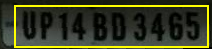
我得到的输出是UP74 BD 3465,这是错误的。有许多B被预测为8的例子,还有更多的例子。
- 如何提高它的准确性?。
- 如何对图像进行预处理以得到正确的预测或任何其他方法?
import matplotlib.pyplot as plt
import easyocr
from pylab import rcParams
from IPython.display import Image

rcParams['figure.figsize'] = 8, 16
reader = easyocr.Reader(['en'])

output = reader.readtext(path)
for i in range(len(output)):
print(output[i][-2])回答 3
Stack Overflow用户
发布于 2021-07-06 08:12:07
- 首先,我建议您阅读关于OCR:链接的图像增强的主题.
- 其次,在上述主题的相同意义上,您可以在(ROI),裁剪感兴趣的区域之后使用
Thresholding、Gaussian Filtering和Histogram Equalization来解决这个特定图像的问题,因此输出图像如下所示:

产出如下:
UP14 BD 3465
import cv2
import easyocr
from pylab import rcParams
# import numpy library
import numpy as np

# define the path
path = 'input.png'

# read the image
img = cv2.imread(path, 0)

# find the white rectangle
th = img.copy()
th[th<200] = 0

bbox = np.where(th>0)
y0 = bbox[0].min()
y1 = bbox[0].max()
x0 = bbox[1].min()
x1 = bbox[1].max()

# crop the region of interest (ROI)
img = img[y0:y1, x0:x1]

# histogram equalization
equ = cv2.equalizeHist(img)
# Gaussian blur
blur = cv2.GaussianBlur(equ, (5, 5), 1)

# manual thresholding
th2 = 60 # this threshold might vary!
equ[equ>=th2] = 255
equ[equ<th2]  = 0

# Now apply the OCR on the processed image
rcParams['figure.figsize'] = 8, 16
reader = easyocr.Reader(['en'])

output = reader.readtext(equ)

for i in range(len(output)):
print(output[i][-2])Stack Overflow用户
发布于 2021-12-14 16:44:06
你给出的图像太暗了,所以如果你想要的话,你可以跟着这个链接https://stackoverflow.com/a/50053219/17233488。另外,在增加亮度后,您可能会在图像上看到一些阴影,因此,您可以通过这个链接,https://stackoverflow.com/a/44752405/17233488。另外,对于其他任务,尝试使用deskew和其他形态过程,如上面所建议的。
Stack Overflow用户
发布于 2022-08-17 06:37:42
还有另一种方法可以正确地识别它。
首先,
pip3 install paddleocr然后
paddleocr --image_dir=./J8uyr.png你可以得到下面的结果。
[[20.0,10.0,202.0,10.0,202.0,42.0,20.0,42.0],('UP14BD3465',0.9637424349784851)]
我建议使用paddleOCR (https://github.com/PaddlePaddle/PaddleOCR)
页面原文内容由Stack Overflow提供。腾讯云小微IT领域专用引擎提供翻译支持
原文链接:
https://stackoverflow.com/questions/68261703
复制相关文章
相似问题
腾讯云开发者

Copyright © 2013 - 2026 Tencent Cloud. All Rights Reserved. 腾讯云 版权所有
深圳市腾讯计算机系统有限公司 ICP备案/许可证号:粤B2-20090059  粤公网安备44030502008569号
腾讯云计算(北京)有限责任公司 京ICP证150476号 | 京ICP备11018762号