
如何将此Vuetify (bootstrap) v与其父行的底部对齐?
如何将此Vuetify (bootstrap) v与其父行的底部对齐?
提问于 2021-06-28 20:24:13
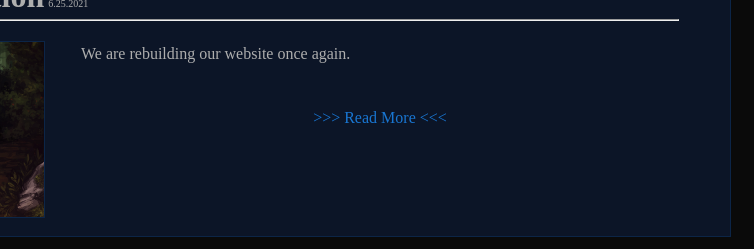
我已经尝试了我所能想到的一切,但是我不能让“读取更多”的超链接位于父行的底部,所以‘读得越多’就在容器的右下角。没有理由或对齐的组合似乎有帮助。
文章图像应该位于左侧,然后文章标题在整个面板的右下角显示"Read“。我认为最简单的方法是将超链接的列对齐到v行的底部,然后使用文本右进行格式化。
  <v-row>
    <v-col>
      <h1 style='display: inline'>{{article.title}}</h1> <span style='font-size: x-small'>{{article.month}}.{{article.day}}.{{article.year}}</span>
    </v-col>
  </v-row>
  <v-row style='padding: 0px; margin-top: -25px; margin-bottom: -15px'>
    <v-col>
      <hr>
    </v-col>
  </v-row>
  <v-row>
    <v-col md='4' class='text-center'>
      <img :src="article.image" class='article-image'>
    </v-col>
    <v-col>
      <v-row>
        <v-col>
          <p>{{article.header}}</p>
        </v-col>
      </v-row>
      <v-row>
        <v-col class='text-center'>
          <a>>>> Read More <<<</a>
        </v-col>
      </v-row>
    </v-col>
  </v-row>
最后的解决方案,包括这两个部分都读过:
<template>
<v-container fluid class='content-body'>
  <v-row>
    <v-col cols="12">
      <h1 class="ml-2" style="display: inline">{{ item.title }}</h1>
      <span style="font-size: x-small">{{ item.date }}</span>
    </v-col>
    <v-col style='padding: 0; margin-top: -15px; margin-bottom: -15px' cols="12">
      <hr />
    </v-col>
    <v-row v-if='!readMore' class='mb-1 pr-1 pl-1'>
      <v-col md="4" class="text-center">
    <v-img class="ml-1 mr-1 mb-1 article-image" :src="item.image"/>
      </v-col>
      <v-col md="8">
    <v-row class="fill-height" dense>
      <v-col cols="12" class='mb-2 ml-1 mr-1'>
            <h3>{{ item.header }}</h3>
      </v-col>
      <v-col cols="12" class="text-right pb-0 mb-0" align-self="end">
            <v-btn color='#0a0a0a' class='blue--text mr-0' v-on:click="showMore">Read More</v-btn>
      </v-col>
    </v-row>
      </v-col>
    </v-row>
    <v-row v-else class='mb-1 pr-1 pl-1'>
      <v-col cols='12'>
    <nuxt-content :document='item'/>
      </v-col>
      <v-col cols="12" class="text-right" align-self="end">
        <v-btn color='#0a0a0a' class='blue--text mr-0' v-on:click="showLess">Read Less</v-btn>
      </v-col>
    </v-row>
  </v-row>
</v-container>
</template>回答 2
Stack Overflow用户
回答已采纳
发布于 2021-07-01 05:49:41
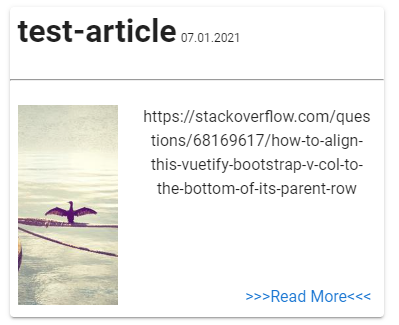
您需要使用<v-col align-self="end">属性对齐y轴。
我修正了你的密码。这是代码片段。
<v-row>
  <v-col cols="12">
    <h1 class="ml-2" style="display: inline">{{ article.title }}</h1>
    <span style="font-size: x-small">{{ article.month }}.{{ article.day }}.{{ article.year }}</span>
  </v-col>
  <v-col
    cols="12"
    ><hr />
  </v-col>

  <v-col md="4" class="text-center">
    <v-img class="ml-2 mb-3" :src="article.image" height="200px"/>
  </v-col>

  <v-col md="8" class="text-center">
    <v-row class="fill-height mr-2" dense>
      <v-col cols="12">
        <p>{{ article.header }}</p>
      </v-col>

      <v-col cols="12" class="text-right" align-self="end">
        <a>>>>Read More<<<</a>
      </v-col>
    </v-row>
  </v-col>
</v-row>您可以在CodePen中看到的完整代码。结果如下所示。
Stack Overflow用户
发布于 2021-07-01 05:04:38
试试这个:
 <v-row>
    <v-col>
      <h1 style='display: inline'>{{article.title}}</h1> <span style='font-size: x-small'>{{article.month}}.{{article.day}}.{{article.year}}</span>
    </v-col>
  </v-row>
  <v-row style='padding: 0px; margin-top: -25px; margin-bottom: -15px'>
    <v-col>
      <hr>
    </v-col>
  </v-row>
  <v-row>
    <v-col md='4' class='text-center'>
      <img :src="article.image" class='article-image'>
    </v-col>
    <v-col class="d-flex">
      <v-row>
        <v-col>
          <p>{{article.header}}</p>
        </v-col>
      </v-row>
      <v-row class="align-self-end">
        <v-col class='text-end'>
          <a>>>> Read More <<<</a>
        </v-col>
      </v-row>
    </v-col>
  </v-row>
页面原文内容由Stack Overflow提供。腾讯云小微IT领域专用引擎提供翻译支持
原文链接:
https://stackoverflow.com/questions/68169617
复制相关文章
相似问题
腾讯云开发者

Copyright © 2013 - 2026 Tencent Cloud. All Rights Reserved. 腾讯云 版权所有
深圳市腾讯计算机系统有限公司 ICP备案/许可证号:粤B2-20090059  粤公网安备44030502008569号
腾讯云计算(北京)有限责任公司 京ICP证150476号 | 京ICP备11018762号