
使用librsvg和Python呈现SVG时的差异
根据呈现SVG的不同,无论是作为一个完整的文档还是作为一个单一的元素,都会显示呈现方面的差异。
我使用Inkscape创建了一个简单的SVG图形,并希望使用Python呈现它。我觉得图书馆员是该走的路。这是我的SVG,从Inkscape中保存为“普通SVG”(没有Inkscape特有的扩展)。
<?xml version="1.0" encoding="UTF-8" standalone="no"?>
<!-- Created with Inkscape (http://www.inkscape.org/) -->

<svg
   width="23.105469mm"
   height="23.10545mm"
   viewBox="0 0 23.105469 23.10545"
   version="1.1"
   id="svg1380"
   xmlns:xlink="http://www.w3.org/1999/xlink"
   xmlns="http://www.w3.org/2000/svg"
   xmlns:svg="http://www.w3.org/2000/svg">
  <defs
     id="defs1377">
    <radialGradient
       xlink:href="#SphereBlueGlow"
       id="radialGradient17266-1-5-3"
       cx="206.91444"
       cy="205.5472"
       fx="206.91444"
       fy="205.5472"
       r="11.552734"
       gradientTransform="translate(-188.33616,-3.103272)"
       gradientUnits="userSpaceOnUse" />
    <linearGradient
       id="SphereBlueGlow">
      <stop
         style="stop-color:#ffffff;stop-opacity:1"
         offset="0"
         id="stop954-7" />
      <stop
         style="stop-color:#44ccff;stop-opacity:0"
         offset="0.69538838"
         id="stop956-4" />
      <stop
         style="stop-color:#000000;stop-opacity:0"
         offset="1"
         id="stop958-1" />
    </linearGradient>
    <radialGradient
       xlink:href="#SphereSpecularReflection"
       id="radialGradient868-5-1-3-3-5-3-5-8-5-2-9-0-9-3-9-2-0-2"
       gradientUnits="userSpaceOnUse"
       gradientTransform="matrix(0.11379011,0.15082671,-0.14646196,0.11049697,33.91806,171.06396)"
       cx="60.713989"
       cy="169.90594"
       fx="60.713989"
       fy="169.90594"
       r="37.436264" />
    <linearGradient
       id="SphereSpecularReflection">
      <stop
         style="stop-color:#e6e6e6;stop-opacity:1"
         offset="0"
         id="stop944" />
      <stop
         style="stop-color:#8e8e8e;stop-opacity:0"
         offset="0.37699515"
         id="stop946" />
      <stop
         style="stop-color:#000000;stop-opacity:0.02313977"
         offset="1"
         id="stop948" />
    </linearGradient>
  </defs>
  <g
     id="layer1"
     transform="translate(3.4848234,-128.62724)">
    <g
       id="zauberplatzPassiv"
       transform="translate(-10.51038,-62.263795)">
      <ellipse
         style="mix-blend-mode:normal;fill:#000000;fill-opacity:1;stroke:none;stroke-width:0.155336;stroke-miterlimit:4;stroke-dasharray:none;stroke-opacity:0.529412"
         id="path833-3-7-9-8-0-7-1-4-0-2-1-9-9-7-6-44-5-9"
         cx="18.578291"
         cy="202.44376"
         rx="11.552734"
         ry="11.552725" />
      <ellipse
         style="mix-blend-mode:normal;fill:url(#radialGradient17266-1-5-3);fill-opacity:1;stroke:none;stroke-width:0.155336;stroke-miterlimit:4;stroke-dasharray:none;stroke-opacity:0.529412"
         id="path833-3-7-9-8-0-7-1-4-0-2-1-9-9-7-6-4-6-5-2"
         cx="18.578291"
         cy="202.44376"
         rx="11.552734"
         ry="11.552725" />
      <ellipse
         style="mix-blend-mode:hard-light;fill:url(#radialGradient868-5-1-3-3-5-3-5-8-5-2-9-0-9-3-9-2-0-2);fill-opacity:1;stroke:none;stroke-width:0.155336;stroke-miterlimit:4;stroke-dasharray:none;stroke-opacity:0.529412"
         id="path833-1-7-1-6-8-3-7-2-0-6-1-8-0-8-4-0-9-0"
         cx="18.578291"
         cy="202.44376"
         rx="11.552734"
         ry="11.552725" />
    </g>
  </g>
</svg>
我用于呈现的Python代码(希望它通过了这个问题的简化):
import gi
gi.require_version('Rsvg', '2.0')
from gi.repository import Rsvg
import cairo

def render_image(svg):
    ratio = svg.props.em / svg.props.dpi_x
    svg.set_dpi(160 / ratio)

    dim = svg.get_dimensions()
    # create the cairo context
    surface = cairo.ImageSurface(cairo.FORMAT_ARGB32, dim.width, dim.height)
    context = cairo.Context(surface)
    svg.render_cairo(context)
    surface.write_to_png('sphere_used.image.png')

def render_elements (svg):
    rect = Rsvg.Rectangle()
    rect.x = 0
    rect.y = 0
    rect.width = 160
    rect.height = 160
    # create the cairo context
    surface = cairo.ImageSurface(cairo.FORMAT_ARGB32, int(rect.width), int(rect.height))
    context = cairo.Context(surface)
    svg.render_element(context, '#zauberplatzPassiv', rect)
    surface.write_to_png('sphere_used.element.png')

if __name__ == '__main__':
    # use rsvg to render the cairo context
    svg = Rsvg.Handle().new_from_file(INPUTFILE)
    render_image(svg)
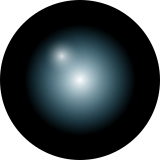
render_elements(svg)render_image(svg)的输出似乎与我在Inkscape中所做的相同:
相反,render_element(svg)的输出忽略了镜面反射:
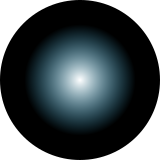
显然,librsvg SVG支持使用的所有SVG特性,并且能够正确地显示图像。但是当选择一个元素时,会出现一些问题。在SVG或Python方面有什么可以让它们看起来完全相同的吗?
我可以想象,在这两种情况下,应用不同的SVG翻译的顺序是不同的,从而导致反射呈现在屏幕之外。但我对SVG还不够了解。
回答 1
Stack Overflow用户
发布于 2021-06-09 07:07:50
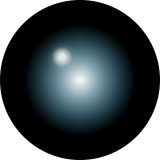
罪魁祸首是mix-blend-mode:hard-light;。
我清理了SVG,重置了所有的翻译,但是高亮部分一直没有显示。只有在将mix-blend-mode从hard-light设置为normal之后,它才会重新出现。
<?xml version="1.0" encoding="UTF-8" standalone="no"?>
<!-- Created with Inkscape (http://www.inkscape.org/) -->

<svg
   width="160px"
   height="160px"
   viewBox="0 0 160 160"
   version="1.1"
   id="svg1380"
   xmlns:xlink="http://www.w3.org/1999/xlink"
   xmlns="http://www.w3.org/2000/svg"
   xmlns:svg="http://www.w3.org/2000/svg">
  <defs
     id="defs1377">
    <radialGradient
       xlink:href="#SphereBlueGlow"
       id="circular_glow"
       cx="80"
       cy="80"
       fx="80"
       fy="80"
       r="80"
       gradientUnits="userSpaceOnUse" />
    <linearGradient
       id="SphereBlueGlow">
      <stop
         style="stop-color:#ffffff;stop-opacity:1"
         offset="0"
         id="stop954-7" />
      <stop
         style="stop-color:#44ccff;stop-opacity:0"
         offset="0.69538838"
         id="stop956-4" />
      <stop
         style="stop-color:#000000;stop-opacity:0"
         offset="1"
         id="stop958-1" />
    </linearGradient>
    <radialGradient
       xlink:href="#SphereSpecularReflection"
       id="circular_specular_reflection"
       gradientUnits="userSpaceOnUse"
       gradientTransform="matrix(0.65,0,0,0.65,10,5)"
       cx="80"
       cy="80"
       fx="80"
       fy="80"
       r="80" />
    <linearGradient
       id="SphereSpecularReflection">
      <stop
         style="stop-color:#e6e6e6;stop-opacity:1"
         offset="0"
         id="stop000" />
     <stop
         style="stop-color:#e6e6e6;stop-opacity:1"
         offset="0.05"
         id="stop040" />
      <stop
         style="stop-color:#e6e6e6;stop-opacity:0.5"
         offset="0.14"
         id="stop060" />
      <stop
         style="stop-color:#e6e6e6;stop-opacity:0.1"
         offset="0.2"
         id="stop080" />
      <stop
         style="stop-color:#e6e6e6;stop-opacity:0"
         offset="0.3"
         id="stop020" />
      <stop
         style="stop-color:#e6e6e6;stop-opacity:0"
         offset="1"
         id="stop100" />
    </linearGradient>
  </defs>
  <g
     id="layer1">
    <g
       id="zauberplatzPassiv">
      <ellipse
         style="mix-blend-mode:normal;fill:#000000;fill-opacity:1;stroke:none;stroke-width:0.155336;stroke-miterlimit:4;stroke-dasharray:none;stroke-opacity:0.529412"
         id="black-ellipse"
         cx="80"
         cy="80"
         rx="80"
         ry="80" />
      <ellipse
         style="mix-blend-mode:normal;fill:url(#circular_glow);fill-opacity:1;stroke:none;stroke-width:0.155336;stroke-miterlimit:4;stroke-dasharray:none;stroke-opacity:0.529412"
         id="glow-ellipse"
         cx="80"
         cy="80"
         rx="80"
         ry="80" />
      <ellipse
         style="mix-blend-mode:normal;fill:url(#circular_specular_reflection);fill-opacity:1;stroke:none;stroke-width:0.155336;stroke-miterlimit:4;stroke-dasharray:none;stroke-opacity:0.529412"
         id="highlight-ellipse"
         cx="80"
         cy="80"
         rx="80"
         ry="80" />
    </g>
  </g>
</svg>
我不得不编辑渐变以使它更适合这个混合模式,但结果看起来对我来说足够好:
我仍然很好奇hard-light有什么特别之处,所以如果有图书馆员专家来的话,他们可能会对此有所了解。
https://stackoverflow.com/questions/67898437
复制相似问题
腾讯云开发者

Copyright © 2013 - 2026 Tencent Cloud. All Rights Reserved. 腾讯云 版权所有
深圳市腾讯计算机系统有限公司 ICP备案/许可证号:粤B2-20090059  粤公网安备44030502008569号
腾讯云计算(北京)有限责任公司 京ICP证150476号 | 京ICP备11018762号