
POI Word无法垂直合并新创建的单元格
我知道如何将单元格与Apache垂直合并。但是,如果创建了一个新行,合并就不会生效。
以下是输入表:
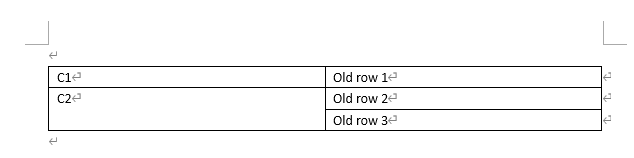
我希望在old row 2和old row 3之间添加一个新行,并将新行的单元格在第一列合并为C2,如下所示:
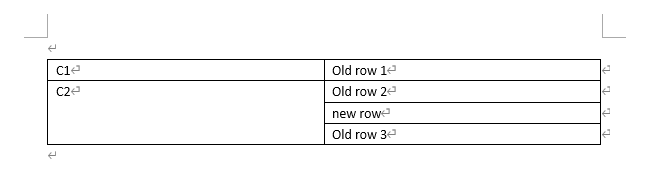
因此,我创建了一个新行,并将其添加到old row 2下面的表中,并尝试合并这些单元格。
github源代码链接在这里,它可以重现问题。
public class POIWordAddSubRowQuestionDemo{
    public static void main(String[] args) throws IOException, XmlException{
        ClassLoader classLoader = POIWordAddSubRowQuestionDemo.class.getClassLoader();
        InputStream inputStream = classLoader.getResourceAsStream("input.docx");
        String outputDocxPath = "F:/TEMP/output.docx";
        assert inputStream != null;
        XWPFDocument doc = new XWPFDocument(inputStream);
        XWPFTable table = doc.getTables().get(0);
        //this is 'old row 2'
        XWPFTableRow secondRow = table.getRows().get(1);

        //create a new row that is based on 'old row 2'
        CTRow ctrow = CTRow.Factory.parse(secondRow.getCtRow().newInputStream());
        XWPFTableRow newRow = new XWPFTableRow(ctrow, table);
        XWPFRun xwpfRun = newRow.getCell(1).getParagraphs().get(0).getRuns().get(0);
        //set row text
        xwpfRun.setText("new row", 0);
        // add new row below 'old row 2'
        table.addRow(newRow, 2);

        //merge cells at first column of 'old row 2', 'new row', and 'old row 3'
        mergeCellVertically(doc.getTables().get(0), 0, 1, 3);

        FileOutputStream fos = new FileOutputStream(outputDocxPath);
        doc.write(fos);
        fos.close();
    }

    static void mergeCellVertically(XWPFTable table, int col, int fromRow, int toRow) {
        for(int rowIndex = fromRow; rowIndex <= toRow; rowIndex++) {
            XWPFTableCell cell = table.getRow(rowIndex).getCell(col);
            CTVMerge vmerge = CTVMerge.Factory.newInstance();
            if(rowIndex == fromRow){
                // The first merged cell is set with RESTART merge value
                vmerge.setVal(STMerge.RESTART);
            } else {
                // Cells which join (merge) the first one, are set with CONTINUE
                vmerge.setVal(STMerge.CONTINUE);
                // and the content should be removed
                for (int i = cell.getParagraphs().size(); i > 0; i--) {
                    cell.removeParagraph(0);
                }
                cell.addParagraph();
            }
            // Try getting the TcPr. Not simply setting an new one every time.
            CTTcPr tcPr = cell.getCTTc().getTcPr();
            if (tcPr == null) tcPr = cell.getCTTc().addNewTcPr();
            tcPr.setVMerge(vmerge);
        }
    }
}
但是合并不起作用,我得到了:
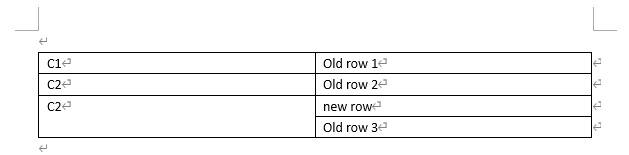
在另一次尝试中,我试图基于图3中的表进行合并,以获得图2中的表,这是成功的。这两次尝试之间唯一的区别是,new row不是新创建的,而是从docx文档中读取的,所以我认为创建一个新行是合并失败的原因。
那么,是否有一个合并新创建的行的解决方案?我真的不想像这样分割这个操作:添加行>保存docx到disk>,从disk>合并行读取docx。
回答 2
Stack Overflow用户
发布于 2021-06-04 10:27:39
您遇到的问题不是mergeCellVertically方法,而是复制表行的方法。当复制底层CTRow并使用CTTbl.TrArray将其插入XWPFTable.addRow时,必须完全完成。以后的更改不是用XML编写的。我已经在我的回答中说过了,现有表插入具有单元格样式和格式的行。我在我的答案commitTableRows中提供了一个方法一旦行被添加到表中,无法更改.docx文件中的行文本。在编写文档之前需要调用此方法,因此后面的更改都是用XML编写的。
因此,因为您正在复制第二行,这是合并的开始,所以该设置也会被复制。而后者称为mergeCellVertically则不起作用。因此,您的newRow仍然是合并的新起点。这就是你得到的。
因此,在所有更改之后,在写出来之前,请调用commitTableRows。
完整的例子:
import java.io.*;
import org.apache.poi.xwpf.usermodel.*;
import org.openxmlformats.schemas.wordprocessingml.x2006.main.*;


public class WordInsertTableRowAndMerge {

 static XWPFTableRow insertNewTableRow(XWPFTableRow sourceTableRow, int pos) throws Exception {
  XWPFTable table = sourceTableRow.getTable();
  CTRow newCTRrow = CTRow.Factory.parse(sourceTableRow.getCtRow().newInputStream());
  XWPFTableRow tableRow = new XWPFTableRow(newCTRrow, table);
  table.addRow(tableRow, pos);
  return tableRow;
 }

 static void commitTableRows(XWPFTable table) {
  int rowNr = 0;
  for (XWPFTableRow tableRow : table.getRows()) {
   table.getCTTbl().setTrArray(rowNr++, tableRow.getCtRow());
  }
 }

 static void mergeCellVertically(XWPFTable table, int col, int fromRow, int toRow) {
  for(int rowIndex = fromRow; rowIndex <= toRow; rowIndex++) {
   System.out.println("rowIndex: " + rowIndex);
   XWPFTableCell cell = table.getRow(rowIndex).getCell(col);
   CTVMerge vmerge = CTVMerge.Factory.newInstance();
   if(rowIndex == fromRow){
    // The first merged cell is set with RESTART merge value
    vmerge.setVal(STMerge.RESTART);
   } else {
    // Cells which join (merge) the first one, are set with CONTINUE
    vmerge.setVal(STMerge.CONTINUE);
    // and the content should be removed
    for (int i = cell.getParagraphs().size(); i > 0; i--) {
     cell.removeParagraph(0);
    }
    cell.addParagraph();
   }
   // Try getting the TcPr. Not simply setting an new one every time.
   CTTcPr tcPr = cell.getCTTc().getTcPr();
   if (tcPr == null) tcPr = cell.getCTTc().addNewTcPr();
   tcPr.setVMerge(vmerge);
  }
 }

 public static void main(String[] args) throws Exception {

  XWPFDocument doc = new XWPFDocument(new FileInputStream("./source.docx"));

  XWPFTable table = doc.getTables().get(0);

  XWPFTableRow row = table.getRow(1);
  XWPFTableRow newRow = insertNewTableRow(row, 2);

  XWPFTableCell cell = newRow.getCell(0); if (cell == null) cell = newRow.addNewTableCell();
  // not needed because merged to cell above
  cell = newRow.getCell(1); if (cell == null) cell = newRow.addNewTableCell();
  for (XWPFParagraph paragraph : cell.getParagraphs()) { // only use first text runs in paragraphs
   for (int r = paragraph.getRuns().size()-1; r >= 0; r--) {
    XWPFRun run = paragraph.getRuns().get(r);
    if (r == 0) {
     run.setText("new row 1", 0);
    } else {
     paragraph.removeRun(r);
    }
   }
  }

  mergeCellVertically(table, 0, 1, 3);

  commitTableRows(table);

  FileOutputStream out = new FileOutputStream("./result.docx");
  doc.write(out);
  out.close();
  doc.close();

 }
}Stack Overflow用户
发布于 2021-06-04 02:23:05
下面是您可能想要适应的VBA方法。它在第3行和第4行之间插入新行:
Sub Demo()
Application.ScreenUpdating = False
With ActiveDocument.Tables(1)
  .Cell(4, 2).Range.InsertBreak (wdColumnBreak)
  .Rows.Add
  .Cell(2, 1).Merge MergeTo:=.Cell(4, 1)
  .Range.Characters.Last.Next.Delete
  .Cell(2, 1).Merge MergeTo:=.Cell(5, 1)
End With
Application.ScreenUpdating = True
End Subhttps://stackoverflow.com/questions/67830373
复制相似问题
腾讯云开发者

Copyright © 2013 - 2026 Tencent Cloud. All Rights Reserved. 腾讯云 版权所有
深圳市腾讯计算机系统有限公司 ICP备案/许可证号:粤B2-20090059  粤公网安备44030502008569号
腾讯云计算(北京)有限责任公司 京ICP证150476号 | 京ICP备11018762号