
如何将UIContextMenuInteraction添加到Xamarin窗体的按钮中?
如何将UIContextMenuInteraction添加到Xamarin窗体的按钮中?
提问于 2021-06-01 19:09:00
我需要为iOS添加一个上下文菜单到一个按钮中。我在苹果开发者网站上找到了一个示例。
因此,我需要做一个非常类似的上下文菜单,但它应该锚定在按钮元素。
我创建了控件并将其命名为InteractionButton
public class InteractionButton : Button
{
    public static readonly BindableProperty ButtonsListProperty = BindableProperty.Create(
        nameof(ButtonsList), typeof(List<string>), typeof(InteractionButton));

    public List<string> ItemsList
    {
        get => (List<string>) GetValue(ButtonsListProperty);
        set => SetValue(ButtonsListProperty, value);
    }
}
另外,我为控件创建了一个简单的iOS渲染器-
[assembly: ExportRenderer(typeof(InteractionButton), typeof(InteractionButtonRenderer))]
public class InteractionButtonRenderer : ButtonRenderer
{
    protected override void OnElementChanged(ElementChangedEventArgs<Button> e)
    {
        base.OnElementChanged(e);


        if (e.NewElement is InteractionButton button)
        {
            // create context menu from button.ItemsList
            // NativeView.AddInteraction(new UIContextMenuInteraction());
        }
    }
}
问题是我不知道该如何构建UIContextMenuInteraction。我们应该将IUIContextMenuInteractionDelegate类型的实例传递到UIContextMenuInteraction对象中。我找不到怎样做这件事的例子。我所拥有的只是苹果开发者网站的一个例子:
let button = UIButton(type: .system)
button.setImage(UIImage(systemName: "plus"), for: .normal)

let barButton = UIBarButtonItem(customView: button)
self.navigationItem.rightBarButtonItem = barButton

let interaction = UIContextMenuInteraction(delegate: self)
button.addInteraction(interaction)


extension ViewController: UIContextMenuInteractionDelegate {
    func contextMenuInteraction(_ interaction: UIContextMenuInteraction, configurationForMenuAtLocation location: CGPoint)
    -> UIContextMenuConfiguration? {
        return UIContextMenuConfiguration(identifier: nil, previewProvider: nil) { suggestedActions in
            let importAction = UIAction(title: "Import", image: UIImage(systemName: "folder")) { action in }
            let createAction = UIAction(title: "Create", image: UIImage(systemName: "square.and.pencil")) { action in }
            return UIMenu(title: "", children: [importAction, createAction])
        }
    }
}
是否有一种简单的方法将上下文菜单交互添加到我的本机控件?
回答 1
Stack Overflow用户
回答已采纳
发布于 2021-06-02 08:13:20
我用下面的代码测试它工作得很好,只需长时间点击它将显示菜单的按钮。
InteractionButton
    public class InteractionButton : Button
    {
        public static readonly BindableProperty ItemsListProperty = BindableProperty.Create(
            nameof(ItemsList),
            typeof(List<string>),
            typeof(InteractionButton));

        public List<string> ItemsList
        {
            get => (List<string>)GetValue(ItemsListProperty);
            set => SetValue(ItemsListProperty, value);
        }
    }
Xaml
<local:InteractionButton HeightRequest="100" WidthRequest="100" Text="Click on me" ItemsList="{Binding list}"/>自定义渲染器
[assembly: ExportRenderer(typeof(InteractionButton), typeof(MyRenderer))]
namespace FormsApp.iOS
{

    class MyRenderer : ButtonRenderer , IUIContextMenuInteractionDelegate
    {
        public UIContextMenuConfiguration GetConfigurationForMenu(UIContextMenuInteraction interaction, CGPoint location)
        {

            List<UIMenuElement> elementList = new List<UIMenuElement>();
            foreach (var item in (Element as InteractionButton).ItemsList) {

                UIAction action = UIAction.Create(item, UIImage.FromFile("dog.png"), item, (a) => {
                    Console.WriteLine("Click on action1");
                });

                elementList.Add(action);
            }
            UIMenu menu = UIMenu.Create("Menu", elementList.ToArray());
            return UIContextMenuConfiguration.Create(null,null,(suggestedActions) => menu);
        }

        protected override void OnElementChanged(ElementChangedEventArgs<Button> e)
        {
            base.OnElementChanged(e);

            if (Control != null)
            {

                var interaction = new UIContextMenuInteraction(this);
                Control.AddInteraction(interaction);
            }
        }
    }
}
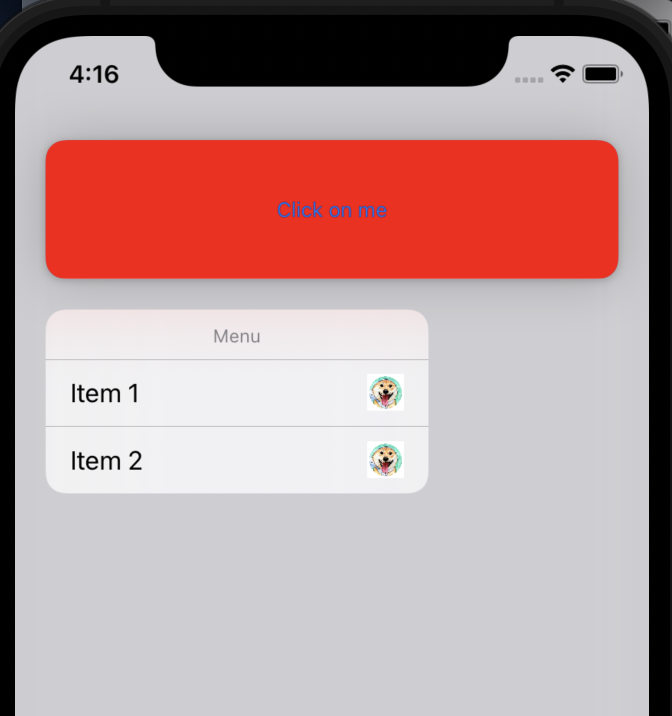
页面原文内容由Stack Overflow提供。腾讯云小微IT领域专用引擎提供翻译支持
原文链接:
https://stackoverflow.com/questions/67794714
复制相关文章
相似问题
腾讯云开发者

Copyright © 2013 - 2026 Tencent Cloud. All Rights Reserved. 腾讯云 版权所有
深圳市腾讯计算机系统有限公司 ICP备案/许可证号:粤B2-20090059  粤公网安备44030502008569号
腾讯云计算(北京)有限责任公司 京ICP证150476号 | 京ICP备11018762号