
角11自定义验证
我一直在寻找所有的努力使自定义验证工作在角11。到目前为止,我一直无法使它按照预期的工作。
如果我使用来自Angular.io的直接方法(下面),那么param (称为“control”)是未定义的。
 export function forbiddenNameValidator(nameRe: RegExp): ValidatorFn {
  return (control: AbstractControl): {[key: string]: any} | null => {
    const forbidden = nameRe.test(control.value);
    return forbidden ? {forbiddenName: {value: control.value}} : null;
  };
}
我可以至少显示一个控件对象,但是这个值总是一个空字符串。
export function requiredIfTrue(control: AbstractControl) {
  const value = control.value;

  if (!value) {
      return null;
  }

  return value === '1' ? {requiredIfTrue:true}: null;
}
希望有人能帮忙。
我将包括我的html和ts以及下面。
HTML:
<form [formGroup]="fg">
<mat-grid-list cols="2" rowHeight="100px">
  <mat-grid-tile>
    <mat-form-field appearance="fill">
      <mat-label>Type</mat-label>
      <mat-select #regType formControlName="typeControl">
        <mat-option *ngFor="let type of types" [value]="type">
          {{type}}
        </mat-option>
      </mat-select>
    </mat-form-field>
  </mat-grid-tile>
  <mat-grid-tile>
    <mat-form-field appearance="fill">
      <mat-label>First Name</mat-label>
      <input matInput formControlName="fNameControl" type="text" [maxlength]="charLimit4">
    </mat-form-field>
  </mat-grid-tile>
</mat-grid-list>
TS:
import { Component, OnInit } from '@angular/core';
import { FormControl, FormGroup, Validators } from '@angular/forms';
import {requiredIfTrue} from './custom-validators/custom-validators';

@Component({
  selector: 'app-registration-form',
  templateUrl: './registration-form.component.html',
  styleUrls: ['./registration-form.component.css']
})
export class RegistrationFormComponent implements OnInit {

  constructor() { }


  fg: any;
  types: any = ['1','2'];

  ngOnInit(): void {
    this.fg = new FormGroup({
      typeControl: new FormControl('',[Validators.required]),
      fNameControl: new FormControl('',[requiredIfTrue]),
    });
  }
Submit(): any{
  debugger;
};
}
TLDR:如果从ddl中选择了某个值,则应该需要一个字段。目前,所有的方法,我可以在网上找到角11没有工作。请帮帮忙。
更新:这是可行的,但我想验证单个控件,而不是表单组。这样,即使在我不关心的控件上,这些函数也不会被击中。
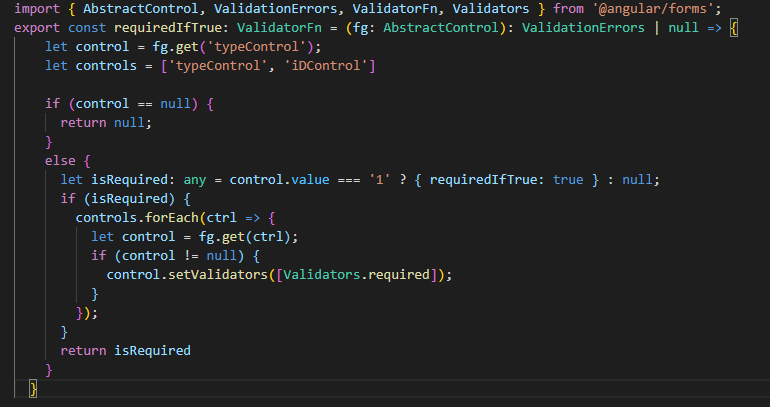
提前谢谢你!
回答 1
Stack Overflow用户
发布于 2021-05-12 06:30:42
如果我的理解是正确的,您只希望第二个控件是必需的,如果您的其他控件中有一个特定的值,即下拉列表。
有几种方法可以做到,
- 您可以动态地从该控件中添加和删除所需的验证器,
this.fg.controls.typeControl.valueChanges.subscribe(value => { if(value ===‘else’){ this.fg.controls.fNameControl.setValidators(Validators.required);}else{ this.fg.controls.fNameControl.clearValidators();};
这是侦听下拉列表上的更改,然后根据下拉列表的值从其他控件中添加和删除所需的验证器。
- 您可以像您正在尝试的那样使用自定义验证器,但它将是一个“交叉字段”验证器。意味着一个字段的有效性基于另一个字段的值.
在这里,角文档给出了一个很好的解释,https://angular.io/guide/form-validation#cross-field-validation
关键是您需要将验证器应用到包含两个控件的FormGroup,以便验证器中的AbstractControl包含两个FormControls,并使用一个(下拉列表)的值来验证另一个(fNameControl)的值,而不是单个FormControl。
  this.fg = new FormGroup({
    typeControl: new FormControl('',[Validators.required]),
    fNameControl: new FormControl(''),
  }, {validators: YourCustomCrossFieldValidator });
验证器看起来就像,
    export const YourCustomCrossFieldValidator: ValidatorFn = (control: AbstractControl): ValidationErrors | null => {
 //control is a reference to the FormGroup
  const typeControl = control.get('typeControl');
  const fNameControl = control.get('fNameControl');

  return typeControl && fNameControl && typeControl.value === 'whatever' && (!fNameControl.value || fNameControl.value.length === 0) ? { requiredIfTrue: true } : null;
};
编辑:我忘记提到的一件事是,当您添加验证器FormGroup时,默认情况下,错误将应用于该FormGroup,而不是任何单独的控件。
解决这一问题的一种方法是手动向验证器中的控件添加一个错误,然后始终返回null (这样我们就不会在FormGroup上重复错误)。
fNameControl.setErrors({...fNameControl.errors, 'requiredIfTrue': {value: true}});
return null;https://stackoverflow.com/questions/67495054
复制相似问题
腾讯云开发者

Copyright © 2013 - 2026 Tencent Cloud. All Rights Reserved. 腾讯云 版权所有
深圳市腾讯计算机系统有限公司 ICP备案/许可证号:粤B2-20090059  粤公网安备44030502008569号
腾讯云计算(北京)有限责任公司 京ICP证150476号 | 京ICP备11018762号