
无法承载或连接到服务
无法承载或连接到服务
提问于 2021-05-06 14:04:39
我正在使用Protobuf创建一个简单的示例供我玩,但我无法让它工作。
我从客户端得到以下错误:
Status(StatusCode="Unavailable....
我已经从protobuf-net.Grpc下载了项目Client_CS、Server_CS和Shared_CS的示例,在运行这个.时也存在同样的问题。
启动服务器时弹出的网页使用url localhost:44312。
但是launchSettings帮助:
"iisExpress": {
      "applicationUrl": "http://localhost:9385",
      "sslPort": 44312
    }
而且还
"applicationUrl": "https://localhost:5001;http://localhost:5000",但是,启动被设置为侦听端口10042,而客户端正在同一端口上寻找服务。很让人困惑?
合同:
[ProtoContract]
public class TestRequest
{

}

[ProtoContract]
public class TestResponse
{
    [ProtoMember(1)]
    public string Text { get; set; }
}
服务:
public class TestService : ITestService
{
    public ValueTask<TestResponse> TestAsync(TestRequest request, CallContext context = default)
    {
        TestResponse resp = new TestResponse();
        resp.Text = "weee";

        return new ValueTask<TestResponse>(resp);
    }
}
Program.cs:
public class Program
{
    public static void Main(string[] args)
    {
        CreateHostBuilder(args).Build().Run();
    }

    public static IWebHostBuilder CreateHostBuilder(string[] args) =>
        WebHost.CreateDefaultBuilder(args)
            .ConfigureKestrel(options =>
            {
                options.ListenLocalhost(10042, listenOptions =>
                {
                    listenOptions.Protocols = HttpProtocols.Http2;
                });
            })
            .UseStartup<Startup>();
}
Startup.cs:
public class Startup
{
    public Startup(IConfiguration configuration)
    {
        Configuration = configuration;
    }

    public IConfiguration Configuration { get; }

    // This method gets called by the runtime. Use this method to add services to the container.
    public void ConfigureServices(IServiceCollection services)
    {
        services.AddCodeFirstGrpc(config =>
        {
            config.ResponseCompressionLevel = System.IO.Compression.CompressionLevel.Optimal;
        });

        services.AddSingleton<ITestService, TestService>();
    }

    // This method gets called by the runtime. Use this method to configure the HTTP request pipeline.
    public void Configure(IApplicationBuilder app, IWebHostEnvironment env)
    {
        if (env.IsDevelopment())
        {
            app.UseDeveloperExceptionPage();
        }

        app.UseRouting();

        app.UseEndpoints(endpoints =>
        {
            endpoints.MapGrpcService<ITestService>();

            endpoints.MapGet("/", async context =>
            {
                await context.Response.WriteAsync("Communication with gRPC endpoints must be made through a gRPC client. To learn how to create a client, visit: https://go.microsoft.com/fwlink/?linkid=2086909");
            });
        });
    }
}
lanuchSettings.json:
{
  "iisSettings": {
    "windowsAuthentication": false,
    "anonymousAuthentication": true,
    "iisExpress": {
      "applicationUrl": "http://localhost:9385",
      "sslPort": 44312
    }
  },
  "profiles": {
    "IIS Express": {
      "commandName": "IISExpress",
      "launchBrowser": true,
      "environmentVariables": {
        "ASPNETCORE_ENVIRONMENT": "Development"
      }
    },
    "Protobuf_net.API": {
      "commandName": "Project",
      "dotnetRunMessages": "true",
      "launchBrowser": false,
      "applicationUrl": "https://localhost:5001;http://localhost:5000",
      "environmentVariables": {
        "ASPNETCORE_ENVIRONMENT": "Development"
      }
    }
  }
}
客户端:
GrpcClientFactory.AllowUnencryptedHttp2 = true;
using var http = GrpcChannel.ForAddress("http://localhost:10042");

var testService = http.CreateGrpcService<ITestService>();
var result = await testService.TestAsync(new TestRequest());
Console.WriteLine($"Result: {result.Text}");

Console.WriteLine("Press [Enter] to exit");
Console.ReadLine();回答 1
Stack Overflow用户
回答已采纳
发布于 2021-05-10 13:22:53
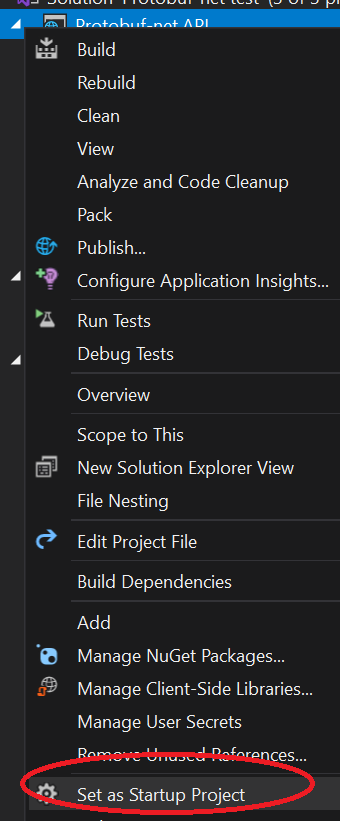
我认为这只是一个IDE问题;默认情况下,IDE希望使用IIS,坦率地说:它使一切变得一团糟。首先,将服务器项目设置为单个启动项目(右键单击该项目,“设置为启动项目”):
现在,在IDE的顶部,您可能会看到它试图使用IIS:

这是错误的配置;将其改为服务器项目本身。
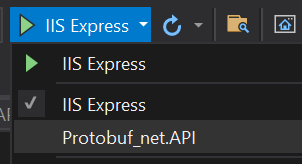
现在,当您运行服务器时,它应该加载在正确的端口上。
页面原文内容由Stack Overflow提供。腾讯云小微IT领域专用引擎提供翻译支持
原文链接:
https://stackoverflow.com/questions/67419778
复制相关文章
相似问题
腾讯云开发者

Copyright © 2013 - 2026 Tencent Cloud. All Rights Reserved. 腾讯云 版权所有
深圳市腾讯计算机系统有限公司 ICP备案/许可证号:粤B2-20090059  粤公网安备44030502008569号
腾讯云计算(北京)有限责任公司 京ICP证150476号 | 京ICP备11018762号