
CustomScrollView: SliverAppBar下的身体卷轴
CustomScrollView: SliverAppBar下的身体卷轴
提问于 2021-05-05 20:51:17
我在一个SliverAppBar中有多个CustomScrollView,屏幕的主体在SliverFillRemaining中。
顶部SliverAppBar是固定的
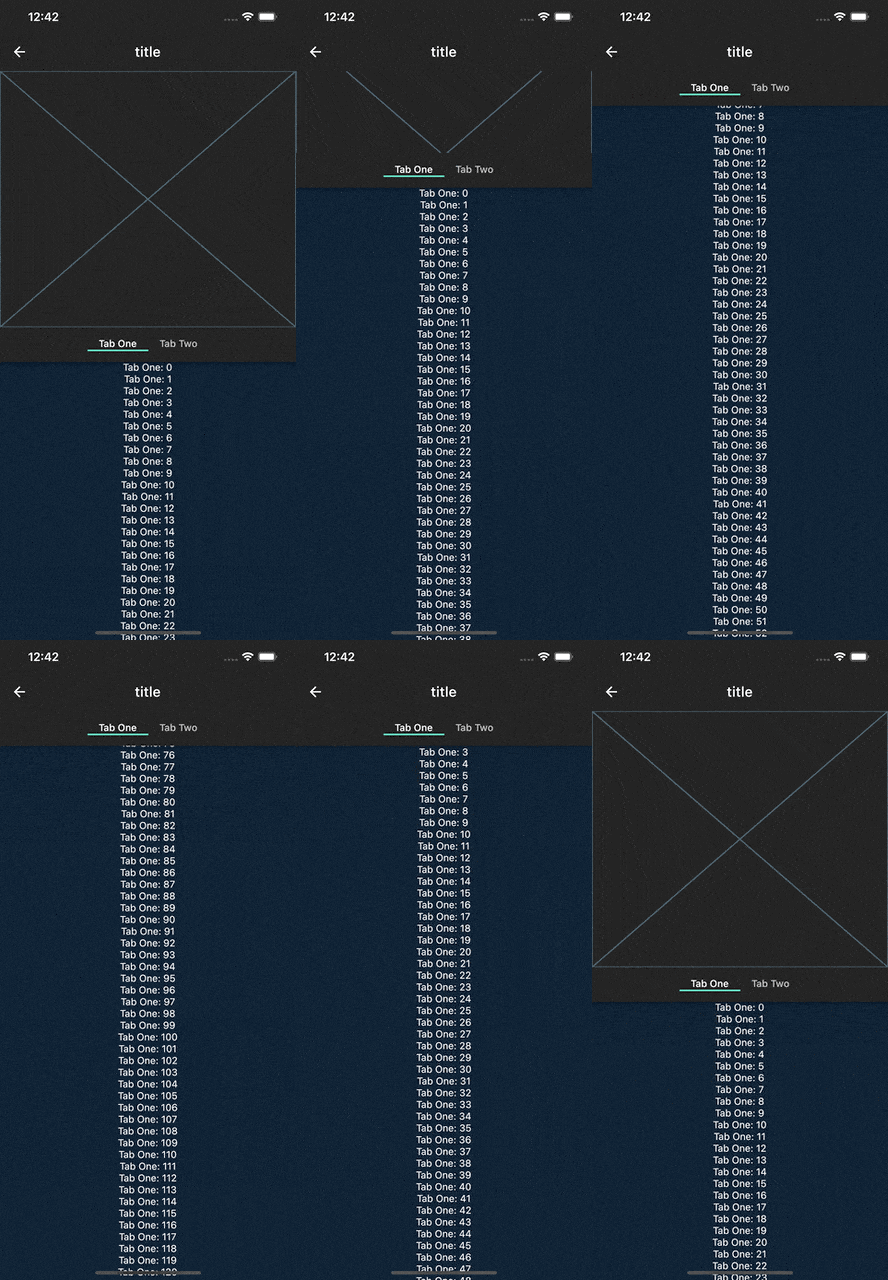
中间SliverAppBar是一个图像,将随着用户滚动而折叠。
底部SliverAppBar是一个固定的TabBar,在图像完全折叠后,它将位于第一个SliverAppBar下面
当前的经验是,当您最初滚动时,身体在最低的SliverAppBar下滚动。我已经试过使用SliverOverlapAbsorber/Injector,但这只是在身体顶部增加了一个空间,这样空间就会重叠,而不是身体,但这不是我想要的。
我希望身体和SliverAppBars一起滚动,直到中间的SliverAppBar完全崩溃,然后我希望身体滚动。
我已经做了几个小时了,,如何防止身体在卷轴上被重叠?
回答 1
Stack Overflow用户
回答已采纳
发布于 2021-05-06 00:22:59
为了实现这种滚动行为,使用NestedScrollView更容易,并注意主应用程序不再在条中了
import 'package:flutter/material.dart';

final Color darkBlue = Color.fromARGB(255, 18, 32, 47);

void main() {
  runApp(MyApp());
}

class MyApp extends StatelessWidget {
  @override
  Widget build(BuildContext context) {
    return MaterialApp(
      theme: ThemeData.dark().copyWith(scaffoldBackgroundColor: darkBlue),
      debugShowCheckedModeBanner: false,
      home: Scaffold(
        body: Center(
          child: MyWidget(),
        ),
      ),
    );
  }
}

class MyWidget extends StatefulWidget {
  @override
  MyWidgetState createState() => MyWidgetState();
}

class MyWidgetState extends State<MyWidget>
    with SingleTickerProviderStateMixin {
  TabController _tabController;

  @override
  void initState() {
    super.initState();
    _tabController = TabController(vsync: this, length: 2);
  }

  @override
  Widget build(BuildContext context) {
    return Scaffold(
      appBar: AppBar(
        title: const Text('title'),
        elevation: 0,
        leading: IconButton(
          icon: const Icon(Icons.arrow_back),
          onPressed: () {},
        ),
      ),
      body: NestedScrollView(
        floatHeaderSlivers: true,
        physics: const BouncingScrollPhysics(),
        body: TabBarView(
          controller: _tabController,
          physics: const NeverScrollableScrollPhysics(),
          children: [
            SingleChildScrollView(
              physics: const NeverScrollableScrollPhysics(),
              child: Column(
                children: List.generate(
                  1000,
                  (index) => Text('Tab One: $index'),
                ),
              ),
            ),
            SingleChildScrollView(
              physics: const NeverScrollableScrollPhysics(),
              child: Column(
                  children: List.generate(
                1000,
                (index) => Text('Tab Two: $index'),
              )),
            )
          ],
        ),
        headerSliverBuilder: (context, innerBoxIsScrolled) {
          return <Widget>[
            SliverAppBar(
              pinned: true,
              floating: false,
              elevation: 0,
              toolbarHeight: 0,
              collapsedHeight: null,
              automaticallyImplyLeading: false,
              expandedHeight: MediaQuery.of(context).size.height * .4,
              flexibleSpace: const FlexibleSpaceBar(
                  collapseMode: CollapseMode.parallax,
                  background: Placeholder()),
              titleSpacing: 0,
              primary: false,
            ),
            SliverAppBar(
              pinned: true,
              forceElevated: true,
              primary: false,
              automaticallyImplyLeading: false,
              expandedHeight: 50,
              collapsedHeight: null,
              toolbarHeight: 50,
              titleSpacing: 0,
              title: Align(
                alignment: Alignment.topCenter,
                child: TabBar(
                    controller: _tabController,
                    isScrollable: true,
                    tabs: [
                      const Text('Tab One'),
                      const Text('Tab Two'),
                    ]),
              ),
            ),
          ];
        },
      ),
    );
  }
}页面原文内容由Stack Overflow提供。腾讯云小微IT领域专用引擎提供翻译支持
原文链接:
https://stackoverflow.com/questions/67408590
复制相关文章
相似问题
腾讯云开发者

Copyright © 2013 - 2026 Tencent Cloud. All Rights Reserved. 腾讯云 版权所有
深圳市腾讯计算机系统有限公司 ICP备案/许可证号:粤B2-20090059  粤公网安备44030502008569号
腾讯云计算(北京)有限责任公司 京ICP证150476号 | 京ICP备11018762号