
表格单元的多色边框
表格单元的多色边框
提问于 2021-05-03 04:04:07
对于某些表格单元格,我想要一个多颜色的顶部边框或底部边框。
基于如何创建多色边框与-css和css-多色边框,我能够创建一个多颜色的边框。
问题是,我想把它组合成一个表格单元格td,其中一些单元格有一个正常的边框,而另一些单元格有一个多颜色的边框。
下面的代码设置了一个单元格的多颜色,但是一旦我想为“普通”单元格添加黑色边框,它就会覆盖多色边框(参见码页)。
<style>

.works  .gap-from {
  text-align:center;
  border-bottom: 4px solid;
  border-image:  linear-gradient(to right, lightgrey 40%, yellow 40%) 1;
}
</style>


<table class="works">
  <tr><td>no color border</td><td class="gap-from">without span</td></tr>
  <tr><td><span class="gap-from">with span</span></td></tr>
</table>
这似乎使它的部分工作,一个背景颜色必须设置为表。但这会导致边界线很大。
table.works {background-color: black;}
table.works colgroup {background-color: white;}
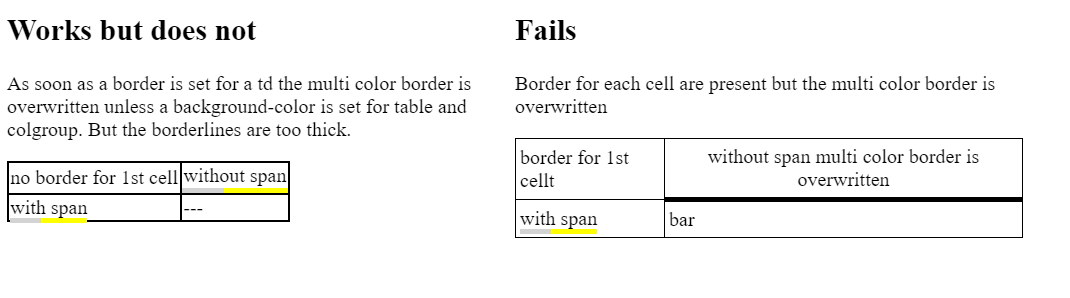
问题
能做些什么
- 每个单元的正常薄边框
- 某些单元格的多色边框
- 而不使用额外的标记(额外的跨度)?
回答 1
Stack Overflow用户
回答已采纳
发布于 2021-05-03 07:52:59
由于普通单元格和多色单元格都使用相同的border属性来实现边框外观和感觉,因此必须覆盖另一个。如果多色单元格需要2个边框,则可以将一个边框转移到另一个元素。因为有一个需求(不需要额外的标记),我们可以使用psuedo元素来承载多色边框。因此,所有单元格将有薄的黑色边框和多色单元将有一个额外的厚,多色底部边界。
table {
  border-collapse: collapse;
}

td {
  position: relative;
  /* normal thin borders for every cell */
  border: 1px solid black;
}

/* let the psuedo element host the multi-color border, so it wont be overritten by normal td */
td.multiColor:after {
  border-bottom: 4px solid;
  border-image: linear-gradient(to right, lightgrey 40%, yellow 40%) 1;
  /* psuedo element positioning */
  position: absolute;
  content: '';
  height: 100%;
  width: 100%;
  left: 0;
  top: 0;
  /* tell the borowser its border width is included with its element size, so it will not overlap with td border */
  box-sizing: border-box;
}<table>
<tr>
<td>normal cell</td>
<td class='multiColor'>multi color</td>
</tr>
<tr>
<td class="multiColor">multi color</td>
<td>normal cell</td>
</tr>
</table>
页面原文内容由Stack Overflow提供。腾讯云小微IT领域专用引擎提供翻译支持
原文链接:
https://stackoverflow.com/questions/67363336
复制相关文章
相似问题
腾讯云开发者

Copyright © 2013 - 2026 Tencent Cloud. All Rights Reserved. 腾讯云 版权所有
深圳市腾讯计算机系统有限公司 ICP备案/许可证号:粤B2-20090059  粤公网安备44030502008569号
腾讯云计算(北京)有限责任公司 京ICP证150476号 | 京ICP备11018762号