
ILMerge / ILRepack dll无法使用Dynamic365插件注册工具注册
我正在尝试为D365创建一个插件。我有包依赖项,包括
- Azure.DigitalTwins.Core
- Azure.Core
- Azure.Identity
这些.dll依赖项必须合并到单个.dll中才能注册插件。我使用一个ILMerge批处理文件脚本将这些dll组合成一个merged.dll输出。
下面是我正在使用的脚本:
@echo off
:: this script needs https://www.nuget.org/packages/ilmerge

:: Set build, used for directory. Typically Release or Debug
SET ILMERGE_BUILD=bin\Debug\ilmerge

:: set your NuGet ILMerge Version, this is the number from the package manager install, for example:
:: PM> Install-Package ilmerge -Version 3.0.29
:: to confirm it is installed for a given project, see the packages.config file
SET ILMERGE_VERSION=3.0.41

:: the full ILMerge should be found here:
SET ILMERGE_PATH=%USERPROFILE%\.nuget\packages\ilmerge\%ILMERGE_VERSION%\tools\net452
:: dir "%ILMERGE_PATH%"\ILMerge.exe

SET PROJECT_ROOT=%CD%
SET ASSEMBLY_DIR=%PROJECT_ROOT%\bin\Debug\net462

::/targetplatform:v4,"C:\Program Files (x86)\Reference Assemblies\Microsoft\Framework\.NETFramework\v4.0" ^
::/target:library ^
::/copyattrs ^
::/closed ^
::/allowDup ^

echo Merging adtplugin...
:: add project DLL's starting with replacing the FirstLib with this project's DLL
"%ILMERGE_PATH%"\ILMerge.exe ^
/keyfile:%PROJECT_ROOT%\adtplugin.snk ^
/out:%ILMERGE_BUILD%\merged.dll ^
/target:library ^
/nDebug ^
/closed ^
/allowDup ^
/copyattrs ^
/targetplatform:v4,"C:\Program Files (x86)\Reference Assemblies\Microsoft\Framework\.NETFramework\v4.7.2" ^
%ASSEMBLY_DIR%\adtplugin.dll ^
%ASSEMBLY_DIR%\Azure.Core.dll ^
%ASSEMBLY_DIR%\Azure.DigitalTwins.Core.dll ^
%ASSEMBLY_DIR%\Azure.Identity.dll ^
%ASSEMBLY_DIR%\Microsoft.Bcl.AsyncInterfaces.dll ^
%ASSEMBLY_DIR%\Microsoft.Identity.Client.dll ^
%ASSEMBLY_DIR%\Microsoft.Identity.Client.Extensions.Msal.dll ^
%ASSEMBLY_DIR%\Microsoft.Win32.Primitives.dll ^
%ASSEMBLY_DIR%\netstandard.dll ^
%ASSEMBLY_DIR%\System.Memory.dll ^
%ASSEMBLY_DIR%\System.Threading.Tasks.Extensions.dll

pause
:Done
我玩了相当多的/option标志传递给ILMerge.exe。当前,通过显示配置,我可以将列出的.dlls合并到一个merged.dll输出中。
接下来,我尝试使用插件注册工具来使用merged.dll输出文件注册一个新程序集。当我尝试注册插件时,我得到的是错误:
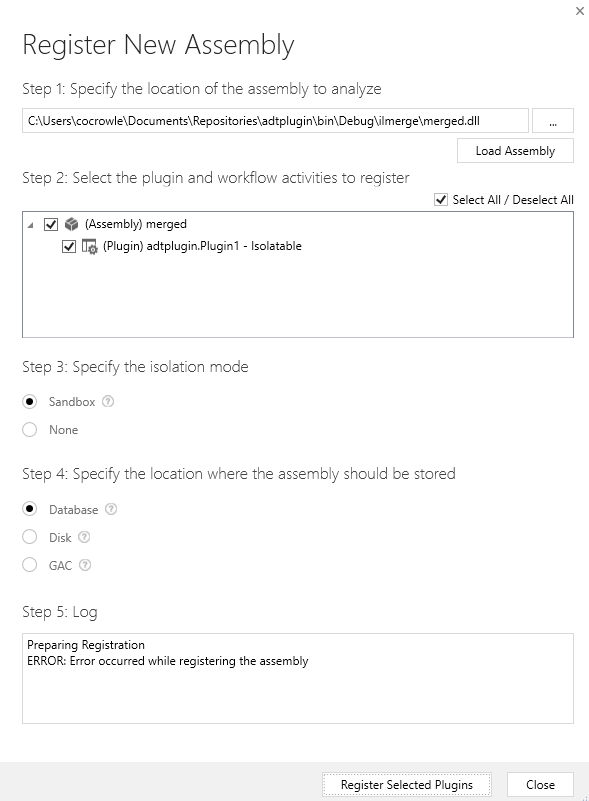
下面是错误转储:
Unhandled Exception: System.ServiceModel.FaultException`1[[Microsoft.Xrm.Sdk.OrganizationServiceFault, Microsoft.Xrm.Sdk, Version=9.0.0.0, Culture=neutral, PublicKeyToken=31bf3856ad364e35]]: Unable to load plug-in assembly.
Detail: <OrganizationServiceFault xmlns="http://schemas.microsoft.com/xrm/2011/Contracts" xmlns:i="http://www.w3.org/2001/XMLSchema-instance">
<ActivityId>9e6ed737-8374-464e-956a-d70b46a2c686</ActivityId>
<ErrorCode>-2147204719</ErrorCode>
<ErrorDetails xmlns:a="http://schemas.datacontract.org/2004/07/System.Collections.Generic">
<KeyValuePairOfstringanyType>
<a:key>ApiExceptionSourceKey</a:key>
<a:value i:type="b:string" xmlns:b="http://www.w3.org/2001/XMLSchema">Plugin/Microsoft.Crm.ObjectModel.PluginAssemblyService</a:value>
</KeyValuePairOfstringanyType>
<KeyValuePairOfstringanyType>
<a:key>ApiSourceActivityKey</a:key>
<a:value i:type="b:string" xmlns:b="http://www.w3.org/2001/XMLSchema">Microsoft.Crm.Extensibility.PipelineStep</a:value>
</KeyValuePairOfstringanyType>
<KeyValuePairOfstringanyType>
<a:key>ApiExceptionOwnerKey</a:key>
<a:value i:type="b:string" xmlns:b="http://www.w3.org/2001/XMLSchema">COMMONDATASERVICECDS\CDSAPI-Reliability</a:value>
</KeyValuePairOfstringanyType>
<KeyValuePairOfstringanyType>
<a:key>ApiOriginalExceptionKey</a:key>
<a:value i:type="b:string" xmlns:b="http://www.w3.org/2001/XMLSchema">Microsoft.Crm.CrmException: Unable to load plug-in assembly. ---> Microsoft.Crm.CrmException: Unable to load plug-in assembly.
at Microsoft.Crm.ObjectModel.PluginAssemblyServiceInternal`1.LoadCrmPluginAssemblyMetadata(IBusinessEntity pluginAssembly, IExecutionContext context, Boolean loadAllMetadata)
at Microsoft.Crm.ObjectModel.PluginAssemblyServiceInternal`1.RetrieveAssemblyMetadata(IBusinessEntity pluginAssembly, ExecutionContext context, Boolean retrieveFromExisting, Boolean forSystemAssembly)
at Microsoft.Crm.ObjectModel.PluginAssemblyServiceInternal`1.ValidateOperation(String operationName, IBusinessEntity entity, ExecutionContext context)
at Microsoft.Crm.ObjectModel.SdkEntityServiceBase.CreateInternal(IBusinessEntity entity, ExecutionContext context, Boolean verifyAction)
--- End of inner exception stack trace ---
at Microsoft.Crm.Extensibility.VersionedPluginProxyStepBase.Execute(PipelineExecutionContext context)
at Microsoft.Crm.Extensibility.PipelineInstrumentationHelper.Execute(Boolean instrumentationEnabled, String stopwatchName, ExecuteWithInstrumentation action, PipelineExecutionContext context)
at Microsoft.Crm.Extensibility.Pipeline.<>c__DisplayClass7_0.<RunStep>b__0()</a:value>
</KeyValuePairOfstringanyType>
<KeyValuePairOfstringanyType>
<a:key>ApiStepKey</a:key>
<a:value i:type="b:guid" xmlns:b="http://schemas.microsoft.com/2003/10/Serialization/">3ecabb1b-ea3e-db11-86a7-000a3a5473e8</a:value>
</KeyValuePairOfstringanyType>
<KeyValuePairOfstringanyType>
<a:key>ApiDepthKey</a:key>
<a:value i:type="b:int" xmlns:b="http://www.w3.org/2001/XMLSchema">1</a:value>
</KeyValuePairOfstringanyType>
<KeyValuePairOfstringanyType>
<a:key>ApiActivityIdKey</a:key>
<a:value i:type="b:guid" xmlns:b="http://schemas.microsoft.com/2003/10/Serialization/">9e6ed737-8374-464e-956a-d70b46a2c686</a:value>
</KeyValuePairOfstringanyType>
<KeyValuePairOfstringanyType>
<a:key>ApiPluginSolutionNameKey</a:key>
<a:value i:type="b:string" xmlns:b="http://www.w3.org/2001/XMLSchema">System</a:value>
</KeyValuePairOfstringanyType>
<KeyValuePairOfstringanyType>
<a:key>ApiStepSolutionNameKey</a:key>
<a:value i:type="b:string" xmlns:b="http://www.w3.org/2001/XMLSchema">System</a:value>
</KeyValuePairOfstringanyType>
<KeyValuePairOfstringanyType>
<a:key>ApiExceptionCategory</a:key>
<a:value i:type="b:string" xmlns:b="http://www.w3.org/2001/XMLSchema">SystemFailure</a:value>
</KeyValuePairOfstringanyType>
<KeyValuePairOfstringanyType>
<a:key>ApiExceptionMessageName</a:key>
<a:value i:type="b:string" xmlns:b="http://www.w3.org/2001/XMLSchema">UnableToLoadPluginAssembly</a:value>
</KeyValuePairOfstringanyType>
<KeyValuePairOfstringanyType>
<a:key>ApiExceptionHttpStatusCode</a:key>
<a:value i:type="b:int" xmlns:b="http://www.w3.org/2001/XMLSchema">500</a:value>
</KeyValuePairOfstringanyType>
<KeyValuePairOfstringanyType>
<a:key>0</a:key>
<a:value i:type="b:string" xmlns:b="http://www.w3.org/2001/XMLSchema">Failed to load plugin assembly with exception Microsoft.Crm.CrmException: GetAssemblyMetadata: expected mdtAssemblyRef or mdtAssembly
at Microsoft.Crm.CrmException.Assert(Boolean condition, String message)
at Microsoft.Crm.CrmPluginAssemblyMetadata.GetAssemblyMetadata(UInt32 token)
at Microsoft.Crm.CrmPluginAssemblyMetadata.ProcessTypeRef(UInt32 typeRef)
at Microsoft.Crm.CrmPluginAssemblyMetadata.ProcessType(UInt32 token)
at Microsoft.Crm.CrmPluginAssemblyMetadata.ProcessTypeDef(UInt32 typeDef)
at Microsoft.Crm.CrmPluginAssemblyMetadata.ProcessType(UInt32 token)
at Microsoft.Crm.CrmPluginAssemblyMetadata.LoadMetadata()
at Microsoft.Crm.CrmPluginAssemblyMetadata.LoadMetadataFromAssemblyContent(ArraySegment`1 assemblyContents, Boolean loadAllMetadata)
at Microsoft.Crm.CrmPluginAssemblyMetadata.LoadMetadataFromAssemblyContent(String content, Boolean loadAllMetadata)
at Microsoft.Crm.ObjectModel.PluginAssemblyServiceInternal`1.LoadCrmPluginAssemblyMetadata(IBusinessEntity pluginAssembly, IExecutionContext context, Boolean loadAllMetadata). PluginInfo => Crm plugin assembly info : sourcetype = 0, description = , ismanaged = False, pluginassemblyid = b77380cb-8676-45b6-9e5c-63a5960ed2ac, ispasswordset = False, publickeytoken = 7F66FA42F6885FDC, name = merged, culture = neutral, isolationmode = 2, version = 1.0.0.0, </a:value>
</KeyValuePairOfstringanyType>
<KeyValuePairOfstringanyType>
<a:key>1</a:key>
<a:value i:type="b:string" xmlns:b="http://www.w3.org/2001/XMLSchema">Microsoft.Crm.CrmException: GetAssemblyMetadata: expected mdtAssemblyRef or mdtAssembly
at Microsoft.Crm.CrmException.Assert(Boolean condition, String message)
at Microsoft.Crm.CrmPluginAssemblyMetadata.GetAssemblyMetadata(UInt32 token)
at Microsoft.Crm.CrmPluginAssemblyMetadata.ProcessTypeRef(UInt32 typeRef)
at Microsoft.Crm.CrmPluginAssemblyMetadata.ProcessType(UInt32 token)
at Microsoft.Crm.CrmPluginAssemblyMetadata.ProcessTypeDef(UInt32 typeDef)
at Microsoft.Crm.CrmPluginAssemblyMetadata.ProcessType(UInt32 token)
at Microsoft.Crm.CrmPluginAssemblyMetadata.LoadMetadata()
at Microsoft.Crm.CrmPluginAssemblyMetadata.LoadMetadataFromAssemblyContent(ArraySegment`1 assemblyContents, Boolean loadAllMetadata)
at Microsoft.Crm.CrmPluginAssemblyMetadata.LoadMetadataFromAssemblyContent(String content, Boolean loadAllMetadata)
at Microsoft.Crm.ObjectModel.PluginAssemblyServiceInternal`1.LoadCrmPluginAssemblyMetadata(IBusinessEntity pluginAssembly, IExecutionContext context, Boolean loadAllMetadata)</a:value>
</KeyValuePairOfstringanyType>
</ErrorDetails>
<HelpLink>http://go.microsoft.com/fwlink/?LinkID=398563&error=Microsoft.Crm.CrmException%3a80044191&client=platform</HelpLink>
<Message>Unable to load plug-in assembly.</Message>
<Timestamp>2021-04-29T17:46:08.9958593Z</Timestamp>
<ExceptionRetriable>false</ExceptionRetriable>
<ExceptionSource i:nil="true" />
<InnerFault>
<ActivityId>9e6ed737-8374-464e-956a-d70b46a2c686</ActivityId>
<ErrorCode>-2147204719</ErrorCode>
<ErrorDetails xmlns:a="http://schemas.datacontract.org/2004/07/System.Collections.Generic" />
<HelpLink i:nil="true" />
<Message>Unable to load plug-in assembly.</Message>
<Timestamp>2021-04-29T17:46:08.9958593Z</Timestamp>
<ExceptionRetriable>false</ExceptionRetriable>
<ExceptionSource i:nil="true" />
<InnerFault i:nil="true" />
<OriginalException i:nil="true" />
<TraceText i:nil="true" />
</InnerFault>
<OriginalException i:nil="true" />
<TraceText i:nil="true" />
</OrganizationServiceFault>
Server stack trace:
at System.ServiceModel.Channels.ServiceChannel.HandleReply(ProxyOperationRuntime operation, ProxyRpc& rpc)
at System.ServiceModel.Channels.ServiceChannel.Call(String action, Boolean oneway, ProxyOperationRuntime operation, Object[] ins, Object[] outs, TimeSpan timeout)
at System.ServiceModel.Channels.ServiceChannelProxy.InvokeService(IMethodCallMessage methodCall, ProxyOperationRuntime operation)
at System.ServiceModel.Channels.ServiceChannelProxy.Invoke(IMessage message)
Exception rethrown at [0]:
at Microsoft.Crm.Tools.Libraries.RegistrationHelper.RegisterAssembly(CrmOrganization org, String pathToAssembly, CrmPluginAssembly assembly) in D:\a\1\s\src\GeneralTools\PluginRegistrationV3\PluginRegistration\CrmLibraries\RegistrationHelper.cs:line 723
at Microsoft.Crm.Tools.AssemblyRegistration.PluginRegistrationViewModel.RegisterAssembly() in D:\a\1\s\src\GeneralTools\PluginRegistrationV3\RegistrationTools\AssemblyRegistration\ViewModels\PluginRegistrationViewModel.cs:line 649如果有人成功地使用.bat脚本运行ILMerge,合并.dll文件,并使用输出注册D365插件,请告诉我!(非常具体.我知道哈哈)
更新
我现在转到了ILRepack和ILRepack.Lib.MSBuild.Task。我在ILRepack.targets文件中使用以下配置:
<?xml version="1.0" encoding="utf-8" ?>
<Project xmlns="http://schemas.microsoft.com/developer/msbuild/2003">
  <Target Name="ILRepacker" AfterTargets="Build">
    <ItemGroup>
      <InputAssemblies Include="$(OutputPath)$(TargetName)$(TargetExt)" />
      <!--<InputAssemblies Include="$(OutputPath)\*.dll" />-->
      <InputAssemblies Include="$(OutputPath)adtplugin.dll" />
      <InputAssemblies Include="$(OutputPath)Azure.Core.dll" />
      <InputAssemblies Include="$(OutputPath)Azure.DigitalTwins.Core.dll"/>
      <InputAssemblies Include="$(OutputPath)Azure.Identity.dll"/>
      <InputAssemblies Include="$(OutputPath)Microsoft.Bcl.AsyncInterfaces.dll"/>
      <InputAssemblies Include="$(OutputPath)System.Memory.dll"/>
      <InputAssemblies Include="$(OutputPath)System.Threading.Tasks.Extensions.dll"/>
      <!--<InputAssemblies Include="$(OutputPath)Microsoft.Identity.Client.dll"/>
      <InputAssemblies Include="$(OutputPath)Microsoft.Identity.Client.Extensions.Msal.dll"/>
      <InputAssemblies Include="$(OutputPath)Microsoft.Win32.Primitives.dll"/>
      <InputAssemblies Include="$(OutputPath)netstandard.dll"/>-->

    </ItemGroup>

    <ILRepack
        Parallel="true"
        Internalize="false"
        InternalizeExclude="@(DoNotInternalizeAssemblies)"
        InputAssemblies="@(InputAssemblies)"
        LibraryPath="$(OutputPath)"
        Wildcards="false"
        TargetKind="SameAsPrimaryAssembly"
        DebugInfo="false"
        KeyFile="adtplugin.snk"
        OutputFile="$(OutputPath)Merged\$(AssemblyName).dll"
        LogFile="$(OutputPath)Merged\ILRepack.log"
    />
  </Target>
</Project>
合并成功,但插件注册仍然失败,与上面显示的错误转储相同。
回答 2
Stack Overflow用户
发布于 2021-04-30 13:18:39
您可能希望避免合并任何属于.NET框架的内容(我假设System.Memory和System.Threading.Tasks这样的库是这样的)。
尽管如此,基于您要合并的DLL,即使您让它注册,取决于代码的实际操作,沙箱环境的限制可能会阻止插件的运行。
如果结果是这样的话,您可能需要查看一个Azure感知插件。
我曾经有一个插件,在那里我必须进行RSA签名验证。我尝试使用.NET库,但是沙箱禁止与RSA相关的代码运行。最后,我不得不使用我发现的一个名为EZ的开源RSA库“滚动我自己的”。
感谢你的更新。我进一步研究了错误信息。我发现了这篇文章和这个问题,开发人员似乎得出结论,ILMerging是一个标识库,是一个展示器。
就合并/重新包装路径而言,您可能希望使用一个空白项目并逐一合并DLL,在每个项目之后测试插件注册,以查看哪个库或哪个库破坏了注册。
我最后一次听说,即使它能工作,ILMerge在技术上也是不受支持的。支持的是一个Azure插件。
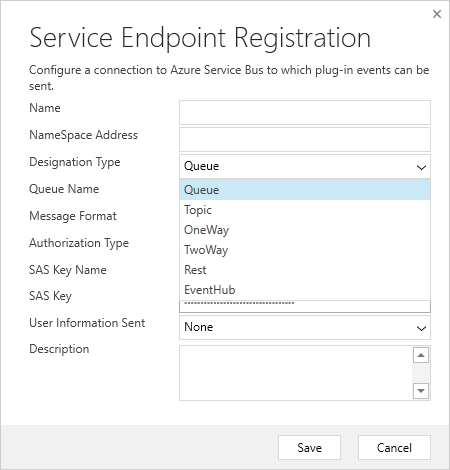
您可以注册您的插件,以便在某个服务端点或web钩子触发时调用它:
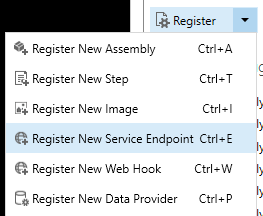
对于Service,它可以命中Azure服务总线队列中的各种类型的侦听器(通过连接字符串或此配置对话框)。
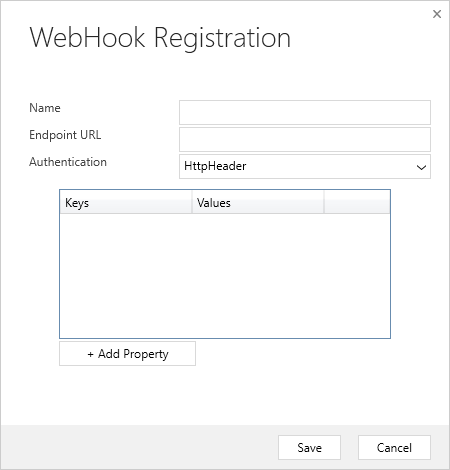
呼叫Web钩子也是一种选择:
Stack Overflow用户
发布于 2021-04-30 05:42:50
尝试使用Fody包在生成操作后合并..dll s。首先,您需要通过nuget安装福迪和Costura.Fody。它将添加一些引用和文件FodyWeavers.xml,您可以这样填充它们
<Weavers xmlns:xsi="http://www.w3.org/2001/XMLSchema-instance" xsi:noNamespaceSchemaLocation="FodyWeavers.xsd">
  <Costura />
</Weavers>然后,在“解决方案资源管理器”中,选择要合并到一起的程序集的引用,并在“属性”窗口中将复制本地更改为True。对于那些不想包含在合并过程中的程序集,选择复制本地- False
重新构建解决方案,并在输出中获得合并的dll。
https://stackoverflow.com/questions/67322633
复制相似问题
腾讯云开发者

Copyright © 2013 - 2026 Tencent Cloud. All Rights Reserved. 腾讯云 版权所有
深圳市腾讯计算机系统有限公司 ICP备案/许可证号:粤B2-20090059  粤公网安备44030502008569号
腾讯云计算(北京)有限责任公司 京ICP证150476号 | 京ICP备11018762号