
带参数和TabBar的Shell路由
我正在尝试将参数路由到一个可以被多个选项卡重用的页面(其中包含一个WebView)。我想传递一个Url和Title,但是到目前为止,在BrowserPage中,我得到了空字符串
AppShell.xaml
<TabBar>
    <ShellContent Title="Page 1" Icon="icon_about.png" Route="Page1Route" ContentTemplate="{DataTemplate local:BrowserPage}"/>
    <ShellContent Title="Page 2" Icon="icon_about.png" Route="Page2Route" ContentTemplate="{DataTemplate local:BrowserPage}"/>
</TabBar>
AppShell.xaml.cs
public partial class AppShell : Xamarin.Forms.Shell {
   public AppShell() {
      InitializeComponent();
      Routing.RegisterRoute("Page1Route?Url=page1url&Title=Page1", typeof(BrowserPage));
      Routing.RegisterRoute("Page2Route?Url=page2url&Title=Page2", typeof(BrowserPage));

   }
}
BrowserPage.xaml.cs
[XamlCompilation(XamlCompilationOptions.Compile)]
[QueryProperty(nameof(Url), nameof(Url))]
[QueryProperty(nameof(Title), nameof(Title))]

public partial class BrowserPage : ContentPage {

    public BrowserPage() {
        InitializeComponent();

        ((BrowserViewModel)BindingContext).Title = Title;
        ((BrowserViewModel)BindingContext).Url = Url;
    }

    private string url = "";
    public string Url {
        get {
            return url;
        }
        set {
            url = value;
            OnPropertyChanged();
        }
    }
}在BrowserPage代码隐藏中,Title和Url是空的。如何以这种方式正确传递和接收数据?
回答 3
Stack Overflow用户
发布于 2021-04-13 20:56:13
我能够通过完全删除路由并向BrowserPage的代码背后添加一个Url属性和一个Title属性来解决这个问题:
private string url;
public string Url {
    get => url;
    set {
        url = value;
        ((BrowserViewModel)BindingContext).SetSource(url);
    }
}

private string pageTitle;
public string PageTitle {
    get => pageTitle;
    set {
        pageTitle = value;
        ((BrowserViewModel)BindingContext).SetPageTitle(pageTitle);
    }
}在AppShell.xaml文件中,我删除了Route和ContentTemplate,并将ShellContent.Content设置为在此描述。它允许我设置网址和标题:
<ShellContent Title="Page 1" Icon="icon_about.png" >
    <local:BrowserPage Url="http://www.yahoo.com" PageTitle="Page 1"/>
</ShellContent>

<ShellContent Title="Page 2" Icon="icon_about.png">
    <local:BrowserPage Url="http://www.google.com" PageTitle="Page 2"/>
</ShellContent>
当应用程序启动并设置Url和PageTitle时,它会将其传递给ViewModel并加载页面。
任何需要实现这一目标的人都可以使用完整的代码。
BrowserPage.xaml
<?xml version="1.0" encoding="utf-8" ?>
<ContentPage xmlns="http://xamarin.com/schemas/2014/forms"
             xmlns:x="http://schemas.microsoft.com/winfx/2009/xaml"
             xmlns:vm="clr-namespace:MyApp.ViewModels"
             x:Class="MyApp.Views.BrowserPage"
             Title="{Binding Title}">

    <ContentPage.BindingContext>
        <vm:BrowserViewModel/>
    </ContentPage.BindingContext>

    <ContentPage.Resources>
        <ResourceDictionary>
            <Color x:Key="Accent">#96d1ff</Color>
        </ResourceDictionary>
    </ContentPage.Resources>

    <Grid>
        <WebView
            x:Name="mywebview"
            Source="{Binding Source}"
            Cookies="{Binding Cookies}"
            Navigating="mywebview_Navigating"
            Navigated="mywebview_Navigated"
            WidthRequest="1000"
            HeightRequest="1000"/>

        <ActivityIndicator
            x:Name="spinner"
            Color="Black"
            IsRunning="True"
            HorizontalOptions="Center"
            VerticalOptions="Center"/>
    </Grid>
</ContentPage>
BrowserPage.xaml.cs
using MyApp.ViewModels;
using System.Diagnostics;
using Xamarin.Forms;
using Xamarin.Forms.Xaml;

namespace MyApp.Views {
    [XamlCompilation(XamlCompilationOptions.Compile)]
    public partial class BrowserPage : ContentPage {

        private string url;
        public string Url {
            get => url;
            set {
                url = value;
                ((BrowserViewModel)BindingContext).SetSource(url);
            }
        }

        private string pageTitle;
        public string PageTitle {
            get => pageTitle;
            set {
                pageTitle = value;
                ((BrowserViewModel)BindingContext).SetPageTitle(pageTitle);
            }
        }

        public BrowserPage() {
            InitializeComponent();
        }

        private void mywebview_Navigated(object sender, WebNavigatedEventArgs e) {
            mywebview.IsVisible = true;
            spinner.IsVisible = false;
        }

        private void mywebview_Navigating(object sender, WebNavigatingEventArgs e) {
            mywebview.IsVisible = false;
            spinner.IsVisible = true;
        }
    }
}
BrowserViewModel.cs
using System;
using System.Net;
using Xamarin.Forms;

namespace MyApp.ViewModels {
    public class BrowserViewModel : BaseViewModel {

        private string text;
        public string Text {
            get => text;
            set {
                SetProperty(ref text, value);
            }
        }

        private UrlWebViewSource source;
        public UrlWebViewSource Source {
            get {
                return source;
            }
            set {
                SetProperty(ref source, value);
            }
        }

        private CookieContainer cookies;
        public CookieContainer Cookies {
            get {
                return cookies;
            }
            set {
                SetProperty(ref cookies, value);
            }
        }

        public BrowserViewModel() { }
        public BrowserViewModel(string title) {
            Title = title;
        }

        public void SetPageTitle(string title) {
            Title = title;
        }

        public void SetSource(string Url) {
            CookieContainer cookieJar = new CookieContainer();
            Uri uri = new Uri(Url, UriKind.RelativeOrAbsolute);

            Cookie cookie = new Cookie {
                ...
            };
            cookieJar.Add(uri, cookie);

            Cookies = cookieJar;
            Source = new UrlWebViewSource { Url = uri.ToString() };
        }
    }
}
AppShell.xaml
<?xml version="1.0" encoding="UTF-8"?>
<Shell xmlns="http://xamarin.com/schemas/2014/forms"
       xmlns:x="http://schemas.microsoft.com/winfx/2009/xaml"
       xmlns:local="clr-namespace:MyApp.Views"
       Title="MyApp"
       x:Class="MyApp.AppShell">
    <Shell.Resources>
        <ResourceDictionary>
            <Style x:Key="BaseStyle" TargetType="Element">
                <Setter Property="Shell.BackgroundColor" Value="{StaticResource Primary}" />
                <Setter Property="Shell.ForegroundColor" Value="White" />
                <Setter Property="Shell.TitleColor" Value="White" />
                <Setter Property="Shell.DisabledColor" Value="#B4FFFFFF" />
                <Setter Property="Shell.UnselectedColor" Value="#95FFFFFF" />
                <Setter Property="Shell.TabBarBackgroundColor" Value="{StaticResource Primary}" />
                <Setter Property="Shell.TabBarForegroundColor" Value="White"/>
                <Setter Property="Shell.TabBarUnselectedColor" Value="#95FFFFFF"/>
                <Setter Property="Shell.TabBarTitleColor" Value="White"/>
            </Style>
            <Style TargetType="TabBar" BasedOn="{StaticResource BaseStyle}" />
            <Style TargetType="FlyoutItem" BasedOn="{StaticResource BaseStyle}" />
        </ResourceDictionary>
    </Shell.Resources>

    <TabBar>
        <ShellContent Title="Page 1" Icon="icon_about.png" >
            <local:BrowserPage Url="http://www.yahoo.com" PageTitle="Page 1"/>
        </ShellContent>

        <ShellContent Title="Page 2" Icon="icon_about.png">
            <local:BrowserPage Url="http://www.google.com" PageTitle="Page 2"/>
        </ShellContent>
    </TabBar>
</Shell>Stack Overflow用户
发布于 2021-04-09 18:41:33
路由注册与不带参数相同,参数是在GoToAsync()调用上发送(指定),而不是在RegisterRoute()调用中发送,因此在导航到BrowserPage时需要提供参数。
public partial class AppShell : Xamarin.Forms.Shell {
   public AppShell() {
      InitializeComponent();
      Routing.RegisterRoute(nameof(BrowserPage), typeof(BrowserPage));
   }
}
Page1.xaml.cs
async void Button_Clicked(object sender, System.EventArgs e)
{
   await Shell.Current.GoToAsync($"{nameof(BrowserPage)}?Title=Page1Title&Url=Page1Url");
}
Page2.xaml.cs
async void Button_Clicked(object sender, System.EventArgs e)
{
   await Shell.Current.GoToAsync($"{nameof(BrowserPage)}?Title=Page2Title&Url=Page2Url");
}此外,我相信您不需要在自动属性后面的代码上使用OnPropertyChanged,而且Title属性也没有定义:
[QueryProperty(nameof(Url), nameof(Url))]
[QueryProperty(nameof(Title), nameof(Title))]

public partial class BrowserPage : ContentPage {

    public BrowserPage() {
        InitializeComponent();

        ((BrowserViewModel)BindingContext).Title = Title;
        ((BrowserViewModel)BindingContext).Url = Url;
    }

    public string Url { get; set; }
    public string Title { get; set; }
}
编辑
我建议您看看在这种情况下是否可以重新设计您的应用程序结构。
Stack Overflow用户
发布于 2021-04-10 01:34:44
首先,我们没有在Routing.RegisterRoute中添加传输数据。
如果注册页面,只需使用以下代码格式,则不要添加传输数据。
Routing.RegisterRoute(nameof(Page1), typeof(Page1));执行导航时,可以使用查询属性属性(QueryProperty)传输数据。
例如,我想导航到page1,然后发送Title和Url。
  private async void Button_Clicked(object sender, EventArgs e)
        {

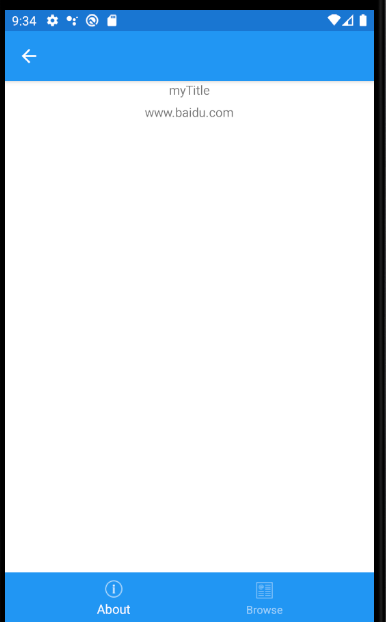
            string Title = "myTitle";
            string Url = "www.baidu.com";
             await Shell.Current.GoToAsync($"Page1?title={Title}&url={Url}");
        }
然后我们可以从Page1中得到值。
 [XamlCompilation(XamlCompilationOptions.Compile)]
    [QueryProperty(nameof(Title), "title")]
    [QueryProperty(nameof(Url), "url")]
    public partial class Page1 : ContentPage
    {
        private string url = "";
        public string Url
        {
            get
            {
                return url;
            }
            set
            {
                url = value;
                OnPropertyChanged("Url");
            }
        }

        private string title = "";
        public string Title
        {
            get
            {
                return title;
            }
            set
            {
                title = value;
                OnPropertyChanged("Title");
            }
        }
        public Page1()
        {
            InitializeComponent();

             BindingContext = this;
        }
    }
}
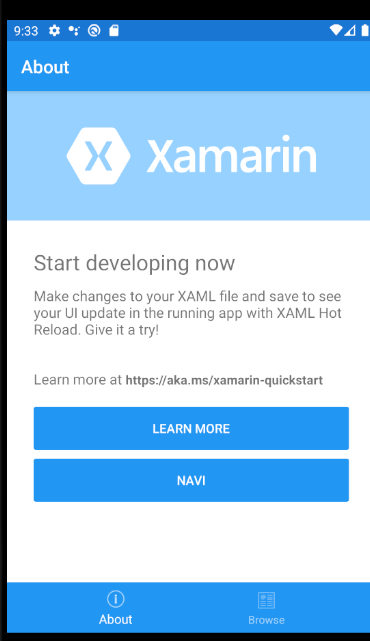
这是正在运行的截图。单击navi按钮,然后导航到page1
那我们就能得到价值了。
https://stackoverflow.com/questions/67025328
复制相似问题
腾讯云开发者

Copyright © 2013 - 2026 Tencent Cloud. All Rights Reserved. 腾讯云 版权所有
深圳市腾讯计算机系统有限公司 ICP备案/许可证号:粤B2-20090059  粤公网安备44030502008569号
腾讯云计算(北京)有限责任公司 京ICP证150476号 | 京ICP备11018762号