
PDF打印透明背景
PDF打印透明背景
提问于 2021-04-07 22:46:04
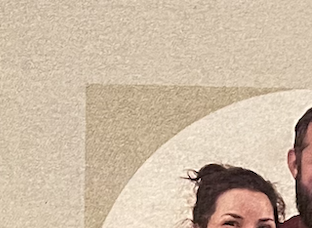
我的应用程序做PDF创建。作为其中的一部分,我已经成功地允许用户添加一个图像,并且图像被裁剪成一个圆圈并添加。当您在屏幕上或计算机屏幕上查看随后创建的PDF时,它看起来很棒。但是当你把它打印掉的时候,它会打印出部分透明的背景,就像在图片中看到的,以及屏幕上的样子。这是Xcode中的PDFKit的问题,还是我可以做些什么来解决这个问题?
- (void) generatePdfWithFilePath2: (NSString *)thefilePath
{
    UIGraphicsBeginPDFContextToFile(thefilePath, CGRectZero, nil);

    BOOL done = NO;
    do
    {
        UIGraphicsBeginPDFPageWithInfo(CGRectMake(0, 0, pageSize.width, pageSize.height), nil);

        [self drawImage];
        [self drawImage2];
        [self drawText];
        [self drawText2];
        [self drawText4];
        [self drawText5];

        done = YES;
    }
    while (!done);

    // Close the PDF context and write the contents out.
    UIGraphicsEndPDFContext();

}
并画出图像:
- (void) drawImage2
{
    UIImage * demoImage = self.imageCopy;
    NSData *pngData = UIImagePNGRepresentation(demoImage);
    CGDataProviderRef dp = CGDataProviderCreateWithCFData(( CFDataRef)pngData);
    CGImageRef cgImage = CGImageCreateWithPNGDataProvider(dp, NULL, true, kCGRenderingIntentDefault);
    [[UIImage imageWithCGImage:cgImage] drawInRect:CGRectMake(100, 371.82, 190, 190)];

}

回答 1
Stack Overflow用户
回答已采纳
发布于 2021-04-13 14:10:05
一些事情..。
transparent?
- If
- 是否有理由将您转换为
CGImage并返回?
- 是确定的,背景完全是
CGImage,您可以确定,然后您可能想尝试使用剪裁路径。
这是我快速测试的结果..。
将其用作“背景”图像:

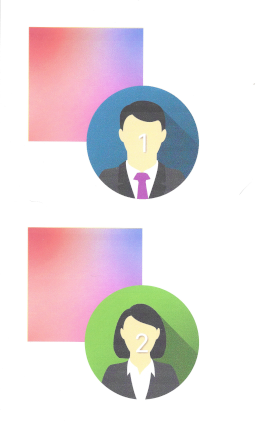
与这两幅图像重叠的背景,与透明度-第一图像有一个α/透明区域,第二图像没有:


使用此代码:
- (void)viewDidLoad {
    [super viewDidLoad];
}
- (IBAction)didTap:(id)sender {

    NSFileManager *fileManager = [NSFileManager defaultManager];

    //Get documents directory
    NSArray *directoryPaths = NSSearchPathForDirectoriesInDomains
    (NSDocumentDirectory, NSUserDomainMask, YES);
    NSString *documentsDirectoryPath = [directoryPaths objectAtIndex:0];

    NSString *path = [documentsDirectoryPath stringByAppendingPathComponent:@"SomeFileName.pdf"];

    [self generatePdfWithFilePath2:path];

}

- (void) generatePdfWithFilePath2: (NSString *)thefilePath
{
    UIGraphicsBeginPDFContextToFile(thefilePath, CGRectZero, nil);

    CGSize pageSize = CGSizeMake(612, 792);

    BOOL done = NO;
    do
    {
        UIGraphicsBeginPDFPageWithInfo(CGRectMake(0, 0, pageSize.width, pageSize.height), nil);

        [self drawImage1];
        [self drawImage2];
        [self drawImage3];
        [self drawImage4];

        done = YES;
    }
    while (!done);

    // Close the PDF context and write the contents out.
    UIGraphicsEndPDFContext();

}

- (void) drawImage1
{
    UIImage * demoImage = [UIImage imageNamed:@"bkgGradient"];
    [demoImage drawInRect:CGRectMake(50, 50, 200, 200)];
}

- (void) drawImage2
{
    UIImage * demoImage = [UIImage imageNamed:@"pro1"];
    [demoImage drawInRect:CGRectMake(150, 150, 200, 200)];
}

- (void) drawImage3
{
    UIImage * demoImage = [UIImage imageNamed:@"bkgGradient"];
    [demoImage drawInRect:CGRectMake(50, 400, 200, 200)];
}

- (void) drawImage4
{
    UIImage * demoImage = [UIImage imageNamed:@"pro2"];
    CGRect r = CGRectMake(150, 500, 200, 200);
    // create a bezier path defining rounded corners
    UIBezierPath * path = [UIBezierPath bezierPathWithRoundedRect:r cornerRadius:r.size.height];
    // use this path for clipping in the implicit context
    [path addClip];
    [demoImage drawInRect:r];
}
下面是它在屏幕上预览的样子:

并对整个印刷页进行扫描(缩小):
和非缩放300 dpi扫描打印页:
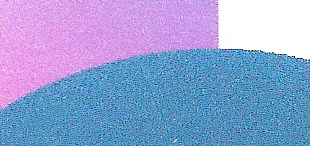
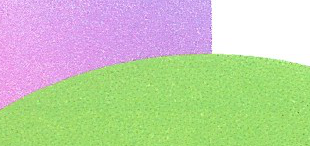
如您所见,"pro1“的alpha区域和"pro2”的剪裁区域都是完全透明的,无论是在屏幕上还是在打印上。
页面原文内容由Stack Overflow提供。腾讯云小微IT领域专用引擎提供翻译支持
原文链接:
https://stackoverflow.com/questions/66995092
复制相关文章
相似问题
腾讯云开发者

Copyright © 2013 - 2026 Tencent Cloud. All Rights Reserved. 腾讯云 版权所有
深圳市腾讯计算机系统有限公司 ICP备案/许可证号:粤B2-20090059  粤公网安备44030502008569号
腾讯云计算(北京)有限责任公司 京ICP证150476号 | 京ICP备11018762号