
如何在函数事件上使用tix气球?
如何在函数事件上使用tix气球?
提问于 2021-04-01 06:41:40
我有一个程序,它将计算突出显示区域的索引长度。我想用tix气球来显示结果。但是为了使用tix气球,它需要我将它绑定到一个小部件上。与其将其绑定到整个小部件,我只希望气球在调用某个事件时显示一次。
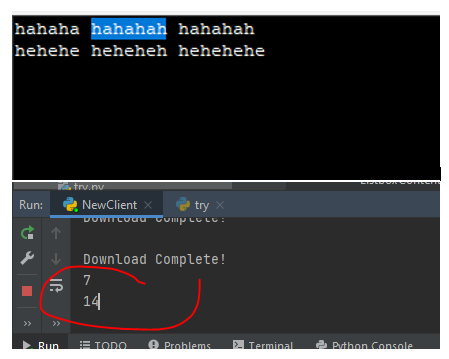
我的程序的演示(高亮区域的计数、开始和结束索引)
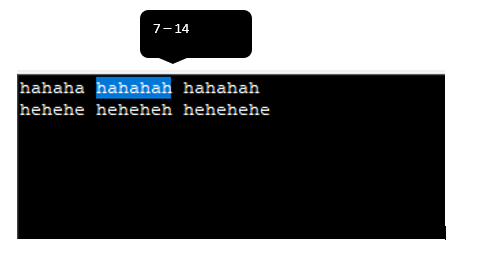
预期输出气球将显示高亮区域旁边的结果
码
root.mainloop()from tkinter import *

import tkinter.tix as tkx

def print_count(event):
    if text.tag_ranges('sel'):
        global s0 , s1
        s0 = text.index("sel.first")
        s1 = text.index("sel.last")
        countstringstart = s0.split('.')[1]
        countstringend = s1.split('.')[1]
        print(countstringstart)
        print(countstringend)
        waitshowballon()

root = tkx.Tk()
global text
text = Text(root)
text.bind('<ButtonRelease-1>', print_count)
text.pack()

def waitshowballon():
    tooltip = tkx.Balloon(root, initwait=100)
    tooltip.bind_widget(text, balloonmsg=s0)

root.mainloop()回答 1
Stack Overflow用户
回答已采纳
发布于 2021-04-01 13:44:58
创建您自己的工具提示。tix似乎没有提供位置参数。
创建自己的工具提示比您想象的要简单得多。This的答案将给你一个关于如何制作你自己的工具提示的想法。
创建一个以索引作为参数的show函数。使用.bbox(index)获取索引的位置,并在所选字母的上方显示工具提示。
样本代码:
from tkinter import *

class TextToolTip:

    def __init__(self, root, widget:Text, delay=0):

        self.parent = root
        self.delay = delay
        self.widget = widget

        self.top = None
        self.pos_x, self.pos_y = 0, 0

        self.i0, self.i1 = "", ""
        self.after_id = None

        self.msg=''

        self.bind()

    def bind(self):
        self.parent.bind('<Button>', self.hide)
        self.parent.bind('<Configure>', self.move)
        self.widget.tag_bind('sel', '<Enter>', self._display) #  remove this if hover tooltip is not necessary
        self.widget.tag_bind('sel', '<Leave>', self.tempHide)


    def tempHide(self, event):
        # similar to hide method the only difference is that this does't reset self.i0 and self.i1
        if self.top:
            self.top.destroy()
            self.top = None


    def hide(self, event=None):
        # destroys the top level
        if self.top:
            self.top.destroy()
            self.top = None

        self.i0, self.i1 = "", ""

    def move(self, event):
        # moves the tooltip along with the window
        if self.top:
            x, y = self.calcPos()
            if x and y:
                self.top.wm_geometry(f"+{x}+{y}")

            else:
                self.hide()

    def _display(self, event=None):
        # creates the tool tip
        if self.top is None:
            self.top = Toplevel(self.parent)
            self.top.wm_overrideredirect(True)

            label = Label(self.top, text=self.msg, justify='left',
                           background="black", foreground='white',
                          relief='solid', borderwidth=1)

            label.pack()

            x, y = self.calcPos()
            if x and y:
                self.top.wm_geometry(f"+{x}+{y}")

            else:
                self.hide()
                return

    def calcPos(self):  # calculates the position to display the tool tip

        try:
            self.widget.update_idletasks()
            b1, b2 = self.widget.bbox(self.i0), self.widget.bbox(self.i1)
            win_x, win_y = self.parent.winfo_x(), self.parent.winfo_y()
            return win_x + ((b2[0]+b1[0])//2), win_y + b1[1]

        except Exception:

            return None, None

    def show(self, msg, i0, i1):
        """ pass in the index and the message (note: must pass a valid index ctrl+a might not provide
                correct index. A simple conditionl stmt to check should do the job.)"""
        if self.top:
            self.hide()

        if self.after_id:
            self.parent.after_cancel(self.after_id)
            self.after_id = None

        self.i0, self.i1 = i0, i1
        self.msg = msg
        self.after_id = self.parent.after(self.delay, self._display)


def print_count(event):
    if text.tag_ranges('sel'):
        global s0 , s1
        s0 = text.index("sel.first")
        s1 = text.index("sel.last")
        countstringstart = s0.split('.')[1]
        countstringend = s1.split('.')[1]

        waitshowballon(countstringstart, countstringend)

    else:
        tooltip.hide()


root = Tk()

text = Text(root)
text.bind('<<Selection>>', print_count)
text.pack()

tooltip = TextToolTip(root, text, 500)  # pass in the rot, text widget and delay


def waitshowballon(cs, ce):

    tooltip.show(f"{cs}-{ce}", s0, s1)

root.mainloop()页面原文内容由Stack Overflow提供。腾讯云小微IT领域专用引擎提供翻译支持
原文链接:
https://stackoverflow.com/questions/66899577
复制相关文章
相似问题
腾讯云开发者

Copyright © 2013 - 2026 Tencent Cloud. All Rights Reserved. 腾讯云 版权所有
深圳市腾讯计算机系统有限公司 ICP备案/许可证号:粤B2-20090059  粤公网安备44030502008569号
腾讯云计算(北京)有限责任公司 京ICP证150476号 | 京ICP备11018762号