
C#窗体在数据库/图表中的消息框/新表单中显示排序列表
我创建了一个包含数据视图、按钮和图表的表单。datagridview显示了业务的销售记录。该图显示了数据视图中最畅销的商品。它基于数据视图的quantity列(出售的项目数)。我想要发生的是,当用户单击Generate按钮时,将出现一个消息框/新表单。
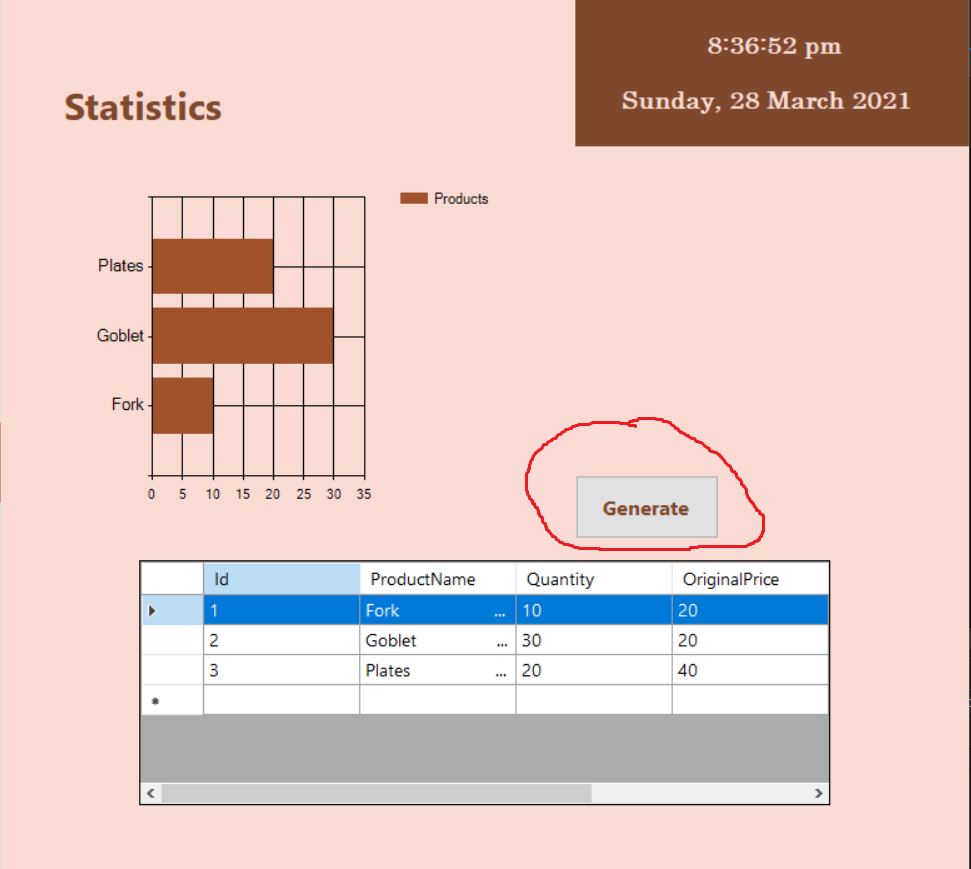
它将包含一个标签(前3项),在该标签下,将有最畅销商品的排名。
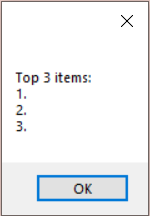
问题是,如果数据来自图表/数据视图,我如何能够在一个消息框/新表单中创建一个排名列表?
下面是表单的当前代码:
public partial class CFReport : Form
    {
        public CFReport()
        {
            InitializeComponent();

        }

        private void timer1_Tick(object sender, EventArgs e)
        {
            label5.Text = DateTime.Now.ToLongTimeString();
            timer1.Start();
        }

        private void CFReport_Load(object sender, EventArgs e)
        {
            // TODO: This line of code loads data into the 'casaFrancaDataSet.Sales' table. You can move, or remove it, as needed.
            this.salesTableAdapter.Fill(this.casaFrancaDataSet.Sales);

            timer1.Start();
            label5.Text = DateTime.Now.ToLongTimeString();
            label6.Text = DateTime.Now.ToLongDateString();
        }

        private void button2_Click(object sender, EventArgs e)
        {
            MessageBox.Show("Top 3 items:" + Environment.NewLine + "1. " + Environment.NewLine + "2. " + Environment.NewLine + "3. ");
        }
}回答 2
Stack Overflow用户
发布于 2021-03-28 14:11:21
如果我问对了就试试这个。可以使用LINQ对图表/数据视图进行排序。
using System;
using System.Collections.Generic;
using System.Data;
using System.Linq;
using System.Text;
using System.Windows.Forms;
namespace WindowsFormsApp9
{
    public partial class Form1 : Form
    {
        public Form1()
        {
            InitializeComponent();
        }
        private void button1_Click(object sender, EventArgs e)
        {
            List<Product> products = new List<Product>(); // your chart/datagridview
            products.Add(new Product { Name = "Banana", Price = 1 });
            products.Add(new Product { Name = "Orange", Price = 10 });
            products.Add(new Product { Name = "Apple", Price = 5 }); // your products
            products = products.OrderByDescending(p => p.Price).ToList(); // ordering products by price
            StringBuilder sb = new StringBuilder();
            int i = 1;
            foreach (var product in products)
            {
                sb.Append($"{i}. {product.Name} - {product.Price}\n");
                i++;
            }
            MessageBox.Show(sb.ToString());
        }
    }
    class Product
    {
        public string Name { get; set; }
        public int Price { get; set; }
    }
}Stack Overflow用户
发布于 2021-04-08 10:03:11
使用数据绑定将数据(模型)与数据的显示方式(视图)分开。
你的DataGridView有一个DataSource。用它来显示数据。
class DisplayedProduct
{
    public int Id {get; set;}
    public string Name {get; set;}
    public int Quantity {get; set;}
    public decimal Price {get; set;}
}
使用visual创建列,并判断哪个列应显示哪个属性,或以编程方式进行此操作。
public MyForm : Form
{
    public MyForm()
    {
         this.InitializeComponent();

         this.columnId.DataPropertyName = nameof(DisplayedProdut.Id);
         this.columnName.DataPropertyName = nameof(DislayedProduct.Name);
         ...
    }
我将制作许多小方法,因此它们将易于理解、易于重用、易于单元测试、调试和更改:
取取产品:
private IEnumerable<DisplayedProduct> FetchProductsToDisplay()
{
    ... // TODO: implement
}
创建一个属性来显示产品并获取显示的(可能是编辑的)产品:
private BindingList<DisplayedProduct> DisplayedProducts
{
    get => (BindingList<DisplayedProduct>)this.dataGridView1.DataSource;
    set => this.dataGridView1.DataSource = value;
}
并在表单装载上显示产品:
private void InitProductDisplay()
{
    this.DisplayedProducts = new BindingList<DisplayedProduct>
        this.FetchProductsToDisplay.ToList());
}

private void OnFormLoading(object sender, ...)
{
    this.InitProductDisplay();
}
这足以显示产品,并在需要时取走它们。操作符所做的所有更改(添加/删除行、编辑单元格)将自动反映在绑定列表中。
private IEnumerable<DisplayedProduct> GetTopProducts()
{
    return this.DisplayedProduts.OrderByDescending(product => product.Quantity);
}

private string CreateTextTopProducts(int count)
{
    IEnumerable<DisplayedProduct> top3Products = GetTopProducts()
    .Select((product, index) => new
    {
        Index = index + 1,
        // select the properties that you want to show in the messagebox:
        Name = product.Name,
        ...
    })
    .Take(count);

    // use a string builder to efficiently add formatted lines:
    StringBuilder stringBuilder = new StringBuilder();
    stringBuilder.AppendLine("Top 3 items:");

    foreach (var product in top3Products)
    {
        stringBuilder.AppendFormat("{0}. {1}", product.Index, product.Name);
        stringBuilder.AppendLine();
    }
    return stringBuilder.ToString();
}
最后,展示top3产品的方法:
private void ShowTop3Products()
{
    string displayText = this.CreateTextTop3Products(3);
    MessageBox.Show(this, displayText, ...);
}

private void button2_Click(object sender, EventArgs e)
{
    this.ShowTop3Products();
}https://stackoverflow.com/questions/66841686
复制相似问题
腾讯云开发者

Copyright © 2013 - 2026 Tencent Cloud. All Rights Reserved. 腾讯云 版权所有
深圳市腾讯计算机系统有限公司 ICP备案/许可证号:粤B2-20090059  粤公网安备44030502008569号
腾讯云计算(北京)有限责任公司 京ICP证150476号 | 京ICP备11018762号