
使用Azure Devops管道运行代码时缺少Terraform local_file
当我使用terraform在Outputs.tf中创建一个“Outputs.tf”资源时:
### The hosts file
resource "local_file" "AnsibleHosts" {
 content = templatefile("${path.module}/hosts.tmpl",
   {
     vm-names                   = [for k, p in azurerm_virtual_machine.vm: p.name],
     private-ip                 = [for k, p in azurerm_network_interface.nic: p.private_ip_address],
     publicvm-names             = [for k, p in azurerm_virtual_machine.publicvm: p.name],
     publicvm-private-ip        = [for k, p in azurerm_network_interface.publicnic: p.private_ip_address],
     public-ip                  = [for k, p in azurerm_public_ip.publicip: p.ip_address],
     public-dns                 = [for k, p in azurerm_public_ip.publicip: p.fqdn],
     }
 )
 filename = "hosts.j2"
}
如果我通过VS代码直接运行它,我会看到创建的hosts.j2文件。
当我使用Azure DevOps管道进行部署时,“计划”和“应用阶段”显示文件已经创建。

当我检查我的DevOps存储库时,文件不在那里。
我假设(我可能是错的)这是因为文件是在构建代理上创建的。有谁知道我如何将文件创建/复制回Azure DevOps Repo。
回答 1
Stack Overflow用户
发布于 2021-03-22 03:52:04
你是正确的。这些文件是在生成代理上创建的。这就是为什么你在你的Devops仓库里看不到它们的原因。您需要将更改提交回您的管道中的。
您可以在管道中的脚本任务中运行git commands,以将更改推送到devops。
如果您正在使用yaml管道。您可以查看下面的脚本:
steps:
- checkout: self
  persistCredentials: true  #Allow scripts to access the system token

- powershell: |

      git config --global user.email "you@example.com"
      git config --global user.name "username"

      git add .
      git commit -m "add hosts.j2"
git push origin HEAD:$(Build.SourceBranchName) 注意:允许脚本访问系统令牌通过添加一个persistCredentials设置为true的checkout节
如果您正在使用经典管道。您可以查看以下脚本:
首先,通过启用以下选项,需要允许脚本访问系统令牌:
在管道编辑页面->代理作业->附加选项
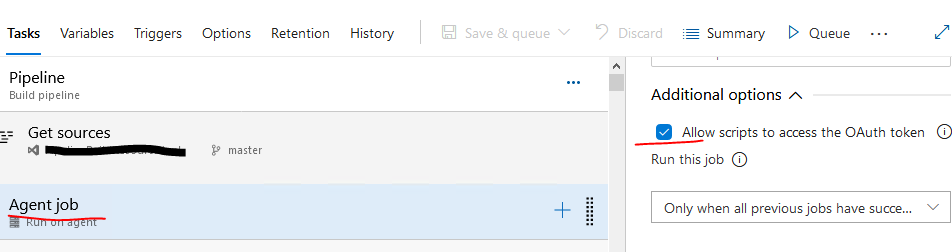
可以在脚本任务中添加以下内联脚本:
git config --global user.email "you@example.com"
git config --global user.name "username"

git add .
git commit -m "add hosts.j2"
git push https://$(System.AccessToken)@dev.azure.com/yourOrg/yourProj/_git/repoName HEAD:$(Build.SourceBranchName) 如果您在运行上述脚本时遇到权限问题,请将其推送到azure。您需要将存储库放在项目设置下。单击Git存储库,在安全页面中,单击plus(+)并搜索组{your project name} build service({your org name})并单击以添加它;在访问控制摘要页中,授予contribute并读取权限
请查一下这条线。
https://stackoverflow.com/questions/66728039
复制相似问题
腾讯云开发者

Copyright © 2013 - 2026 Tencent Cloud. All Rights Reserved. 腾讯云 版权所有
深圳市腾讯计算机系统有限公司 ICP备案/许可证号:粤B2-20090059  粤公网安备44030502008569号
腾讯云计算(北京)有限责任公司 京ICP证150476号 | 京ICP备11018762号