
构建Hashmap的Hashmap
我不经常问问题(大多数情况下,问题可以通过一些研究来解决,对吗?)但我只想听听你的意见,因为可能有更好的(更有效的方法)。
所以让我们看看,下面的代码运行得非常好,并且达到了它的目的。代码的结果是hashmap的hashmap,我需要它作为另一项工作的查找表。
背景:
$ccDb是一个由大约200k项组成的数组,属性是companyCd, costCenterNbr, costCenterShortNm, costCenterLongDescr.- Each属性必须被修剪(请不要让我修剪我的Db,遗憾的是,
companyCd包含了can't). costCenterNbr,这意味着,每个companyCd可以包含多个costCenterNbr.companyCd,可以包含X个具有唯一价值的costCenterNbr.costCenterNbr,同样,companyCd.costCenterShortNm和costCenterLongDescr与costCenterNbr
相关。
这一问题:
这个映射必须构建在脚本的每次运行上,因为这些信息是从SQL表中获取的(SQL表一直在变化)。构建这个地图大约需要15分钟(在一个非常好的服务器上,2 map 12 12Cores)。
问题是:
您认为可以改进这段代码以获得更快/更高效的执行吗?
$ccMap=@{}

foreach($line in $ccDb)
{
    $companyCd=$line.companyCd.trim()
    $costCenterNbr=$line.costCenterNbr.trim()
    $costCenterShortNm=$line.CostCenterShortNm.trim()
    $costCenterLongDescr=$line.CostCenterLongDescr.trim()

    $coceMap=@{
        $costCenterNbr=@{
            shortDesc=$costCenterShortNm
            longDesc=$costCenterLongDescr
        }
    }

    if($ccMap.ContainsKey($companyCd))
    {
        $ccMap[$companyCd]+=$coceMap
    }
    else
    {
        $ccMap.Add($companyCd,$coceMap)
    }
}
我对这么长时间的解释感到很抱歉,但我觉得最好先给出最多的信息。任何帮助都是非常感谢的。此外,我知道PowerShell对于我正在做的事情来说是一种非常糟糕的语言,C#可能会效率更高,但它就是这样的。
编辑:添加测量数据以供参考。
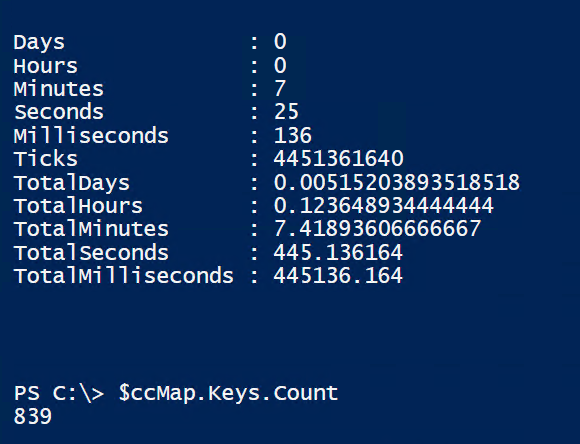
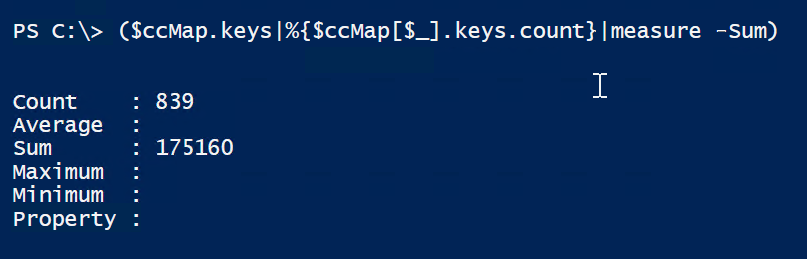
编辑:
谢谢@MathiasR.Jesen,这是他的代码的度量结果。很好的代码。
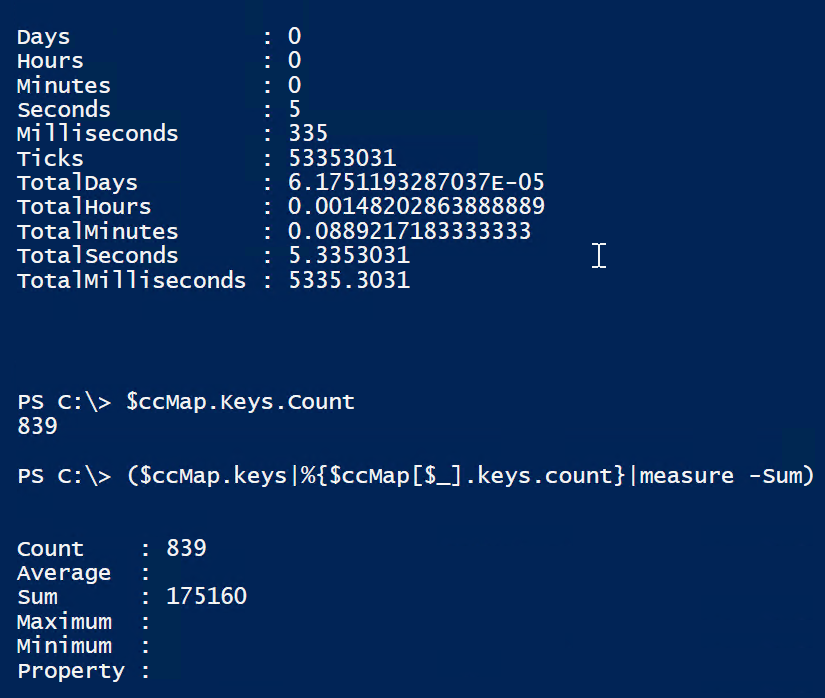
回答 2
Stack Overflow用户
发布于 2021-03-19 21:04:52
不要在紧环中使用+=
这是你最大的水槽:
$ccMap[$companyCd] += $coceMap当使用+ (或+= )将一个哈希表添加到另一个哈希表时,PowerShell将创建一个全新的哈希表。
# Create two different hashtables
$A = @{ Key1 = 'Value1' }
$B = @{ Key2 = 'Value2' }

# Let's save a second reference to the first table
$remember = $A

# Now let's use += to merge the two:
$A += $B运行此命令,您将发现$B和$remember没有变化,但是$A有两个键,因此必须是一个新的键。
为了避免这种性能损失,完全跳过$coceMap的构造,并反转顺序(如果不存在,则先构造hashtable,然后分配):
$ccMap=@{}

foreach($line in $ccDb)
{
    $companyCd=$line.companyCd.trim()
    $costCenterNbr=$line.costCenterNbr.trim()
    $costCenterShortNm=$line.CostCenterShortNm.trim()
    $costCenterLongDescr=$line.CostCenterLongDescr.trim()

    # Create new hashtable if none exist, otherwise retrieve the existing one
    if($ccMap.ContainsKey($companyCd))
    {
        $coceMap = $ccMap[$companyCd]
    }
    else
    {
        $coceMap = $ccMap[$companyCd] = @{}
    }

    $coceMap[$costCenterNbr] = @{
        shortDesc=$costCenterShortNm
        longDesc=$costCenterLongDescr
    }
}基准+=
下面是一个简单的示例,说明了10000项与50个分叉键之间的差异:
$data = @(
    1..10000 |Select-Object @{Name='Company';Expression={Get-Random -Maximum 50}},@{Name='CostCenter';Expression={Get-Random}}
)

@(
    Measure-Command {
        $map = @{}

        foreach($line in $data){
            $entry = @{
                $line.CostCenter = @{
                    Value = 123
                }
            }

            if($map.ContainsKey($line.Company)){
                $map[$line.Company] += $entry
            }
            else {
                $map[$line.Company] = $entry
            }
        }
    }

    Measure-Command {
        $map = @{}

        foreach($line in $data){
            if($map.ContainsKey($line.Company)){
                $entry = $map[$line.Company]
            }
            else {
                $entry = $map[$line.Company] = @{}
            }

            $entry[$line.CostCenter] = @{
                Value = 123
            }
        }
    }
) |select TotalMilliseconds
在我的笔记本电脑上:
TotalMilliseconds
-----------------
         306.4218
          47.8164
一般情况下,如何识别这样的时间汇呢?
有许多方法可以分析PowerShell的运行时行为,但下面是我个人的首选:
我是(Disclaimer__:的维护者):
Install-Module PSProfiler -Scope CurrentUser
- 使用
Measure-Script的方式与使用Measure-Script的方式相同
Measure-Script {
    $map = @{}

    foreach($line in $data){
        $entry = @{
            $line.CostCenter = @{
                Value = 123
            }
        }

        if($map.ContainsKey($line.Company)){
            $map[$line.Company] += $entry
        }
        else {
            $map[$line.Company] = $entry
        }
    }
}
finish
- Review输出的
- 等待代码:
    Anonymous ScriptBlock


      Count  Line       Time Taken Statement
      -----  ----       ---------- ---------
          0     1    00:00.0000000 {
          1     2    00:00.0000187     $map = @{}
          0     3    00:00.0000000
          0     4    00:00.0000000     foreach($line in $data){
      10000     5    00:00.0635585         $entry = @{
          0     6    00:00.0000000             $line.CostCenter = @{
          0     7    00:00.0000000                 Value = 123
          0     8    00:00.0000000             }
          0     9    00:00.0000000         }
          0    10    00:00.0000000
          0    11    00:00.0000000         if($map.ContainsKey($line.Company)){
       9950    12    00:00.3965227             $map[$line.Company] += $entry
          0    13    00:00.0000000         }
          0    14    00:00.0000000         else {
         50    15    00:00.0002810             $map[$line.Company] = $entry
          0    16    00:00.0000000         }
          0    17    00:00.0000000     }
          0    18    00:00.0000000 }
请注意,第12行占用了最完整的执行时间--比任何其他时间都要多得多:
9950 12 00:00.3965227 $map[$line.Company] += $entryStack Overflow用户
发布于 2021-03-19 20:57:02
我有两个建议:
您根本不需要if \ else \ .add()语句,powershell将根据需要添加键。这应该会占用大部分时间,因为您没有搜索整个表中的每个条目:
$ccMap[$companyCd]+=$coceMap如果只使用该值一次,则不需要在上面设置变量。只需使用你的$line
$coceMap=@{
    $line.costCenterNbr.trim()=@{
        shortDesc = $line.CostCenterShortNm.trim()
        longDesc  = $line.CostCenterLongDescr.trim()
    }
}https://stackoverflow.com/questions/66715054
复制相似问题
腾讯云开发者

Copyright © 2013 - 2026 Tencent Cloud. All Rights Reserved. 腾讯云 版权所有
深圳市腾讯计算机系统有限公司 ICP备案/许可证号:粤B2-20090059  粤公网安备44030502008569号
腾讯云计算(北京)有限责任公司 京ICP证150476号 | 京ICP备11018762号