
基于nginx和worker_processes的码头环境
我试图将worker_processes添加到我的停靠环境中的nginx.conf文件中,但是每当我尝试时,它都无法重新启动或加载。我想我错过了一些关键的概念-无论如何:
这是我的nginx.conf文件(这里一切正常):
server {
    listen 80;
    index index.php index.html;
    error_log  /var/log/nginx/error.log;
    access_log /var/log/nginx/access.log;
    root /var/www/src;

    location ~ \.php$ {
        try_files $uri =404;
        fastcgi_split_path_info ^(.+\.php)(/.+)$;
        fastcgi_pass app:9000;
        fastcgi_index index.php;
        include fastcgi_params;
        fastcgi_param SCRIPT_FILENAME $document_root$fastcgi_script_name;
        fastcgi_param PATH_INFO $fastcgi_path_info;
    }
    location / {
        try_files $uri $uri/ /index.php?$query_string;
        gzip_static on;
    }

    location ~* \.(js|css|png|jpg|jpeg|gif|ico)$ {
        expires max;
        log_not_found off;
    }

    location = /favicon.ico {
        log_not_found off;
        access_log off;
    }

    location = /robots.txt {
        allow all;
        log_not_found off;
        access_log off;
    }

    location ~ ^/wp-json/ {
        rewrite ^/wp-json/(.*?)$ /?rest_route=/$1 last;
    }
}我尝试在服务器括号下面添加以下内容,但结果是nginx没有加载。来自enginx的错误是:"worker_processes“指令在/etc/nginx/conf.d:1 :中是不允许的。
worker_processes: 8;

    server {
        listen 80;
        index index.php index.html;
        etc. etc. etc.
这是我的文件夹结构:
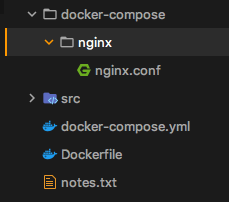
这是目前我的Dockerfile:
FROM php:7.4.15-fpm

# Arguments defined in docker-compose.yml
ARG user
ARG uid

# Install system dependencies
RUN apt-get update && apt-get install -y \
    git \
    curl \
    libpng-dev \
    libonig-dev \
    libxml2-dev \
    zip \
    unzip

# Clear cache
RUN apt-get clean && rm -rf /var/lib/apt/lists/*

# Install PHP extensions
RUN docker-php-ext-install mysqli pdo_mysql mbstring exif pcntl bcmath g
# Set working directory
WORKDIR /var/www

USER $user回答 1
Stack Overflow用户
发布于 2021-03-05 07:27:12
您位于/etc/nginx/conf.d/nginx.conf的配置很可能是由默认配置文件/etc/nginx/nginx.conf和语句include /etc/nginx/conf.d/*.conf;导入的。
因此,您的配置驻留在http上下文中,该上下文不允许worker_processes指令。您需要编辑已经在/etc/nginx/nginx.conf中定义的现有语句,默认情况下,它应该设置为worker_processes auto;。
注意:不需要冒号,所以只需将其更改为worker_processes 8;
对于相同的根问题,一个答案是https://stackoverflow.com/a/41681414/11296166
https://stackoverflow.com/questions/66484338
复制相似问题
腾讯云开发者

Copyright © 2013 - 2026 Tencent Cloud. All Rights Reserved. 腾讯云 版权所有
深圳市腾讯计算机系统有限公司 ICP备案/许可证号:粤B2-20090059  粤公网安备44030502008569号
腾讯云计算(北京)有限责任公司 京ICP证150476号 | 京ICP备11018762号