
文本抽取中的文档布局分析
我需要分析不同文档类型的布局结构,如:pdf、doc、docx、odt等。
我的任务是:给出一个文档,将文本分组,找出每个文本的正确边界。
我用Apache做了一些测试,它是一个很好的提取器,它是一个非常好的工具,但是它经常会搞乱块的顺序,让我解释一下我的顺序是什么意思。
Apache只提取文本,所以如果我的文档有两列,则Tika提取第一列的整个文本,然后提取第二列的文本,即ok...but --有时第一列上的文本与第二列上的文本相关,就像一个具有行关系的表。
因此,我必须处理每一个街区的位置,所以问题是:
- 定义盒子的边界,这很难.我应该明白,如果一个句子开始一个新的块或不。
- 定义方向,例如,给一个表“句子”应该是行,而不是列。
因此,基本上在这里,我必须处理布局结构,以正确地理解块边界。
我给你一个直观的例子:
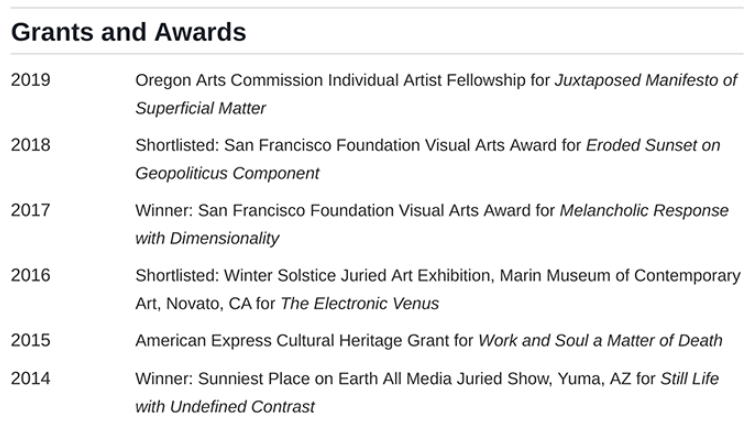
一个经典的提取器返回:
2019
2018
2017
2016
2015
2014
Oregon Arts Commission Individual Artist Fellowship...这是错误的(在我的例子中),因为日期与右边的文本相关。
这个任务是为其他NLP分析做准备的,所以它是非常重要的,因为例如,当我需要识别文本中的实体(NER),然后识别它们之间的关系时,与正确的上下文一起工作是非常重要的。
如何从同一块下的文档和组装相关文本(理解文档的布局结构)中提取文本?
回答 5
Stack Overflow用户
发布于 2021-03-09 16:09:33
这只是部分解决你的问题,但它可以简化手头的任务。这个工具接收PDF文件并将其转换为文本文件。它工作得非常快,可以在大量文件上运行。
它为每个PDF创建一个输出文本文件。与其他工具相比,该工具的优点是输出文本按照其原始布局对齐。
例如,这是一份具有复杂布局的简历:
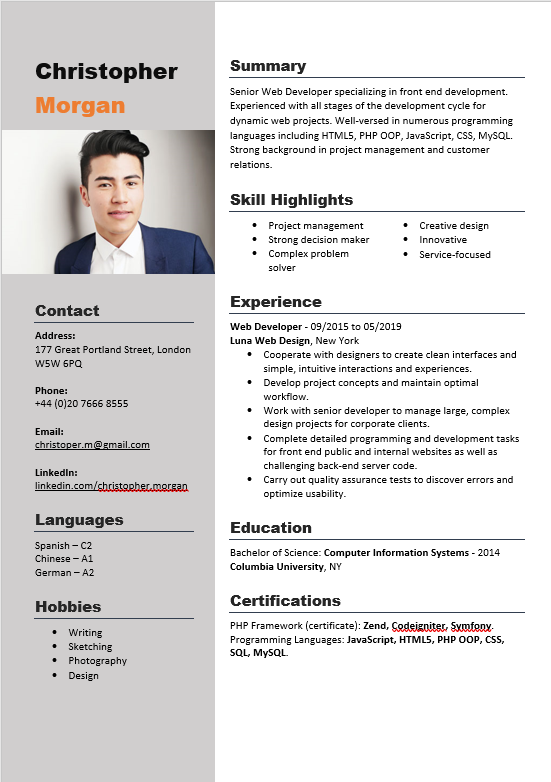
它的输出是以下文本文件:
Christopher                         Summary
                                    Senior Web Developer specializing in front end development.
Morgan                              Experienced with all stages of the development cycle for
                                    dynamic web projects. Well-versed in numerous programming
                                    languages including HTML5, PHP OOP, JavaScript, CSS, MySQL.
                                    Strong background in project management and customer
                                    relations.


                                    Skill Highlights
                                        •   Project management          •   Creative design
                                        •   Strong decision maker       •   Innovative
                                        •   Complex problem             •   Service-focused
                                            solver


                                    Experience
Contact
                                    Web Developer - 09/2015 to 05/2019
Address:                            Luna Web Design, New York
177 Great Portland Street, London      • Cooperate with designers to create clean interfaces and
W5W 6PQ                                   simple, intuitive interactions and experiences.
                                       • Develop project concepts and maintain optimal
Phone:                                    workflow.
+44 (0)20 7666 8555
                                       • Work with senior developer to manage large, complex
                                          design projects for corporate clients.
Email:
                                       • Complete detailed programming and development tasks
christoper.m@gmail.com
                                          for front end public and internal websites as well as
                                          challenging back-end server code.
LinkedIn:
                                       • Carry out quality assurance tests to discover errors and
linkedin.com/christopher.morgan
                                          optimize usability.

Languages                           Education
Spanish – C2
                                    Bachelor of Science: Computer Information Systems - 2014
Chinese – A1
                                    Columbia University, NY
German – A2


Hobbies                             Certifications
                                    PHP Framework (certificate): Zend, Codeigniter, Symfony.
   •   Writing
                                    Programming Languages: JavaScript, HTML5, PHP OOP, CSS,
   •   Sketching
                                    SQL, MySQL.
   •   Photography
   •   Design
-----------------------Page 1 End-----------------------现在,您的任务简化为查找文本文件中的块,并使用单词之间的空格作为对齐提示。首先,我包含了一个脚本,该脚本查找文本列之间的边距,并生成rhs和lhs --分别是右列和左列的文本流。
import numpy as np
import matplotlib.pyplot as plt
import re

txt_lines = txt.split('\n')
max_line_index = max([len(line) for line in txt_lines])
padded_txt_lines = [line + " " * (max_line_index - len(line)) for line in txt_lines] # pad short lines with spaces
space_idx_counters = np.zeros(max_line_index)

for idx, line in enumerate(padded_txt_lines):
    if line.find("-----------------------Page") >= 0: # reached end of page
        break
    space_idxs = [pos for pos, char in enumerate(line) if char == " "]
    space_idx_counters[space_idxs] += 1

padded_txt_lines = padded_txt_lines[:idx] #remove end page line

# plot histogram of spaces in each character column
plt.bar(list(range(len(space_idx_counters))), space_idx_counters)
plt.title("Number of spaces in each column over all lines")
plt.show()

# find the separator column idx
separator_idx = np.argmax(space_idx_counters)
print(f"separator index: {separator_idx}")
left_lines = []
right_lines = []

# separate two columns of text
for line in padded_txt_lines:
    left_lines.append(line[:separator_idx])
    right_lines.append(line[separator_idx:])

# join each bulk into one stream of text, remove redundant spaces
lhs = ' '.join(left_lines)
lhs = re.sub("\s{4,}", " ", lhs)
rhs = ' '.join(right_lines)
rhs = re.sub("\s{4,}", " ", rhs)

print("************ Left Hand Side ************")
print(lhs)
print("************ Right Hand Side ************")
print(rhs)
地块输出:
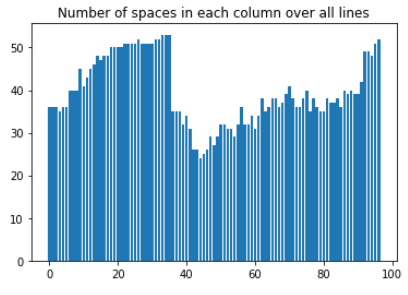
文本输出:
separator index: 33
************ Left Hand Side ************
Christopher Morgan Contact Address: 177 Great Portland Street, London W5W 6PQ Phone: +44 (0)20 7666 8555 Email: christoper.m@gmail.com LinkedIn: linkedin.com/christopher.morgan Languages Spanish – C2 Chinese – A1 German – A2 Hobbies •   Writing •   Sketching •   Photography •   Design
************ Right Hand Side ************
   Summary Senior Web Developer specializing in front end development. Experienced with all stages of the development cycle for dynamic web projects. Well-versed in numerous programming languages including HTML5, PHP OOP, JavaScript, CSS, MySQL. Strong background in project management and customer relations. Skill Highlights •   Project management •   Creative design •   Strong decision maker •   Innovative •   Complex problem •   Service-focused solver Experience Web Developer - 09/2015 to 05/2019 Luna Web Design, New York • Cooperate with designers to create clean interfaces and simple, intuitive interactions and experiences. • Develop project concepts and maintain optimal workflow. • Work with senior developer to manage large, complex design projects for corporate clients. • Complete detailed programming and development tasks for front end public and internal websites as well as challenging back-end server code. • Carry out quality assurance tests to discover errors and optimize usability. Education Bachelor of Science: Computer Information Systems - 2014 Columbia University, NY Certifications PHP Framework (certificate): Zend, Codeigniter, Symfony. Programming Languages: JavaScript, HTML5, PHP OOP, CSS, SQL, MySQL.
下一步是将此脚本概括为处理多页文档、删除冗余标志等。
祝好运!
Stack Overflow用户
发布于 2021-03-09 03:44:00
Stack Overflow用户
发布于 2021-03-12 15:24:49
您可以使用easyocr。它使用深度学习模型来提取字符。。它既返回单词,又返回论文中单词的位置。步骤是将文档转换为图像,然后进行分析。
#pip install -U easyocr
import easyocr

language = "en"

image_path = "https://i.stack.imgur.com/i6vHT.png"

reader = easyocr.Reader([language])
response = reader.readtext(image_path, detail=True)

print(response)
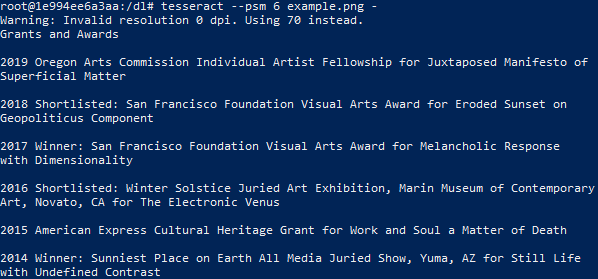
下面是我们忽略边框细节的例子。
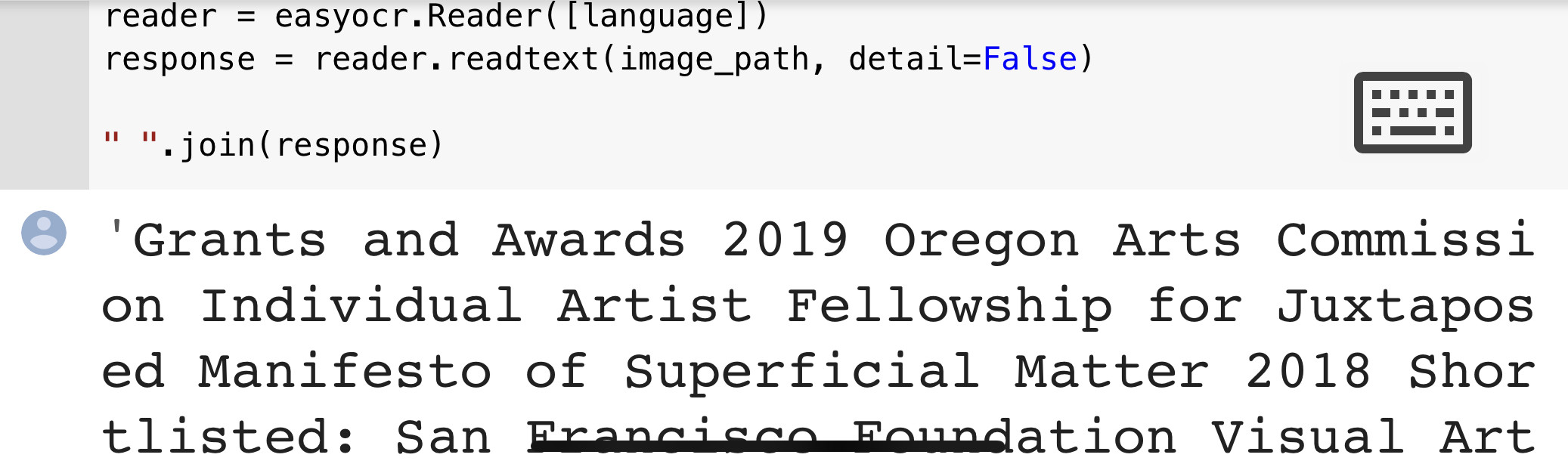
所显示的文本被正确地收集。
https://stackoverflow.com/questions/66473977
复制相似问题
腾讯云开发者

Copyright © 2013 - 2026 Tencent Cloud. All Rights Reserved. 腾讯云 版权所有
深圳市腾讯计算机系统有限公司 ICP备案/许可证号:粤B2-20090059  粤公网安备44030502008569号
腾讯云计算(北京)有限责任公司 京ICP证150476号 | 京ICP备11018762号