
用ZAP Docker映像扫描APIs .用regex替换
用ZAP Docker映像扫描APIs .用regex替换
提问于 2021-03-02 20:04:19
我正在尝试使用API扫描器Docker映像,如下所述:https://www.zaproxy.org/blog/2017-06-19-scanning-apis-with-zap/和我想使用regexp进行一些请求替换。我用的是命令:
docker run -v $(pwd):/zap/wrk/:rw --network=host -t owasp/zap2docker-weekly zap-api-scan.py --hook=/zap/wrk/authentication-hooks.py -t docs/openapi.yaml -f openapi -w output/oppenapi.md -z "-configfile /zap/wrk/zapproxy.prop" -d加上"zapproxy.prop":
replacer.full_list(0).description=customerId
replacer.full_list(0).enabled=true
replacer.full_list(0).matchtype=REQ_HEADER_STR
replacer.full_list(0).matchstr=/api/customers/\d+
replacer.full_list(0).regex=true
replacer.full_list(0).replacement=/api/customers/1
对于我想要修改的URL,这个替换不起作用: GET /api/customers/10。通过GUI使用的规则也很好。
我也试过:
replacer.full_list(0).description=customerId
replacer.full_list(0).enabled=true
replacer.full_list(0).matchtype=REQ_HEADER_STR
replacer.full_list(0).matchstr=/api/customers/10
replacer.full_list(0).regex=false
replacer.full_list(0).replacement=/api/customers/1
它也很好用。
Simon建议检查GUI如何保存这些设置:https://www.zaproxy.org/faq/how-do-you-find-out-what-key-to-use-to-set-a-config-value-on-the-command-line/。正如你所看到的
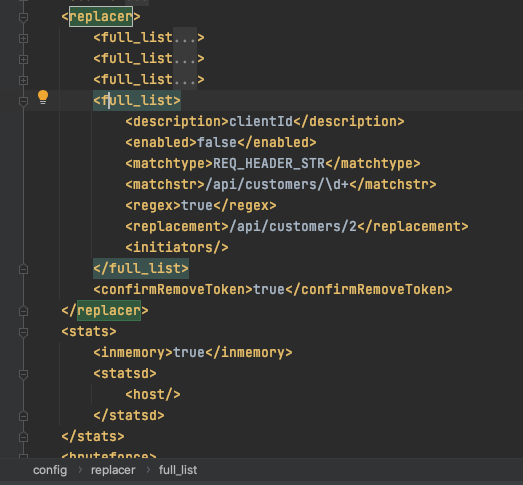
为了正确地传递这个正则表达式,我需要做些什么吗?
回答 1
Stack Overflow用户
回答已采纳
发布于 2021-03-03 22:03:10
逃跑是问题所在:
replacer.full_list(0).description=clientId
replacer.full_list(0).enabled=true
replacer.full_list(0).matchtype=REQ_HEADER_STR
replacer.full_list(0).matchstr=/api/customers/\\d+
replacer.full_list(0).regex=true
replacer.full_list(0).replacement=/api/customers/2页面原文内容由Stack Overflow提供。腾讯云小微IT领域专用引擎提供翻译支持
原文链接:
https://stackoverflow.com/questions/66446342
复制相关文章
相似问题
腾讯云开发者

Copyright © 2013 - 2026 Tencent Cloud. All Rights Reserved. 腾讯云 版权所有
深圳市腾讯计算机系统有限公司 ICP备案/许可证号:粤B2-20090059  粤公网安备44030502008569号
腾讯云计算(北京)有限责任公司 京ICP证150476号 | 京ICP备11018762号