
用Flot绘图:呈现的空白区域
用Flot绘图:呈现的空白区域
提问于 2021-03-02 07:35:35
考虑到这个HTML (使用jQuery3.5.1和flot 0.8.3):
<!DOCTYPE html>
<html>
    <head>
        <meta charset="utf-8">
        <title>Flot Issue</title>
        <script src="https://cdnjs.cloudflare.com/ajax/libs/jquery/3.5.1/jquery.min.js"></script>
        <script src="https://cdnjs.cloudflare.com/ajax/libs/flot/0.8.3/jquery.flot.min.js"></script>
        <script src="plot.js"></script>
    </head>
    <body>
        <h1>Flot Issue</h1>
        <div id="plot-area" style="width: 800px; height: 400px;"></div>
    </body>
</html>我想把一些数据绘制成一个堆叠条(plot.js):
"use strict";

$(function () {

    var graphData = [
        {
            label: "foo",
            data: [ [0, 6], [1, 5], [2, 0] ]
        },
        {
            label: "bar",
            data: [ [0, 3], [1, 0], [2, 8] ]
        },
    ];

    var graphAxis = [ [0, 'First'], [1, 'Second'], [2, 'Third'] ];

    var stack = 0, bars = true, lines = false, steps = false;

    function plot() {
        $.plot($("#plot-area"), graphData, {
            series: {
                stack: stack,
                lines: { show: lines, steps: steps },
                bars: { show: bars, barWidth: 0.6, align: "center" },
            },
            xaxis : {
                ticks: graphAxis,
                autoscaleMargin: 0.02
            },
            yaxis : {
                min: 0,
                tickDecimals: 0,
                minTickSize: 1
            },
            legend : {
                noColumns: 3
            },
            colors: ["#4da74d","#edc240","#afd8f8","#9440ed","#cb4b4b"]
        });
    }

    plot();

});
密谋是有用的:
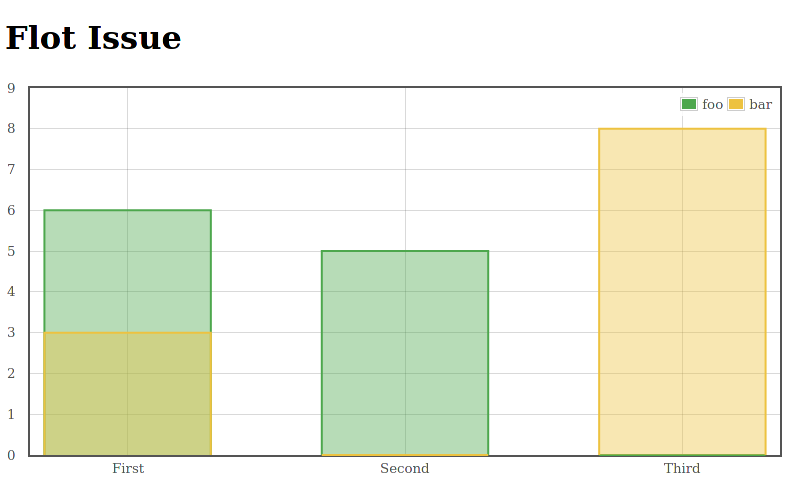
然而,在“第二”和“第三”栏的底部,这两个类别都绘制了该条,尽管其中之一的区域为0。这导致了那些空黄色(第二)和绿色(第三)边框,我想摆脱这些。
如何防止空白区域被绘制?
回答 1
Stack Overflow用户
回答已采纳
发布于 2021-03-02 09:02:47
您可以通过将0值替换为graphData中的null来使Flot忽略空部件。
有关完整的示例,请参阅此小提琴。
页面原文内容由Stack Overflow提供。腾讯云小微IT领域专用引擎提供翻译支持
原文链接:
https://stackoverflow.com/questions/66435119
复制相关文章
相似问题
腾讯云开发者

Copyright © 2013 - 2026 Tencent Cloud. All Rights Reserved. 腾讯云 版权所有
深圳市腾讯计算机系统有限公司 ICP备案/许可证号:粤B2-20090059  粤公网安备44030502008569号
腾讯云计算(北京)有限责任公司 京ICP证150476号 | 京ICP备11018762号