
静态文件不从静态文件夹加载。
静态文件不从静态文件夹加载。
提问于 2021-02-26 06:56:21
我正在构建一个BlogApp,我被一个问题困住了。
问题
Static Files不是从static folder加载的。有些文件正在加载,但有些文件没有加载。
我做了什么?
urls.py
我还把static url放在urls.py里,它对我也不起作用。
urlpatterns += static(settings.STATIC_URL, document_root=settings.STATIC_ROOT)settings.py
os.path.join(BASE_DIR, "static", "static")

STATICFILES_DIRS = [
    os.path.join(BASE_DIR, 'static'),

]
STATIC_URL = '/static/'
STATIC_ROOT = os.path.join(BASE_DIR, 'static_cdn')
my_template.html
    {% load static %}

   <link rel="stylesheet" href="https://fonts.googleapis.com/css?family=Open+Sans:400,600" />
    <!DOCTYPE html>
    <html lang="en">
      <head>
        <meta charset="UTF-8" />
        <meta name="viewport" content="width=device-width, initial-scale=1.0" />
        <meta http-equiv="X-UA-Compatible" content="ie=edge" />
        <title>Next Level - Gallery</title>
    <!--
    Next Level CSS Template
    https://templatemo.com/tm-532-next-level
    -->
        <link rel="stylesheet" href="https://fonts.googleapis.com/css?family=Open+Sans:400,600" />


    <script src="{% static 'comments/all.min.css' %}"></script>

    <script src="{% static 'comments/bootstrap.min.css' %}"></script>

    <script src="{% static 'comments/templatemo-style.css' %}"></script>

      </head>
          <div class="row tm-welcome-row">
            <div class="col-12">
              <div
                class="tm-welcome-parallax tm-center-child"
                data-parallax="scroll"
                data-image-src="static/images/blooming-bg.jpg"
              >
                <div class="tm-bg-black-transparent tm-parallax-overlay">
                  <h2>Our Gallery</h2>
                  <p>this is a parallax background image</p>
                </div>
              </div>
            </div>
          </div>

              <div class="tm-page-col-right">
                <div class="tm-gallery" id="tmGallery">
                  <div class="tm-gallery-item category-1">
                    <figure class="effect-bubba">
                      <img
                        src="static/comments/gallery/gallery-item-01.jpg"
                        alt="Gallery item"
                        class="img-fluid"
                      />
                    </figure>
                  </div>
                </div>
              </div>
            </div>
          </section>

    <script src="{% static 'comments/jquery.min.js' %}"></script>
    <script src="{% static 'coments/parallax.min.js' %}"></script>
    <script src="{% static 'comments/imagesloaded.pkgd.min.js' %}"></script>
    <script src="{% static 'comments/isotope.pkgd.min.js' %}"></script>
    <script src="{% static 'comments/bootstrap.min.js' %}"></script>

        <script>
          $(function() {
            /* Isotope Gallery */

            // init isotope
            var $gallery = $(".tm-gallery").isotope({
              itemSelector: ".tm-gallery-item",
              layoutMode: "fitRows"
            });
            // layout Isotope after each image loads
            $gallery.imagesLoaded().progress(function() {
              $gallery.isotope("layout");
            });

            $(".filters-button-group").on("click", "a", function() {
              var filterValue = $(this).attr("data-filter");
              $gallery.isotope({ filter: filterValue });
              console.log("Filter value: " + filterValue);
            });

            /* Tabs */
            $(".tabgroup > div").hide();
            $(".tabgroup > div:first-of-type").show();
            $(".tabs a").click(function(e) {
              e.preventDefault();
              var $this = $(this),
                tabgroup = "#" + $this.parents(".tabs").data("tabgroup"),
                others = $this
                  .closest("li")
                  .siblings()
                  .children("a"),
                target = $this.attr("href");
              others.removeClass("active");
              $this.addClass("active");

              // Scroll to tab content (for mobile)
              if ($(window).width() < 992) {
                $("html, body").animate(
                  {
                    scrollTop: $("#tmGallery").offset().top
                  },
                  200
                );
              }
            });
          });
        </script>
      </body>
    </html>
我试过什么
0 static files copied to 'D:\myapp\static_cdn', 248 unmodified.
- I也尝试了
python manage.py collectstatic,它显示了
我尝试了很多答案,其中一些回答是add static url in urls.py`,但它没有起作用。
该怎么办呢
任何帮助都将不胜感激
先谢谢你
回答 2
Stack Overflow用户
发布于 2021-02-26 07:34:41
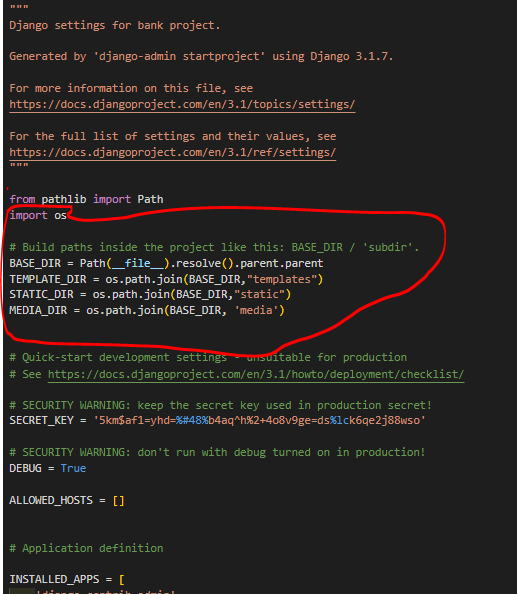
确保您的settings.py具有以下内容
settings.py
from pathlib import Path
import os

# Build paths inside the project like this: BASE_DIR / 'subdir'.
BASE_DIR = Path(__file__).resolve().parent.parent
TEMPLATE_DIR = os.path.join(BASE_DIR,"templates")
STATIC_DIR = os.path.join(BASE_DIR,"static")
MEDIA_DIR = os.path.join(BASE_DIR, 'media')
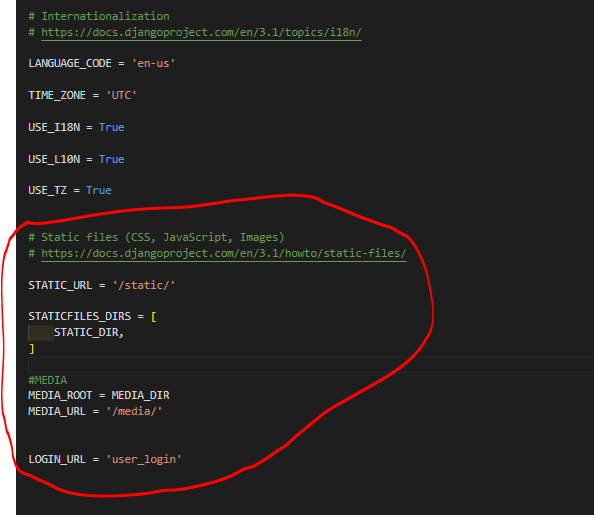
下面最好在底部
# Static files (CSS, JavaScript, Images)
# https://docs.djangoproject.com/en/3.1/howto/static-files/

STATIC_URL = '/static/'

STATICFILES_DIRS = [
    STATIC_DIR,
]

#MEDIA
MEDIA_ROOT = MEDIA_DIR
MEDIA_URL = '/media/'


LOGIN_URL = 'user_login'
现在,在基目录(您拥有manage.py的位置)中创建一个名为static的文件夹,并在其中包含静态文件。
确保在模板中加载静态%}
如果没有效果,尝试打开一个新项目并尝试上面的内容。
Stack Overflow用户
发布于 2022-11-01 13:57:49
但是,
- 与静态文件dir不同,directory.Django使用2种类型的静态文件夹。系统和应用程序
- 您需要将所有静态文件放入静态文件dir位置,然后运行
python manage.py collectstatic。它将将所有应用程序静态文件移动到系统静态文件夹。 - 现在将从目标(系统静态文件目录)位置服务。
。
页面原文内容由Stack Overflow提供。腾讯云小微IT领域专用引擎提供翻译支持
原文链接:
https://stackoverflow.com/questions/66381380
复制相关文章
相似问题
腾讯云开发者

Copyright © 2013 - 2026 Tencent Cloud. All Rights Reserved. 腾讯云 版权所有
深圳市腾讯计算机系统有限公司 ICP备案/许可证号:粤B2-20090059  粤公网安备44030502008569号
腾讯云计算(北京)有限责任公司 京ICP证150476号 | 京ICP备11018762号