
如何在HTML/CSS中对文本进行居中
如何在HTML/CSS中对文本进行居中
提问于 2021-02-14 18:01:08
有人知道为什么我的上一排不是中间的吗?我已经附上了我的桌子的照片作为参考。产品销售标题不是中心。在我的html代码中,您只需要注意头-单元格div类,因为这是我为顶部行编写代码的地方。我尝试了我在CSS文件中所知道的所有中心化技术,但似乎都没有效果。任何帮助都将不胜感激!
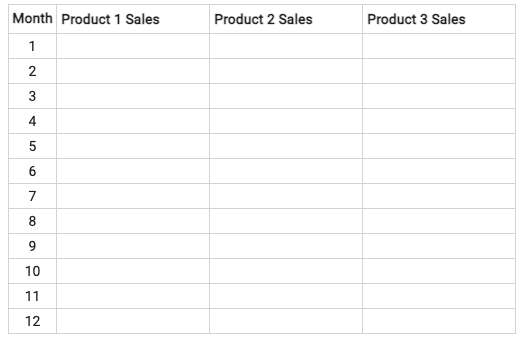
.single-cell {
  margin-left: 0px;
  margin-right: 0px;
  margin-top: 0px;
  margin-bottom: 0px;
  text-align: center;
}

.header-cell {
  margin-left: 3px;
  margin-right: 3px;
  margin-top: 3px;
  margin-bottom: 3px;
  text-align: center;
  align-items: center;
  justify-content: center;
}

table,
th,
td {
  border: 1px solid lightgray;
  border-collapse: collapse;
  text-align: center;
  vertical-align: middle;
}<table>
<tr>
<div class="header-cell">
<tr>
<b>Month</b>
</tr>
</div>
<th *ngFor="let p of products">
<div class="header-cell">
<tr>
<b>{{ p.salesLabel }}</b>
</tr>
</div>
</th>
</tr>
<tr></tr>
<tr>
<td>1</td>
<th *ngFor="let p of products">
<div class="single-cell">
<tr>
<input style="border: none" type="text" name="cogs-label" />
</tr>
</div>
</th>
</tr>
<tr>
<td>2</td>
<th *ngFor="let p of products">
<div class="single-cell">
<tr>
<input style="border: none" type="text" name="cogs-label" />
</tr>
</div>
</th>
</tr>
<tr>
<td>3</td>
<th *ngFor="let p of products">
<div class="single-cell">
<tr>
<input style="border: none" type="text" name="cogs-label" />
</tr>
</div>
</th>
</tr>
<tr>
<td>4</td>
<th *ngFor="let p of products">
<div class="single-cell">
<tr>
<input style="border: none" type="text" name="cogs-label" />
</tr>
</div>
</th>
</tr>
<tr>
<td>5</td>
<th *ngFor="let p of products">
<div class="single-cell">
<tr>
<input style="border: none" type="text" name="cogs-label" />
</tr>
</div>
</th>
</tr>
<tr>
<td>6</td>
<th *ngFor="let p of products">
<div class="single-cell">
<tr>
<input style="border: none" type="text" name="cogs-label" />
</tr>
</div>
</th>
</tr>
<tr>
<td>7</td>
<th *ngFor="let p of products">
<div class="single-cell">
<tr>
<input style="border: none" type="text" name="cogs-label" />
</tr>
</div>
</th>
</tr>
<tr>
<td>8</td>
<th *ngFor="let p of products">
<div class="single-cell">
<tr>
<input style="border: none" type="text" name="cogs-label" />
</tr>
</div>
</th>
</tr>
<tr>
<td>9</td>
<th *ngFor="let p of products">
<div class="single-cell">
<tr>
<input style="border: none" type="text" name="cogs-label" />
</tr>
</div>
</th>
</tr>
<tr>
<td>10</td>
<th *ngFor="let p of products">
<div class="single-cell">
<tr>
<input style="border: none" type="text" name="cogs-label" />
</tr>
</div>
</th>
</tr>
<tr>
<td>11</td>
<th *ngFor="let p of products">
<div class="single-cell">
<tr>
<input style="border: none" type="text" name="cogs-label" />
</tr>
</div>
</th>
</tr>
<tr>
<td>12</td>
<th *ngFor="let p of products">
<div class="single-cell">
<tr>
<input style="border: none" type="text" name="cogs-label" />
</tr>
</div>
</th>
</tr>
</table>
回答 1
Stack Overflow用户
回答已采纳
发布于 2021-03-08 21:11:37
您的表结构结构非常错误。F.ex。tr不是div的子类,而是头、体、脚或表本身。不要把td和th混为一谈。这是头的,td代表的是头和脚。
table {
  border-collapse: collapse;
  width: 100%;
}

table,
th,
td {
  border: 1px solid lightgray;
}

th,
td {
  text-align: center;
  vertical-align: middle;
}<table>
<thead>
<tr>
<th>Month</th>
<th>Product 1 Sales</th>
<th>Product 2 Sales</th>
<th>Product 3 Sales</th>
</tr>
</thead>
<tbody>
<tr>
<td>1</td>
<td></td>
<td></td>
<td></td>
</tr>
<tr>
<td>2</td>
<td></td>
<td></td>
<td></td>
</tr>
<tr>
<td>3</td>
<td></td>
<td></td>
<td></td>
</tr>
<tr>
<td>4</td>
<td></td>
<td></td>
<td></td>
</tr>
<tr>
<td>5</td>
<td></td>
<td></td>
<td></td>
</tr>
<tr>
<td>6</td>
<td></td>
<td></td>
<td></td>
</tr>
<tr>
<td>7</td>
<td></td>
<td></td>
<td></td>
</tr>
<tr>
<td>8</td>
<td></td>
<td></td>
<td></td>
</tr>
<tr>
<td>9</td>
<td></td>
<td></td>
<td></td>
</tr>
<tr>
<td>10</td>
<td></td>
<td></td>
<td></td>
</tr>
<tr>
<td>11</td>
<td></td>
<td></td>
<td></td>
</tr>
<tr>
<td>12</td>
<td></td>
<td></td>
<td></td>
</tr>
</tbody>
</table>
页面原文内容由Stack Overflow提供。腾讯云小微IT领域专用引擎提供翻译支持
原文链接:
https://stackoverflow.com/questions/66198428
复制相关文章
相似问题
腾讯云开发者

Copyright © 2013 - 2026 Tencent Cloud. All Rights Reserved. 腾讯云 版权所有
深圳市腾讯计算机系统有限公司 ICP备案/许可证号:粤B2-20090059  粤公网安备44030502008569号
腾讯云计算(北京)有限责任公司 京ICP证150476号 | 京ICP备11018762号