
Ngx-可移动的,多个可拖组件
Ngx-可移动的,多个可拖组件
提问于 2021-02-05 03:38:48
我有这样的问题,第二个目标在拖放时复制第一个目标的更改。我用的是角8。我跟踪了ngx-可移动的文档,但没有找到解决方案,也许我只是错过了它。我不知道。有人能帮我吗?我对角质也有点陌生。这是我的问题的一个视频例子。
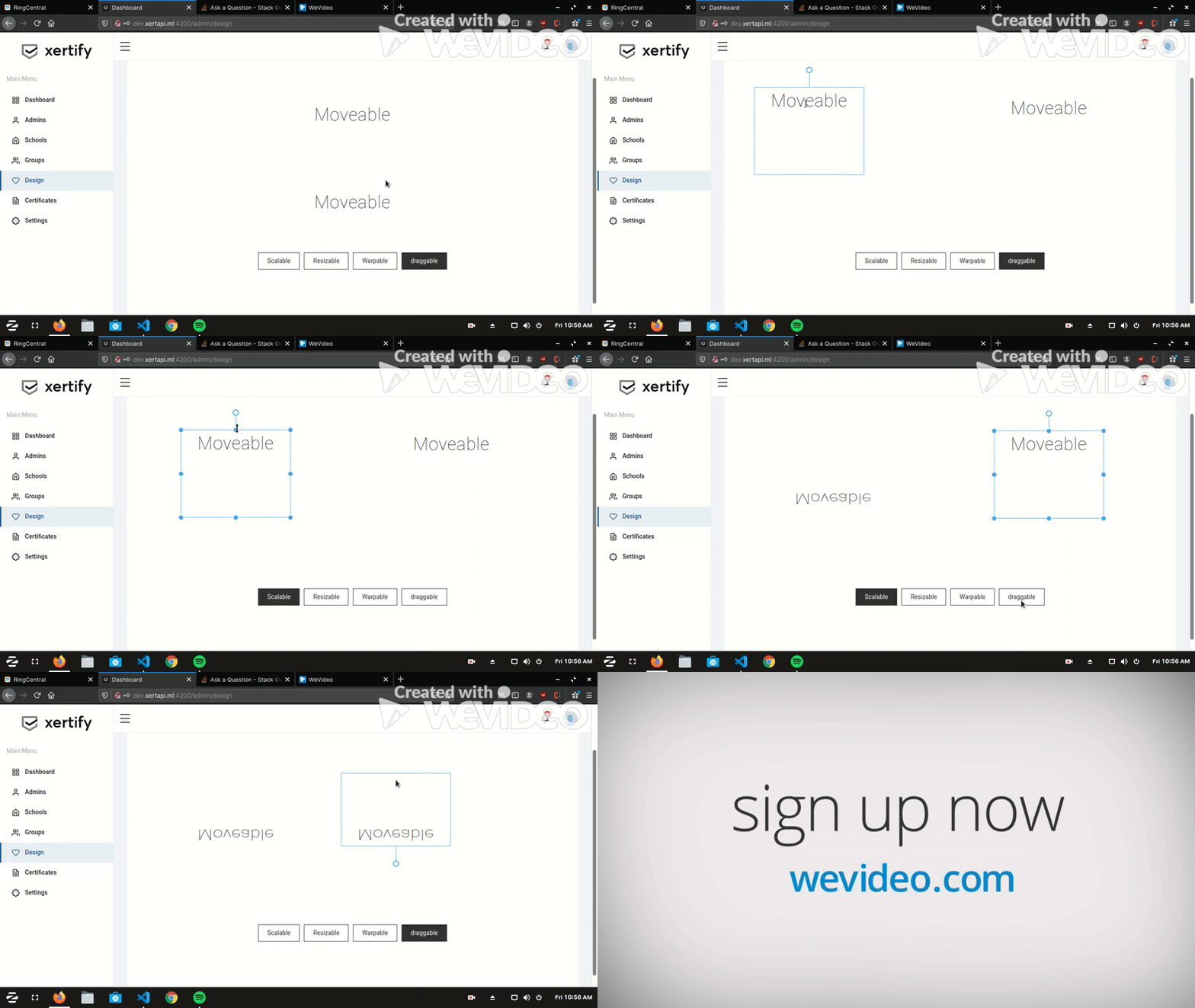
所以这解释了我的问题。
这是我的HTML代码
<div class="label" #label></div>
<div class="page main">
<div class="container">

<div (mousedown)="onMouseDown($event)">
    <div class="target"><div class="moveable"><span>Moveable</span></div></div>
    <div class="target"><div class="moveable"><span>Moveable</span></div></div>
</div>

<div class="buttons able">
  <a data-able="scalable" [class]="scalable ? 'selected' : ''" (click)="clickScalable()" >Scalable</a>
  <a data-able="resizable" [class]="resizable ? 'selected' : ''" (click)="clickResizable()">Resizable</a>
  <a data-able="warpable" [class]="warpable ? 'selected' : ''" (click)="clickWarpable()">Warpable</a>
  <a data-able="draggable" [class]="draggable ? 'selected' : ''" (click)="clickDraggable()">draggable</a>
</div>

<ngx-moveable
  #moveable
  [target]="target"
  [draggable]="draggable"
  [origin]="false"
  [rotatable]="true"
  [pinchable]="true"
  [scalable]="scalable"
  [resizable]="resizable"
  [warpable]="warpable"
  [keepRatio]="false"
  [throttleDrag]="1"
  [throttleScale]="0.01"
  [throttleRotate]="0.2"
  [throttleResize]="1"
  (drag)="onDrag($event)"
  (resize)="onResize($event)"
  (scale)="onScale($event)"
  (warp)="onWarp($event)"
  (rotate)="onRotate($event)"
  (pinch)="onPinch($event)"
  (dragEnd)="onEnd()"
  (resizeEnd)="onEnd()"
  (scaleEnd)="onEnd()"
  (warpEnd)="onEnd()"
  (rotateEnd)="onEnd()"
  (pinchEnd)="onEnd()"
  >
</ngx-moveable>
这是我的TS文件:
import { Component, ViewChild, OnInit, OnDestroy, ElementRef } from '@angular/core';
import { Frame } from 'scenejs';
import { CdkDragEnd } from "@angular/cdk/drag-drop";
import { OnPinch, OnScale, OnDrag, OnRotate, OnResize, OnWarp } from "moveable";
import { NgxMoveableComponent } from "ngx-moveable";

@Component({
  selector: 'app-design-template',
  templateUrl: './design-template.component.html',
  styleUrls: ['./design-template.component.scss'],
})

export class DesignTemplateComponent implements OnInit {

 @ViewChild('target', { static: false }) target;
 @ViewChild('label', { static: false }) label;
 @ViewChild('moveable', { static: false }) moveable;

 onMouseDown(e) {
  this.target = e.target;
  setTimeout(() => {
   this.moveable.ngDragStart(e);
  });
}

scalable = false;
resizable = false;
warpable = false;
draggable = true;

frame = new Frame({
  width: '250px',
  height: '200px',
  left: '0px',
  top: '0px',
  transform: {
    rotate: '0deg',
    scaleX: 1,
    scaleY: 1,
    matrix3d: [
      1, 0, 0, 0,
      0, 1, 0, 0,
      0, 0, 1, 0,
      0, 0, 0, 1,
    ],
  },
});
ngOnInit(): void {
  window.addEventListener('resize', this.onWindowReisze);
}
ngOnDestroy(): void {
  window.removeEventListener('resize', this.onWindowReisze);
}
onWindowReisze = () => {
  console.log(this.moveable.ngDragStart);
  this.moveable.updateRect();
}
clickScalable() {
  this.scalable = true;
  this.resizable = false;
  this.warpable = false;
  this.draggable = false;
}
clickResizable() {
  this.scalable = false;
  this.resizable = true;
  this.warpable = false;
  this.draggable = false;
}
clickWarpable() {
  this.scalable = false;
  this.resizable = false;
  this.warpable = true;
  this.draggable = false;
}
clickDraggable() {
  this.scalable = false;
  this.resizable = false;
  this.warpable = false;
  this.draggable = true;
}

setTransform(target: HTMLElement | SVGElement) {
  target.style.cssText = this.frame.toCSS();
}

setLabel(clientX: number, clientY: number, text: string) {
  this.label.nativeElement.style.cssText = `
  display: block; transform: translate(${clientX}px, ${clientY - 10}px) translate(-100%,   -100%) translateZ(-100px);`;
  this.label.nativeElement.innerHTML = text;
}
onPinch({ target, clientX, clientY }: OnPinch) {
  setTimeout(() => {
    this.setLabel(clientX, clientY, `X: ${this.frame.get('left')}
    <br/>Y: ${this.frame.get('top')}
    <br/>W: ${this.frame.get('width')}
    <br/>H: ${this.frame.get('height')}
    <br/>S: ${this.frame.get('transform', 'scaleX').toFixed(2)}, ${this.frame.get('transform', 'scaleY').toFixed(2)}
    <br/>R: ${parseFloat(this.frame.get('transform', 'rotate')).toFixed(1)}deg`);
  });
}
onDrag({ target, clientX, clientY, top, left, isPinch }: OnDrag) {
  this.frame.set('left', `${left}px`);
  this.frame.set('top', `${top}px`);
  this.setTransform(target);
  if (!isPinch) {
    this.setLabel(clientX, clientY, `X: ${left}px<br/>Y: ${top}px`);
  }
}
onScale({ target, delta, clientX, clientY, isPinch }: OnScale) {
  const scaleX = this.frame.get('transform', 'scaleX') * delta[0];
  const scaleY = this.frame.get('transform', 'scaleY') * delta[1];
  this.frame.set('transform', 'scaleX', scaleX);
  this.frame.set('transform', 'scaleY', scaleY);
  this.setTransform(target);
  if (!isPinch) {
    this.setLabel(clientX, clientY, `S: ${scaleX.toFixed(2)}, ${scaleY.toFixed(2)}`);
  }
}
onRotate({ target, clientX, clientY, beforeDelta, isPinch }: OnRotate) {
  const deg = parseFloat(this.frame.get('transform', 'rotate')) + beforeDelta;

  this.frame.set('transform', 'rotate', `${deg}deg`);
  this.setTransform(target);
  if (!isPinch) {
    this.setLabel(clientX, clientY, `R: ${deg.toFixed(1)}`);
  }
}
onResize({ target, clientX, clientY, width, height, isPinch }: OnResize) {
  this.frame.set('width', `${width}px`);
  this.frame.set('height', `${height}px`);
  this.setTransform(target);
  if (!isPinch) {
    this.setLabel(clientX, clientY, `W: ${width}px<br/>H: ${height}px`);
  }
}
onWarp({ target, clientX, clientY, delta, multiply }: OnWarp) {
  this.frame.set('transform', 'matrix3d', multiply(this.frame.get('transform', 'matrix3d'),   delta));
  this.setTransform(target);
  this.setLabel(clientX, clientY, `X: ${clientX}px<br/>Y: ${clientY}px`);
}
onEnd() {
  this.label.nativeElement.style.display = 'none';
 }
}
(预先谢谢:)
编辑:
为了进一步解释我的情况,有两个目标。例如,我反转了target#1,就像在gif中一样。接下来,我希望target#2保持不变。但是当我拖动target#2时,target#2会反转,就像target#1一样。当我旋转、扭曲、缩放、调整目标尺寸时,也会出现这样的问题。
希望这能进一步解释我的处境。谢谢。
回答 1
Stack Overflow用户
发布于 2021-02-16 09:09:43
经过大量的研究,许多试图解决这个问题的尝试都失败了。我决定联系这个软件包的开发人员。他们强烈建议使用ngx来选择和保留转换后的目标。
这是这个包裹的链接。
https://www.npmjs.com/package/ngx-selecto
下面是一个示例演示
页面原文内容由Stack Overflow提供。腾讯云小微IT领域专用引擎提供翻译支持
原文链接:
https://stackoverflow.com/questions/66057235
复制相关文章
相似问题
腾讯云开发者

Copyright © 2013 - 2026 Tencent Cloud. All Rights Reserved. 腾讯云 版权所有
深圳市腾讯计算机系统有限公司 ICP备案/许可证号:粤B2-20090059  粤公网安备44030502008569号
腾讯云计算(北京)有限责任公司 京ICP证150476号 | 京ICP备11018762号