
如何将按钮图标更改为MessagePage中的正常大小?
如何将按钮图标更改为MessagePage中的正常大小?
提问于 2021-02-04 10:45:20
因为我注意到我的按钮图标在其他视图中是正常大小的,所以我猜是因为sap.m.MessagePage元素。
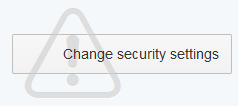
是否有一个很好的解决方案,还是开发人员只是希望我们永远不要在元素中使用按钮内的图标?:D
globalThis.onUI5Init = () => sap.ui.require([
  "sap/ui/core/mvc/XMLView"
], async XMLView => (await XMLView.create({
  definition: document.getElementById("myxmlview").textContent,
  height: "100%",
})).placeAt("content"));<script defer id="sap-ui-bootstrap"
src="https://openui5.hana.ondemand.com/resources/sap-ui-core.js"
data-sap-ui-oninit="onUI5Init"
data-sap-ui-libs="sap.ui.core,sap.m"
data-sap-ui-theme="sap_fiori_3"
data-sap-ui-async="true"
data-sap-ui-compatversion="edge"
data-sap-ui-excludejquerycompat="true"
data-sap-ui-xx-waitfortheme="init"
></script>
<!-- Issue fully reproducible with UI5 <= 1.87 and partially reproducible until 1.93 -->
<script id="myxmlview" type="text/xml">
<mvc:View xmlns:mvc="sap.ui.core.mvc" xmlns="sap.m" displayBlock="true">
<App>
<MessagePage showHeader="false" icon="sap-icon://sap-ui5" text="UI5" description="sap.m.MessagePage">
<buttons>
<Button icon="sap-icon://message-warning" text="Change security settings" />
</buttons>
</MessagePage>
</App>
</mvc:View>
</script>
<body id="content" class="sapUiBody">
</body>
回答 1
Stack Overflow用户
回答已采纳
发布于 2021-02-04 12:29:19
更新:问题不再重复,因为UI5 1.94 (d90fbe7 / PR #3146)。
先前的回答:
..。开发人员只是想让我们不要在元素中的按钮中使用图标吗?:D
算是吧。:P :根据"Button内容“主题中的Fiori设计指南
按钮可以包含图标或文本。
但是:,即使没有文本,按钮图标看起来也不太好:

这绝对是个窃听器。刚刚在这里创建了一个问题:https://github.com/SAP/openui5/issues/3145
页面原文内容由Stack Overflow提供。腾讯云小微IT领域专用引擎提供翻译支持
原文链接:
https://stackoverflow.com/questions/66044035
复制相关文章
相似问题
腾讯云开发者

Copyright © 2013 - 2026 Tencent Cloud. All Rights Reserved. 腾讯云 版权所有
深圳市腾讯计算机系统有限公司 ICP备案/许可证号:粤B2-20090059  粤公网安备44030502008569号
腾讯云计算(北京)有限责任公司 京ICP证150476号 | 京ICP备11018762号