
PyQt5需要在线编辑帮助
PyQt5需要在线编辑帮助
提问于 2021-01-30 21:03:36
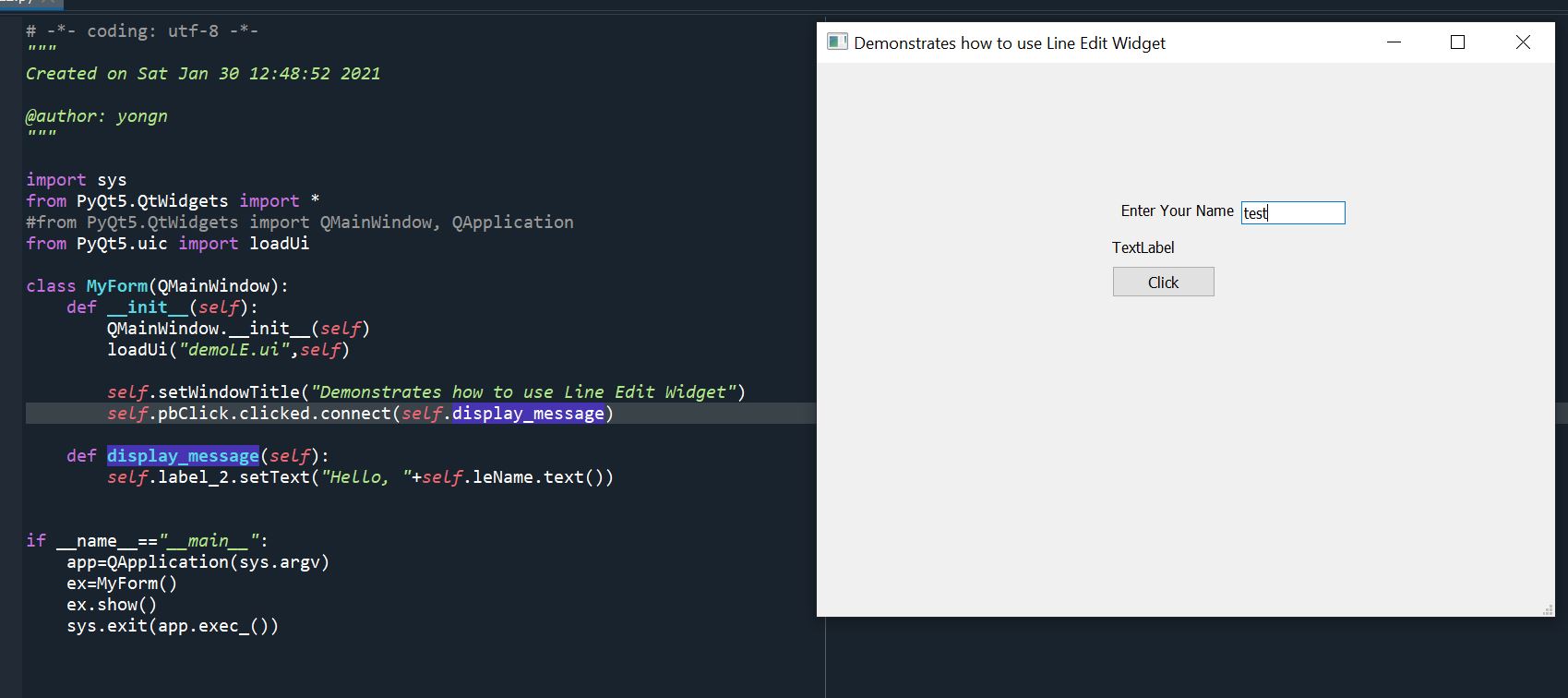
我正在学习PyQt5,并在下面做了一个简单的代码。我有几个问题:
- 在运行代码和输入文本后行编辑,然后单击按钮,得到一个
AttributeError: 'MyForm' object has no attribute 'leName'错误。如何修复它?,我认为leName的名字不正确? - 然后我删除了
self.leName.text(),我点击了按钮,没有显示消息。不知道它是如何工作的? - 关闭了Qt窗口后,我试着在Spyder中重新运行它,它不能再运行了。因此,我必须退出Spyder并重新启动spyder,以便再次运行它。为什么?
import sys
from PyQt5.QtWidgets import *
#from PyQt5.QtWidgets import QMainWindow, QApplication
from PyQt5.uic import loadUi

class MyForm(QMainWindow):
    def __init__(self):
        QMainWindow.__init__(self)
        loadUi("demoLE.ui",self)

        self.setWindowTitle("Demonstrates how to use Line Edit Widget")
        self.pbClick.clicked.connect(self.display_message)

    def display_message(self):
        self.label_2.setText("Hello, "+self.leName.text())


if __name__=="__main__":
    app=QApplication(sys.argv)
    ex=MyForm()
    ex.show()
    sys.exit(app.exec_())
demoLE.ui的内容如下:
<?xml version="1.0" encoding="UTF-8"?>
<ui version="4.0">
 <class>MainWindow</class>
 <widget class="QMainWindow" name="MainWindow">
  <property name="geometry">
   <rect>
    <x>0</x>
    <y>0</y>
    <width>800</width>
    <height>600</height>
   </rect>
  </property>
  <property name="windowTitle">
   <string>MainWindow</string>
  </property>
  <widget class="QWidget" name="centralwidget">
   <widget class="QLabel" name="label">
    <property name="geometry">
     <rect>
      <x>330</x>
      <y>150</y>
      <width>171</width>
      <height>19</height>
     </rect>
    </property>
    <property name="text">
     <string>Enter Your Name</string>
    </property>
   </widget>
   <widget class="QLabel" name="label_2">
    <property name="geometry">
     <rect>
      <x>320</x>
      <y>190</y>
      <width>68</width>
      <height>19</height>
     </rect>
    </property>
    <property name="text">
     <string>TextLabel</string>
    </property>
   </widget>
   <widget class="QLineEdit" name="lineEdit">
    <property name="geometry">
     <rect>
      <x>460</x>
      <y>150</y>
      <width>113</width>
      <height>25</height>
     </rect>
    </property>
   </widget>
   <widget class="QPushButton" name="pbClick">
    <property name="geometry">
     <rect>
      <x>320</x>
      <y>220</y>
      <width>112</width>
      <height>34</height>
     </rect>
    </property>
    <property name="text">
     <string>Click</string>
    </property>
   </widget>
  </widget>
  <widget class="QMenuBar" name="menubar">
   <property name="geometry">
    <rect>
     <x>0</x>
     <y>0</y>
     <width>800</width>
     <height>31</height>
    </rect>
   </property>
  </widget>
  <widget class="QStatusBar" name="statusbar"/>
 </widget>
 <resources/>
 <connections/>
</ui>
回答 1
Stack Overflow用户
回答已采纳
发布于 2021-01-30 21:30:57
QLineEdit的名称是lineEdit,而不是leName,因此将self.label_2.setText("Hello, " + self.leName.text())更改为self.label_2.setText("Hello, " + self.lineEdit.text())
页面原文内容由Stack Overflow提供。腾讯云小微IT领域专用引擎提供翻译支持
原文链接:
https://stackoverflow.com/questions/65973119
复制相关文章
相似问题
腾讯云开发者

Copyright © 2013 - 2026 Tencent Cloud. All Rights Reserved. 腾讯云 版权所有
深圳市腾讯计算机系统有限公司 ICP备案/许可证号:粤B2-20090059  粤公网安备44030502008569号
腾讯云计算(北京)有限责任公司 京ICP证150476号 | 京ICP备11018762号