
如何从字典中添加按钮,但只在字典声明已启用的情况下?
我正在构建一个饮料分配器使用覆盆子Pi和使用Kivy来构建UI。我只想显示可用的饮料在主屏幕上,如果泵为每一种所需的成分是“启用”。如果制造饮料所需的任何成分被分配到一个没有启用的泵上,那么我不希望创建该饮料的按钮。简而言之,应该只显示所有必需成分“启用:真”的饮料。对于python和kivy来说,我都是新手,所以我找不到一种方法来做到这一点。到目前为止..。
main.py:
#!/usr/bin/env python
# -*- coding: utf-8 -*-
from kivy.app import App
from kivy.config import Config
from kivy.clock import *

Config.set('graphics', 'width', '480')
Config.set('graphics', 'height', '800')
Config.set('kivy', 'keyboard_mode', 'dock')
from kivy.uix.screenmanager import *
from kivy.uix.button import *
from kivy.uix.label import *
from kivy.clock import *

pinList = [11, 13, 15, 19, 21, 23, 29, 31, 33, 35, 37, 38, 36, 32, 26, 24]

drink_list = {'Rum & Pepsi': {'ingredients': {'Rum': 50, 'Pepsi': 100}},
              'Cherry Pepsi': {'ingredients': {'Cherry syrup': 40, 'Pepsi': 150}},
              'Lemon Pepsi': {'ingredients': {'Lemon Syrup': 10, 'Pepsi': 113}}}

test_list = {
    'Pump 1': {'Pin': [11], 'Ingredient': ['Pepsi'], 'Pumptime': [0.15], 'Enabled': [True]},
    'Pump 2': {'Pin': [13], 'Ingredient': ['Rum'], 'Pumptime': [0.15], 'Enabled': [True]},
    'Pump 3': {'Pin': [15], 'Ingredient': ['Cherry syrup'], 'Pumptime': [0.15], 'Enabled': [True]},
    'Pump 4': {'Pin': [19], 'Ingredient': ['Lemon syrup'], 'Pumptime': [0.15], 'Enabled': [True]},
    'Pump 5': {'Pin': [21], 'Ingredient': ['Unused'], 'Pumptime': [0.15], 'Enabled': [True]},
    'Pump 6': {'Pin': [23], 'Ingredient': ['Unused'], 'Pumptime': [0.15], 'Enabled': [True]},
    'Pump 7': {'Pin': [29], 'Ingredient': ['Unused'], 'Pumptime': [0.15], 'Enabled': [True]},
    'Pump 8': {'Pin': [31], 'Ingredient': ['Unused'], 'Pumptime': [0.15], 'Enabled': [True]},
    'Pump 9': {'Pin': [33], 'Ingredient': ['Unused'], 'Pumptime': [0.15], 'Enabled': [True]},
    'Pump 10': {'Pin': [35], 'Ingredient': ['Unused'], 'Pumptime': [0.15], 'Enabled': [True]},
    'Pump 11': {'Pin': [37], 'Ingredient': ['Unused'], 'Pumptime': [0.15], 'Enabled': [True]},
    'Pump 12': {'Pin': [38], 'Ingredient': ['Unused'], 'Pumptime': [0.15], 'Enabled': [True]},
    'Pump 13': {'Pin': [36], 'Ingredient': ['Unused'], 'Pumptime': [0.15], 'Enabled': [True]},
    'Pump 14': {'Pin': [32], 'Ingredient': ['Unused'], 'Pumptime': [0.15], 'Enabled': [True]},
    'Pump 15': {'Pin': [26], 'Ingredient': ['Unused'], 'Pumptime': [0.15], 'Enabled': [True]},
    'Pump 16': {'Pin': [24], 'Ingredient': ['Unused'], 'Pumptime': [0.15], 'Enabled': [True]}
}

class HomeScreen(Screen):

    @mainthread
    def on_enter(self):

        # add drink buttons (only if needed pumps are enabled)
        for drink in drink_list:
            ingredients_needed = [*(drink_list[drink]['ingredients'])]
            for x in ingredients_needed:
                for pump in test_list.keys():
                    if x in test_list[pump]['Ingredient'] and test_list[pump]['Enabled'] == [True]:
                        print('yes')
                        button = Button(text=drink, size_hint=(None, None))
                        self.ids.grid1.add_widget(button)
                    else:
                        pass


        # add settings button
        button = Button(text='Settings Page', size_hint=(None, None))
        button.bind(on_press=self.go_first_screen)
        self.ids.grid1.add_widget(button)

    def go_first_screen(self, event):
        self.manager.current = 'settings_screen'


class SettingsScreen(Screen):

    @mainthread
    def on_enter(self):
        # Drink Manager Tab
        for drink in drink_list:
            drink_buttons = Button(text=str(drink), size_hint=(None, None))
            self.ids.grid.add_widget(drink_buttons)
        btn = Button(text='Change Screen', size_hint=(None, None))
        self.ids.grid.add_widget(btn)

        # Pump Assignment Tab
        for pump in test_list:
            pump_buttons = Button(text=str(pump) + ' - \n ' + str(*test_list[pump]['Ingredient']), size_hint=(None, None))
            self.ids.pump_grid.add_widget(pump_buttons)

    def on_leave(self, *args):
        self.ids.grid.clear_widgets()


class Test(App):
    pass


Test().run()
test.kv...
#:kivy 1.9.0
ScreenManager:
    HomeScreen:
    SettingsScreen:

<HomeScreen>:
    name: 'home_screen'

    StackLayout:
        id: grid1
        orientation: 'lr-tb'
        padding: 10
        spacing: 5

<SettingsScreen>:
    name: 'settings_screen'

    TabbedPanel:
        do_default_tab: False
        tab_pos: 'top_mid'
        tab_height: 70
        tab_width: self.width/3
        canvas.before:
            Color:
                rgba: 1, 1, 1, 1
            Rectangle:
                pos: self.pos
                size: self.size

        TabbedPanelItem:
            text: 'Drink Manager'

            StackLayout:
                id: grid
                orientation: 'lr-tb'
                padding: 10
                spacing: 10

        TabbedPanelItem:
            text: 'Pump Assignment'

            StackLayout:
                id: pump_grid
                orientation: 'lr-tb'
                padding: 15
                spacing: 15
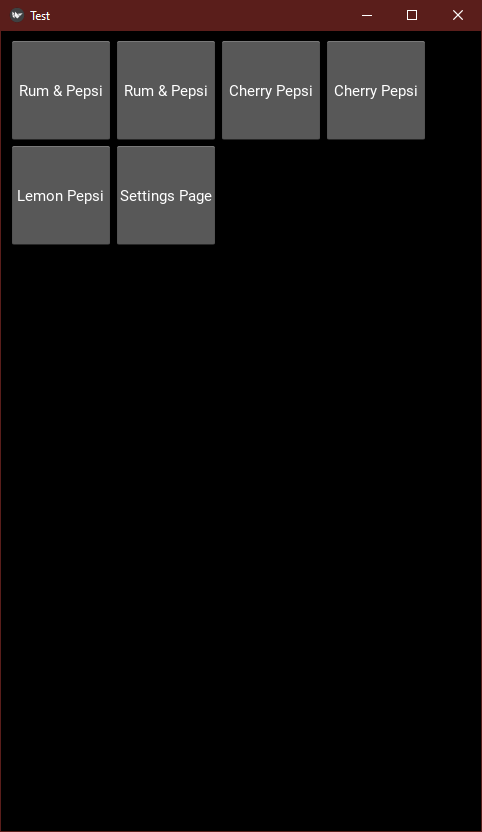
目前,它正在为每种饮料创建2个按钮(除了柠檬按钮,因为某种原因?)每次喝一杯我只需要一个按钮:
回答 1
Stack Overflow用户
发布于 2021-01-26 21:16:03
为什么你现在有重复的按钮
我添加了一个print语句,其中应该创建按钮,执行代码,并亲眼目睹了以下结果:
drink=Rum & Pepsi, x=Rum, pump=Pump 2
drink=Rum & Pepsi, x=Pepsi, pump=Pump 1
drink=Cherry Pepsi, x=Cherry syrup, pump=Pump 3
drink=Cherry Pepsi, x=Pepsi, pump=Pump 1
drink=Lemon Pepsi, x=Lemon Syrup, pump=[no pump]
drink=Lemon Pepsi, x=Pepsi, pump=Pump 1这表明你在为饮料中的每一种成分创建按钮。此外,对于柠檬百事可乐,你找不到“柠檬糖浆”泵,因为在drink_list,Syrup是大写字母。
如何修复它
例如:
class HomeScreen(Screen):

    @mainthread
    def on_enter(self):

        # either define this function here, or at module level,
        # or as a @staticmethod in this class
        def _get_pump_by_ingredient(ingredient):
            for name, pump in test_list.items():
                if pump["Ingredient"] == [ingredient]:
                    return pump

        for drink in drink_list:
            ingredients_needed = [*(drink_list[drink]['ingredients'])]
            if all(_get_pump_by_ingredient(item)["Enabled"] == [True]
                   for item
                   in ingredients_needed):
                  print('yes')
                  button = Button(text=drink, size_hint=(None, None))
                  self.ids.grid1.add_widget(button)

        # add settings button
        ...
注意,如果找不到一个泵(比如“柠檬糖浆”),上面的代码会抛出一个异常,但这可能是件好事。
更多的反馈
创建一个complexity
- it's类可能是有意义的,因为在这个级别的
'Pumptime': 0.15)
中,dict是很尴尬的,您如何将许多东西放入单元素列表('Pumptime': [0.15]而不仅仅是'Pumptime': 0.15)),这有点奇怪。
https://stackoverflow.com/questions/65905531
复制相似问题
腾讯云开发者

Copyright © 2013 - 2026 Tencent Cloud. All Rights Reserved. 腾讯云 版权所有
深圳市腾讯计算机系统有限公司 ICP备案/许可证号:粤B2-20090059  粤公网安备44030502008569号
腾讯云计算(北京)有限责任公司 京ICP证150476号 | 京ICP备11018762号