
如何使用电子标签webview从浏览器窗口到选项卡进行通信?
我试图让我之间的不同渲染过程之间的电子通信。我使用的不是多个窗口,而是可以找到这里的电子标签。首先,我只想让我的主窗口能够使用ipcRenderer向每个选项卡发送消息。使用多个窗口,您可以将每个窗口存储在全局变量中,比如这堆栈溢出问题,然后使用web内容发送消息。
更新:在电子标签文档中,它建议您可以使用选项卡webview,就像使用windows web内容一样(参见这里)。不幸的是,要么是我错过了什么,要么是更复杂一些。
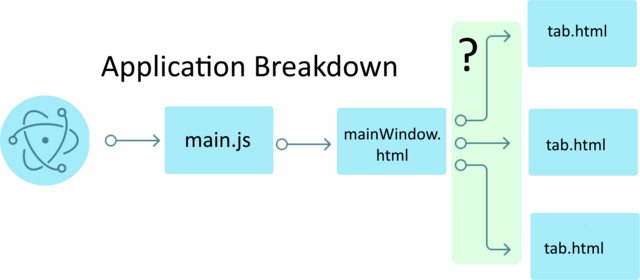
对于代码:我有一个主窗口mainWindow.html
<html>
<head></head>
<body>
<div class="etabs-tabgroup" >
  <div class="etabs-tabs" ></div>
  <div class="etabs-buttons" style="padding:5px 0px"></div>
</div>
<div class="etabs-views"></div>
<link rel="stylesheet" href="node_modules/electron-tabs/electron-tabs.css">

<script>
const TabGroup = require('electron-tabs') ;
const electron = require('electron') ;
const {ipcRenderer} = electron;

var tabs = [];

// Create a new tabGroup
let tabGroup = new TabGroup();

// Add 3 tabs to tabGroup
for (var i = 0; i <3;i++){
    tabs.push(tabGroup.addTab({
        src: 'file://' + __dirname + '/tab.html',
        webviewAttributes: {
            nodeintegration: true
        }
    }));

    // Send test message to tabs... !!!! DOES NOT WORK !!!!
    circuitTabs[i].webview.send('testMessage',i);
}
</script>
</html>
tab.html
<!DOCTYPE html>
<html>
  <head>
  <meta name="viewport" content="width=device-width, initial-scale=1">
  </head>
  <body>
      <script>
        const electron = require('electron') ;
        const {ipcRenderer} = electron;
        const { remote } = require('electron');

        ipcRenderer.on ('testMessage', (event, i) => { alert(`Message from main window to tab ${i}`); });

      </script>
  </body>
  </html>
main.js
const electron = require('electron');
const {app, BrowserWindow} = electron;

let mainWindow = null;

app.on('ready', function () {
    mainWindow = new electron.BrowserWindow({width: 1200,height: 800,
    webPreferences: {
    nodeIntegration: true,
    webviewTag: true
    }
});

mainWindow.loadURL(path.join(__dirname, '/mainWindow.html'));
mainWindow.on('ready-to-show', function () {
    mainWindow.show();
    mainWindow.focus();
});回答 2
Stack Overflow用户
发布于 2021-01-14 16:23:00
我想通了。您可以从选项卡中获取webcontentsID并使用ipcRenderer.sendTo函数。
对于代码:我有一个主窗口mainWindow.html
<html>
<head></head>
<body>
<div class="etabs-tabgroup" >
  <div class="etabs-tabs" ></div>
  <div class="etabs-buttons" style="padding:5px 0px"></div>
</div>
<div class="etabs-views"></div>
<link rel="stylesheet" href="node_modules/electron-tabs/electron-tabs.css">

<script>
const TabGroup = require('electron-tabs') ;
const electron = require('electron') ;
const {ipcRenderer} = electron;

var tabs = [];

// Create a new tabGroup
let tabGroup = new TabGroup();

// Add 3 tabs to tabGroup
for (var i = 0; i <3;i++){
    tabs.push(tabGroup.addTab({
        src: 'file://' + __dirname + '/tab.html',
        webviewAttributes: {
            nodeintegration: true
        }
    }));

    // Send test message to tabs...
    var webContentsID = tabs[i].webview.getWebContentsId();
    ipcRenderer.sendTo(webContentsID,'testMessage');
}
</script>
</html>
tab.html
<!DOCTYPE html>
<html>
  <head>
  <meta name="viewport" content="width=device-width, initial-scale=1">
  </head>
  <body>
      <script>
        const electron = require('electron') ;
        const {ipcRenderer} = electron;
        const { remote } = require('electron');

        ipcRenderer.on ('testMessage', (event, i) => { alert(`Message from main window to tab ${i}`); });

      </script>
  </body>
  </html>
main.js
const electron = require('electron');
const {app, BrowserWindow} = electron;

let mainWindow = null;

app.on('ready', function () {
    mainWindow = new electron.BrowserWindow({width: 1200,height: 800,
    webPreferences: {
    nodeIntegration: true,
    webviewTag: true
    }
});

mainWindow.loadURL(path.join(__dirname, '/mainWindow.html'));
mainWindow.on('ready-to-show', function () {
    mainWindow.show();
    mainWindow.focus();
});Stack Overflow用户
发布于 2021-01-17 09:52:41
试着这样做:
<webview>.send(channel, ...args)channel字符串...argsany[] 返回Promise<void>通过channel向渲染程序进程发送异步消息,也可以发送任意参数。呈现程序进程可以通过侦听带有channel模块的ipcRenderer事件来处理消息。 有关示例,请参见webContents.send。
有关更多信息,请查看下面的文档。
https://www.electronjs.org/docs/api/webview-tag#webviewsendchannel-args
https://stackoverflow.com/questions/65670867
复制相似问题
腾讯云开发者

Copyright © 2013 - 2026 Tencent Cloud. All Rights Reserved. 腾讯云 版权所有
深圳市腾讯计算机系统有限公司 ICP备案/许可证号:粤B2-20090059  粤公网安备44030502008569号
腾讯云计算(北京)有限责任公司 京ICP证150476号 | 京ICP备11018762号