
在vscode中使用two.js的Tyepscript
在vscode中使用two.js的Tyepscript
提问于 2021-01-09 15:27:13
我正在尝试使用two.js和类型记录来制作一个2D画布项目。
因此,安装@type/two.js
{
  "name": "blueseacore",
  "version": "1.0.0",
  "description": "",
  "main": "index.js",
  "scripts": {
    "test": "echo \"Error: no test specified\" && exit 1",
    "unit": "karma start",
    "build": "webpack --mode=development --config webpack.config.js",
    "web": "cd ./bundle && http-server -o -c-1"
  },
  "keywords": [
    "rf"
  ],
  "author": "",
  "license": "ISC",
  "devDependencies": {
    "@types/jasmine": "^3.6.2",
    "@typescript-eslint/eslint-plugin": "^4.10.0",
    "@typescript-eslint/parser": "^4.10.0",
    "eslint": "^7.16.0",
    "eslint-config-airbnb-base": "^14.2.1",
    "eslint-import-resolver-alias": "^1.1.2",
    "eslint-plugin-import": "^2.22.1",
    "eslint-plugin-typescript": "^0.14.0",
    "jasmine-core": "^3.6.0",
    "karma": "^5.2.3",
    "karma-chrome-launcher": "^3.1.0",
    "karma-cli": "^2.0.0",
    "karma-jasmine": "^4.0.1",
    "karma-typescript": "^5.2.0",
    "ts-loader": "^8.0.13",
    "ts-node": "^9.1.1",
    "typescript": "^4.1.3",
    "typescript-eslint-parser": "^22.0.0",
    "webpack": "^5.11.1",
    "webpack-cli": "^4.3.1",
    "webpack-dev-server": "^3.11.1"
  },
  "dependencies": {
    "@types/two.js": "^0.7.4",
    "mitt": "^2.1.0"
  }
}然而,不幸的是,当我试图导入我的ts文件时,复杂的结果显示它找不到解决模块。找不到模块:错误:无法解析中的“two.js”
export class PreviewLayer {
twoObj = new Two({ width: 1024, height: 768 });
}
但我找到了节点模块目录,two.js存在。
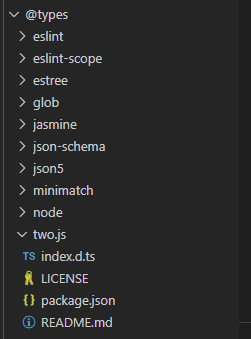
回答 1
Stack Overflow用户
回答已采纳
发布于 2021-01-09 19:32:39
您必须安装这样的twojs npm包:
npm install twojs-ts然后你可以像这样使用它:
import Two from 'twojs-ts';

const elem = document.getElementById('draw-shapes');

if (elem) {
    const two = new Two({ width: 285, height: 200 }).appendTo(elem);
    // two has convenience methods to create shapes.
    const circle = two.makeCircle(72, 100, 50);
    const rect = two.makeRectangle(213, 100, 100, 100);

    // The object returned has many stylable properties:
    circle.fill = '#FF8000';
    circle.stroke = 'orangered'; // Accepts all valid css color
    circle.linewidth = 5;

    rect.fill = 'rgb(0, 200, 255)';
    rect.opacity = 0.75;
    rect.noStroke();

    // Don't forget to tell two to render everything
    // to the screen
    two.update();
}页面原文内容由Stack Overflow提供。腾讯云小微IT领域专用引擎提供翻译支持
原文链接:
https://stackoverflow.com/questions/65644346
复制相关文章
相似问题
腾讯云开发者

Copyright © 2013 - 2026 Tencent Cloud. All Rights Reserved. 腾讯云 版权所有
深圳市腾讯计算机系统有限公司 ICP备案/许可证号:粤B2-20090059  粤公网安备44030502008569号
腾讯云计算(北京)有限责任公司 京ICP证150476号 | 京ICP备11018762号