
UserDefaults文本/ SwiftUI
UserDefaults文本/ SwiftUI
提问于 2021-01-05 10:36:04
当我单击“更新”按钮时,我希望文本视图保存用户默认值中使用的文本。
我做不到。你知道怎么做吗?你能编辑代码吗?更新后,我希望出现复选框,但首先需要设置用户默认值。
Struct ContentView: View{
@State private var profilName = ""
@State private var profilSurname = ""

var body: some View{

 ZStack{

 VStack{
            TextField("Name", text: $profilName)
                .frame(height: 60)
                .padding([.leading, .trailing], 20)
                .foregroundColor(.white)
                .font(Font.system(size: 30, design: .default))
                .multilineTextAlignment(.center)
                .accentColor(Color.white)
                .overlay(RoundedRectangle(cornerRadius:30)
                            .stroke(Color(#colorLiteral(red: 0.5411764706, green:
0.4549019608, blue: 0.2823529412, alpha: 1)), lineWidth: 1)).padding(.horizontal, 50)

               TextField("Surname", text: $profilSurname)
                        .frame(height: 60)
                        .padding([.leading, .trailing], 20)
                        .foregroundColor(.white)
                        .font(Font.system(size: 30, design: .default))
                        .multilineTextAlignment(.center)
                        .accentColor(Color.white)
                        .overlay(RoundedRectangle(cornerRadius:30)
                                    .stroke(Color(#colorLiteral(red: 0.5411764706, green: 0.4549019608, blue: 0.2823529412, alpha: 1)), lineWidth: 1)).padding(.horizontal, 50)

 Button(action: {

            }, label: {
                Text("Update")
                    .frame(width:300 , height: 40)
                    .padding(10)
                    .font(Font.system(size: 30, weight: .medium, design: .serif))
                    .foregroundColor(.white)
                    .background(RoundedRectangle(cornerRadius: 45))
                    .foregroundColor(.init(red: 45 / 255, green: 0 / 255, blue: 112 / 255))

            })
}
}
}
}
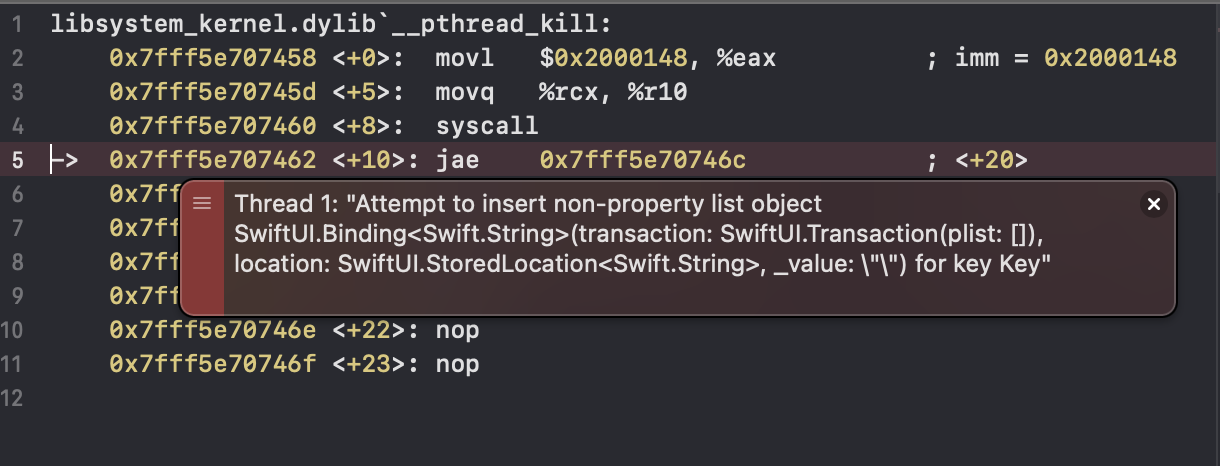
回答 3
Stack Overflow用户
回答已采纳
发布于 2021-01-05 10:39:04
只需在按钮操作中调用用户默认值,就可以保存textfield内容。
 Button(action: {
         UserDefaults.standard.set(profilSurname, forKey: "Key")
 }
若要在应用程序启动时从用户默认值中检索文本,请在init函数中加载用户默认数据,如下所示
struct ContentView: View{
@State private var profilName = ""
@State private var profilSurname = ""

init() {
        self._profilSurname = State(initialValue: UserDefaults.standard.object(forKey: "Key") as? String ?? "")
    }

var body: some View{Stack Overflow用户
发布于 2021-01-05 10:54:37
这将是更新的代码。
Button(action: {
         // This is the action section. You can add your code here
         UserDefaults.standard.set($profilSurname.wrappedValue, forKey: "surnname")
        }, label: {
            Text("Update")
                .frame(width:300 , height: 40)
                .padding(10)
                .font(Font.system(size: 30, weight: .medium, design: .serif))
                .foregroundColor(.white)
                .background(RoundedRectangle(cornerRadius: 45))
                .foregroundColor(.init(red: 45 / 255, green: 0 / 255, blue: 112 / 255))

        })
从用户默认值中获取存储值
let surnName = UserDefaults.standard.object(forKey: "surnname") as? String ?? "" Stack Overflow用户
发布于 2021-01-05 11:30:42
struct ContentView: View{
    @State private var profilName = ""
    @State private var profilSurname: String = UserDefaults.standard.string(forKey: "Key") ?? ""

    var body: some View{

        ZStack{

            VStack{
                TextField("Name", text: $profilName)
                    .frame(height: 60)
                    .padding([.leading, .trailing], 20)
                    .foregroundColor(.black)
                    .font(Font.system(size: 30, design: .default))
                    .multilineTextAlignment(.center)
                    .accentColor(Color.white)
                    .overlay(RoundedRectangle(cornerRadius:30)
                                .stroke(Color(#colorLiteral(red: 0.5411764706, green:
                                                                0.4549019608, blue: 0.2823529412, alpha: 1)), lineWidth: 1)).padding(.horizontal, 50)

                TextField("Surname", text: $profilSurname)
                    .frame(height: 60)
                    .padding([.leading, .trailing], 20)
                    .font(Font.system(size: 30, design: .default))
                    .multilineTextAlignment(.center)
                    .accentColor(Color.white)
                    .overlay(RoundedRectangle(cornerRadius:30)
                                .stroke(Color(#colorLiteral(red: 0.5411764706, green: 0.4549019608, blue: 0.2823529412, alpha: 1)), lineWidth: 1)).padding(.horizontal, 50)

                Button(action: {
                    UserDefaults.standard.set(profilSurname, forKey: "Key")
                }, label: {
                    Text("Update")
                        .frame(width:300 , height: 40)
                        .padding(10)
                        .font(Font.system(size: 30, weight: .medium, design: .serif))
                        .foregroundColor(.white)
                        .background(RoundedRectangle(cornerRadius: 45))
                        .foregroundColor(.init(red: 45 / 255, green: 0 / 255, blue: 112 / 255))

                })

            }
        }
    }
}页面原文内容由Stack Overflow提供。腾讯云小微IT领域专用引擎提供翻译支持
原文链接:
https://stackoverflow.com/questions/65577237
复制相关文章
相似问题
腾讯云开发者

Copyright © 2013 - 2026 Tencent Cloud. All Rights Reserved. 腾讯云 版权所有
深圳市腾讯计算机系统有限公司 ICP备案/许可证号:粤B2-20090059  粤公网安备44030502008569号
腾讯云计算(北京)有限责任公司 京ICP证150476号 | 京ICP备11018762号