
如何与Riverpod一起使用google?
如何与Riverpod一起使用google?
提问于 2021-01-05 10:28:44
我在我的应用程序中使用flutter-riverpod进行状态管理。由于使用Riverpod,我必须将Stateful widget转换为consumer widget,所以无法访问setState()。现在,在使用Riverpod为底部栏编写状态管理代码之后,它就不能工作了。
这是我的密码-
int index = 0;

class HomePage extends ConsumerWidget {
  final currentIndex = Provider<int>((ref) => index);

  Widget build(BuildContext context, ScopedReader watch) {
    int _currentIndex = watch(currentIndex);


    return auth.when(//authstatchange provider
      data: (e) {
        if (e!=null&&e.uid != null) {
          return Scaffold(
            body: PageView(
              physics: NeverScrollableScrollPhysics(),
              controller: _pageController,
              onPageChanged: (ind) {
                index = ind;
              },
              children: [
                SomePage(),
              ],
            ),
            bottomNavigationBar: SingleChildScrollView(
              scrollDirection: Axis.horizontal,
              child: Container(
                someCode(),
),
                child: SomeCode(),)
                        tabBackgroundColor: Colors.grey[800],
                        tabs: [
                          tabs()
                        ],
                        selectedIndex: _currentIndex,
                        onTabChange: (ind) {
                          index = ind;
                         _pageController.jumpToPage(index);
                        )//closing brackets (omitted)
//brackets回答 1
Stack Overflow用户
发布于 2022-10-26 17:08:30
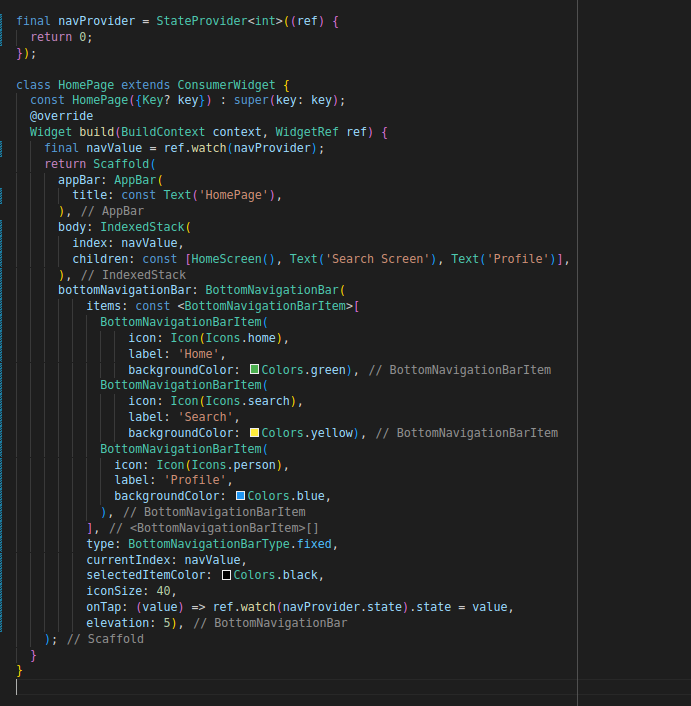
解决了,如果使用状态提供程序,则重新构建状态。
页面原文内容由Stack Overflow提供。腾讯云小微IT领域专用引擎提供翻译支持
原文链接:
https://stackoverflow.com/questions/65577142
复制相关文章
相似问题
腾讯云开发者

Copyright © 2013 - 2026 Tencent Cloud. All Rights Reserved. 腾讯云 版权所有
深圳市腾讯计算机系统有限公司 ICP备案/许可证号:粤B2-20090059  粤公网安备44030502008569号
腾讯云计算(北京)有限责任公司 京ICP证150476号 | 京ICP备11018762号