
谷歌云任务5分钟后请求任务忽略更大的dispatchDeadline设置
谷歌云任务5分钟后请求任务忽略更大的dispatchDeadline设置
提问于 2020-12-28 10:44:26
基础设施:排成队列的Firebase函数、Google项和执行一些长期运行的作业的本地NodeJS Express应用程序。为了调试目的,我使用ngrok将任务隧道到本地应用程序。
GC任务文档声明默认超时为10分钟,可在15秒至30分钟内调整为任何内容。但是,对于稍长于5分钟的工作,我收到了另一个请求,尽管上一个请求尚未完成。
在我的nodejs应用程序中,我使用@google-cloud/tasks包创建任务。我尝试过默认设置(没有dispatchDeadline)和自定义设置(参见下面的代码)。
export const createQueueClient = (ref: string) => {
  const client = new google.CloudTasksClient();

  return {
    client,
    parent: client.queuePath(project, region, ref),
  };
};


export const postMessageToQueue = async <T>(
  queue: QueueNamesType,
  url: string,
  message: T,
  context: functions.https.CallableContext
) => {
  const { client, parent } = createQueueClient(queue);

  const [response] = await client.createTask({
    task: {
      dispatchDeadline: {
        seconds: 15 * 60, // <------------------- attempt to set a timeout value
      },
      httpRequest: {
        httpMethod: 'POST',
        url: url,
        body: Buffer.from(
          JSON.stringify({
            data: message,
          })
        ).toString('base64'),
        headers: {
          // forward auth header to next service
          Authorization: context.rawRequest.header('Authorization') || '',
          'Content-Type': 'application/json',
        },
      },
    },
    parent: parent,
  });

  return response;
};
ngrok:
nodejs应用程序日志,您可以清楚地看到请求之间有5分钟的差别:
[[11:46:31.084]] [LOG]    Received request
[[11:51:31.317]] [LOG]    Received request
[[11:51:34.006]] [LOG]    Finished request iCg7raEbrw6LlbBhjpBS
我在面板中启用了登录功能,并看到300 s的尝试持续时间和“不可用”状态。
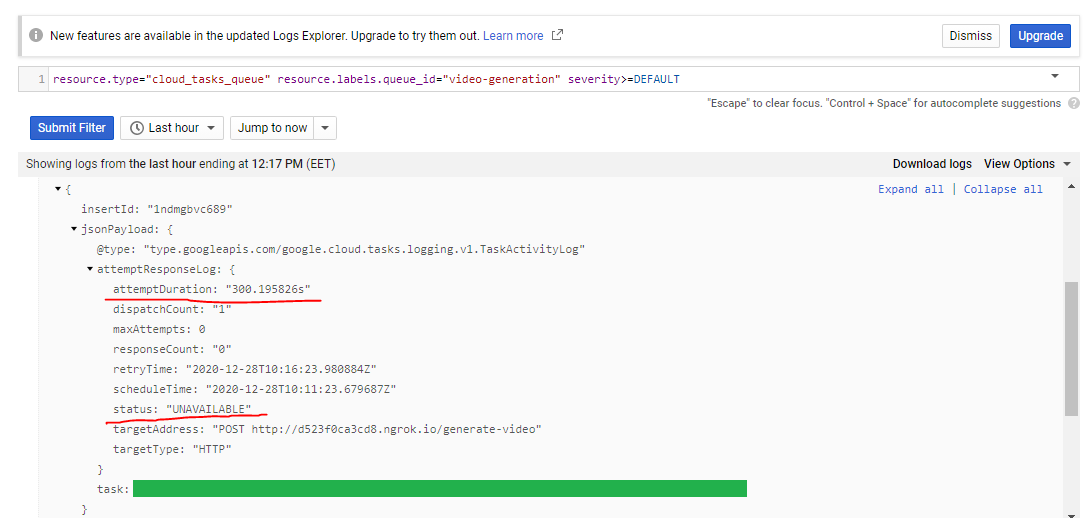
由于重新尝试收集更多的“证据”,屏幕截图/日志的时间可能有所不同。
所有运行不到5分钟的作业都已成功完成,不需要重新请求。我是不是遗漏了什么?
回答 1
Stack Overflow用户
发布于 2022-04-14 05:28:58
dispatchDeadline的财产为我服务。通过以下配置,超时时间增加到30分钟
const {CloudTasksClient} = require('@google-cloud/tasks');
class MyService {
createMyTask(...): Promise<any> {
    return new Promise((resolve, reject) => {
        const client = new CloudTasksClient();
        const payload = {...}
        const parent = client.queuePath(GCP_PROJECT_ID, GCP_SERVICE_LOCATION, GCP_TASK_QUEUE_NAME);
        const url = TASK_URL;
        const task = {
            httpRequest: {
                httpMethod: 'POST',
                headers: {
                    'Content-Type': 'application/json',
                    'Authorization': authToken
                },
                url,
                body: Buffer.from(JSON.stringify(payload)).toString('base64'),
            },
            dispatchDeadline: { seconds: 1800 },
        };
        const request = {parent, task};
        client.createTask(request).then((result: Array<any>) => {
            resolve(`task created: ${result[0].name}`);
        }).catch((err: Error) => {
            reject(`Create task Error: ${err}`);
        });
    });
}
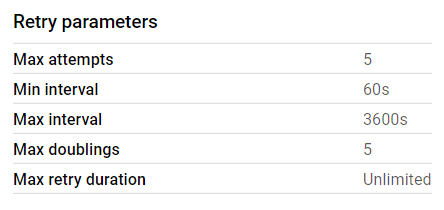
除了dispatchDeadline,您还需要为Google设置重试参数。
页面原文内容由Stack Overflow提供。腾讯云小微IT领域专用引擎提供翻译支持
原文链接:
https://stackoverflow.com/questions/65476395
复制相关文章
相似问题
腾讯云开发者

Copyright © 2013 - 2026 Tencent Cloud. All Rights Reserved. 腾讯云 版权所有
深圳市腾讯计算机系统有限公司 ICP备案/许可证号:粤B2-20090059  粤公网安备44030502008569号
腾讯云计算(北京)有限责任公司 京ICP证150476号 | 京ICP备11018762号