
背景img模糊- css
背景img模糊- css
提问于 2020-12-27 05:58:50
你好,亲爱的开发者,
我想模糊的背景图像在hovering.but上,它不工作。有人能帮我吗?我试过很多种方法。这是一个盒子,我用魔杖模糊背葫芦,显示悬停效果的文本。当前,当鼠标在方框上时,会发生以下情况:背景变得模糊,但文本不显示;或者:文本出现,但背景不会模糊。
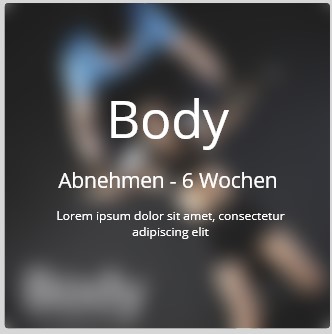
HTML
<div class="kursContainer">
        <div class="BodyKurs">
                <h1>Body</h1>
                <picture>
                    <img src="../Kurse/img/body.webp" alt="zumba">
                </picture>
            <div class="overlay">
                <h2>Body</h2>
                <h3>Abnehmen - 6 Wochen</h3>
                <h4>Lorem ipsum dolor sit amet, consectetur adipiscing     elit</h4>
            </div>
        </div>
CSS
.kursContainer {
  display: grid;
  justify-content: space-evenly;
  grid-template-columns: repeat(3, 1fr);
  grid-gap: 1em;
  justify-items: center;
  width: 122vmin;
  margin: 2vmin auto;
  align-items: center;

  grid-template-areas:
    "body body fatburn"
    "body body zumba"
    "yoga sixpack sixpack"
    "step sixpack sixpack"
    "backwork backwork tourde"
    "backwork backwork booty";
 }
 .BodyKurs{
   position: relative;
   width: 80vmin;
   height: 80vmin;
   border-radius: 10px;
   background-color: var(--schwarz);
   transition: transform 0.2s;
 }

.BodyKurs img{
   width: 80vmin;
   border-radius: 10px;
}
 .BodyKurs h1 {
   position: absolute;
   text-align: start;
   padding-left: 3vmin;
   bottom: 1vmin;
   color: var(--hellGrau);
   font-size: 8vmin;
 }

 .BodyKurs:hover {
    box-shadow: 0 0px 4.6px rgba(0, 0, 0, 0.278),
     0 0px 15.4px rgba(0, 0, 0, 0.411), 0 0px 69px rgba(0, 0, 0, 0.69);
   transform: scale(1.05);
   z-index: 2;
   cursor: pointer;
 }

  .overlay {
  width: 80vmin;
  height: 80vmin;
  position: absolute;
  text-align: center;
  bottom: 0;
  border-radius: 10px;
  color: var(--hellGrau);
  transition: 0.3s all;
  /* background: rgba(0, 0, 0, 0.2); */
  visibility: hidden;
   cursor: pointer;
  z-index: 5;
}
 .overlay:hover {
  visibility: visible;
}

picture:hover {
  filter: blur(5px);
}回答 2
Stack Overflow用户
回答已采纳
发布于 2020-12-27 06:37:39
您可以使用:not(:hover)样式
示例1:
.wrap:hover img,
.wrap:hover img:not(:hover) {
    filter: blur(3px);
}

.wrap {
    width: 300px;
}

span {
    position: absolute;
    color: #ffffff;
    z-index: 1;
    text-align: center;
    width: 300px;
    display: none;
}

.wrap:hover span {
    display: block;
}<div class='wrap'>
<span>
<h1>Lorem</h1>
<p>Text</p>
</span>
<img src="https://encrypted-tbn0.gstatic.com/images?q=tbn%3AANd9GcRK7bvAryKdY7JSlepTHatE1A4nAVU5lJXkdw&usqp=CAU"
width="300px">
</div>
这个例子更多一些CSS,但我认为它更容易理解。再次使用:not(:hover),但这次在span元素上使用。
示例2:
.wrap:hover img,
.wrap:hover span:not(:hover) {
    filter: blur(3px);
}

.wrap {
    position: relative;
    width: 300px;
    overflow: hidden;
}

span {
    position: absolute;
    top: 0px;
    right: 0px;
    bottom: 0px;
    left: 0px;
    color: #ffffff;
    z-index: 1;
    text-align: center;
    display: none;
}

.wrap:hover span {
    display: block;
}<div class='wrap'>
<span>
<h1>Lorem</h1>
<p>Text</p>
</span>
<img src="https://encrypted-tbn0.gstatic.com/images?q=tbn%3AANd9GcRK7bvAryKdY7JSlepTHatE1A4nAVU5lJXkdw&usqp=CAU"
width="300px">
</div>
Stack Overflow用户
发布于 2020-12-27 06:16:10
只需尝试从正文中移除图片标记,只需使用CSS背景图像属性即可。在rgba单元中设置重叠的背景颜色,如下所示:
<div class="kursContainer">
        <div class="BodyKurs">
                <h1>Body</h1>
            <div class="overlay">
                <h2>Body</h2>
                <h3>Abnehmen - 6 Wochen</h3>
                <h4>Lorem ipsum dolor sit amet, consectetur adipiscing     elit</h4>
            </div>
        </div>
</div>
CSS
.kursContainer {
  display: grid;
  justify-content: space-evenly;
  grid-template-columns: repeat(3, 1fr);
  grid-gap: 1em;
  justify-items: center;
  width: 122vmin;
  margin: 2vmin auto;
  align-items: center;

  grid-template-areas:
    "body body fatburn"
    "body body zumba"
    "yoga sixpack sixpack"
    "step sixpack sixpack"
    "backwork backwork tourde"
    "backwork backwork booty";
 }
 .BodyKurs{
   position: relative;
   width: 80vmin;
   height: 80vmin;
   border-radius: 10px;
   background-color: var(--schwarz);
   transition: transform 0.2s;
   background-image: url("../Kurse/img/body.webp");
 }

.BodyKurs img{
   width: 80vmin;
   border-radius: 10px;
}
 .BodyKurs h1 {
   position: absolute;
   text-align: start;
   padding-left: 3vmin;
   bottom: 1vmin;
   color: var(--hellGrau);
   font-size: 8vmin;
 }

 .BodyKurs:hover {
    box-shadow: 0 0px 4.6px rgba(0, 0, 0, 0.278),
     0 0px 15.4px rgba(0, 0, 0, 0.411), 0 0px 69px rgba(0, 0, 0, 0.69);
   transform: scale(1.05);
   z-index: 2;
   cursor: pointer;
 }

  .overlay {
  width: 80vmin;
  height: 80vmin;
  position: absolute;
  text-align: center;
  bottom: 0;
  border-radius: 10px;
  color: var(--hellGrau);
  transition: 0.3s all;
  /* background: rgba(255, 255, 255, 0.3); */
   cursor: pointer;
  z-index: 5;
}
 .overlay:hover {
  background-color: rgba(255, 255, 255, 0.5);
}

picture:hover {
  filter: blur(5px);
}页面原文内容由Stack Overflow提供。腾讯云小微IT领域专用引擎提供翻译支持
原文链接:
https://stackoverflow.com/questions/65463264
复制相关文章
相似问题
腾讯云开发者

Copyright © 2013 - 2026 Tencent Cloud. All Rights Reserved. 腾讯云 版权所有
深圳市腾讯计算机系统有限公司 ICP备案/许可证号:粤B2-20090059  粤公网安备44030502008569号
腾讯云计算(北京)有限责任公司 京ICP证150476号 | 京ICP备11018762号