
NPM安装-套接字超时阻塞的Docker
我有一个简单的Dockerfile,它正在运行节点,这是配置:
FROM node:latest

WORKDIR /usr/src/auth-starter-server

COPY ./ ./

RUN npm install

CMD ["sh"]
它正以这样的方式用于修船机-Compose.yml:
version: "3.8"

services:
  # Node Server
  auth-starter-server:
    container_name: server
    restart: unless-stopped
    build: ./
    command: npm run start:live
    working_dir: /usr/src/auth-starter-server
    ports:
      - "5000:5000"
    volumes:
      - ./:/usr/src/auth-starter-server
从一天到另一天,我无法再建立这个形象了。一开始就没有问题,
Creating network "react-auth-starter_default" with the default driver
Building auth-starter-server
Step 1/5 : FROM node:latest
 ---> 6f7f341ab8b8
Step 2/5 : WORKDIR /usr/src/auth-starter-server
 ---> Using cache
 ---> b25f7c08d3eb
Step 3/5 : COPY ./ ./
 ---> Using cache
 ---> 2a06e76bab32
Step 4/5 : RUN npm install
---> Running in 0034d6afa38e但是,当使用docker-compose up --build (或简单地说是docker build -t auth-starter-server .)构建时,它只是在'npm‘上超时,并返回以下错误:
npm notice
npm notice New minor version of npm available! 7.0.15 -> 7.3.0
npm notice Changelog: <https://github.com/npm/cli/releases/tag/v7.3.0>
npm notice Run `npm install -g npm@7.3.0` to update!
npm notice
npm ERR! code ERR_SOCKET_TIMEOUT
npm ERR! errno ERR_SOCKET_TIMEOUT
npm ERR! request to https://registry.companyregistry.com/yargs-parser/-/yargs-parser-13.1.2.tgz failed, reason: Socket timeout

npm ERR! A complete log of this run can be found in:
npm ERR!     /root/.npm/_logs/2020-12-21T15_37_42_509Z-debug.log
ERROR: Service 'auth-starter-server' failed to build : The command '/bin/sh -c npm install' returned a non-zero code: 1我注意到的是,它没有使用正式的npm注册中心,尽管它还没有被设置为默认注册表。在这里,npm配置(通过运行npm config ls -l获得):
cli configs
long = true
metrics-registry = "https://registry.npmjs.org/"
scope = ""
user-agent = "npm/6.14.9 node/v15.4.0 darwin x64"

; builtin config undefined
prefix = "/usr/local"

; default values
access = null
allow-same-version = false
also = null
always-auth = false
audit = true
audit-level = "low"
auth-type = "legacy"
before = null
bin-links = true
browser = null
ca = null
cache = "/Users/ale917k/.npm"
cache-lock-retries = 10
cache-lock-stale = 60000
cache-lock-wait = 10000
cache-max = null
cache-min = 10
cafile = undefined
cert = null
cidr = null
color = true
commit-hooks = true
depth = null
description = true
dev = false
dry-run = false
editor = "vi"
engine-strict = false
fetch-retries = 2
fetch-retry-factor = 10
fetch-retry-maxtimeout = 60000
fetch-retry-mintimeout = 10000
force = false
format-package-lock = true
fund = true
git = "git"
git-tag-version = true
global = false
global-style = false
globalconfig = "/usr/local/etc/npmrc"
globalignorefile = "/usr/local/etc/npmignore"
group = 20
ham-it-up = false
heading = "npm"
https-proxy = null
if-present = false
ignore-prepublish = false
ignore-scripts = false
init-author-email = ""
init-author-name = ""
init-author-url = ""
init-license = "ISC"
init-module = "/Users/ale917k/.npm-init.js"
init-version = "1.0.0"
json = false
key = null
legacy-bundling = false
link = false
local-address = undefined
loglevel = "notice"
logs-max = 10
; long = false (overridden)
maxsockets = 50
message = "%s"
; metrics-registry = null (overridden)
node-options = null
node-version = "15.4.0"
noproxy = null
offline = false
onload-script = null
only = null
optional = true
otp = null
package-lock = true
package-lock-only = false
parseable = false
prefer-offline = false
prefer-online = false
; prefix = "/usr/local/Cellar/node/15.4.0" (overridden)
preid = ""
production = false
progress = true
proxy = null
read-only = false
rebuild-bundle = true
registry = "https://registry.npmjs.org/"
rollback = true
save = true
save-bundle = false
save-dev = false
save-exact = false
save-optional = false
save-prefix = "^"
save-prod = false
scope = ""
script-shell = null
scripts-prepend-node-path = "warn-only"
searchexclude = null
searchlimit = 20
searchopts = ""
searchstaleness = 900
send-metrics = false
shell = "/bin/zsh"
shrinkwrap = true
sign-git-commit = false
sign-git-tag = false
sso-poll-frequency = 500
sso-type = "oauth"
strict-ssl = true
tag = "latest"
tag-version-prefix = "v"
timing = false
tmp = "/var/folders/2t/36_q44_s62d1b57hnl0l8khw0000gn/T"
umask = 18
unicode = true
unsafe-perm = true
update-notifier = true
usage = false
user = 0
; user-agent = "npm/{npm-version} node/{node-version} {platform} {arch} {ci}" (overridden)
userconfig = "/Users/ale917k/.npmrc"
version = false
versions = false
viewer = "man"
它之所以停止构建是因为它指向了错误的注册表吗?如果是这样,如何才能解决这一问题?
顺便提一下,我还注意到了关于npm更新的警告;如何在码头映像中更新npm包?
任何答案都是非常感谢的,所以感谢您的投入!
回答 6
Stack Overflow用户
发布于 2020-12-23 09:39:08
发现我公司的服务器坏了,关闭了相关的注册中心和类似的系统。
这导致无法处理包安装,因为出于某种原因,我似乎有来自公司自定义注册表的依赖剩饭。
为了解决这一问题,我:
- 首先创建不同的npmrc配置文件,以确保在处理特定项目时使用适当的注册表- Ref可以找到这里。
- 然后删除
node_modules和package-lock.json以清理剩菜 - 使用https://registry.npmjs.org/设置指向开放源代码注册表(
npmrc <profile>)的配置文件。 - (可选):通过简单运行
npmrc检查活动注册表配置文件 - 用
npm install重新安装所有软件包 - 用
docker-compose up --build重建对接图像,这就完成了工作
希望这能对将来的人有所帮助。
Stack Overflow用户
发布于 2020-12-22 18:50:03
我遇到了同样的问题,后来意识到我有一个坏的网络连接,这导致了ERR_SOCKET_TIMEOUT。
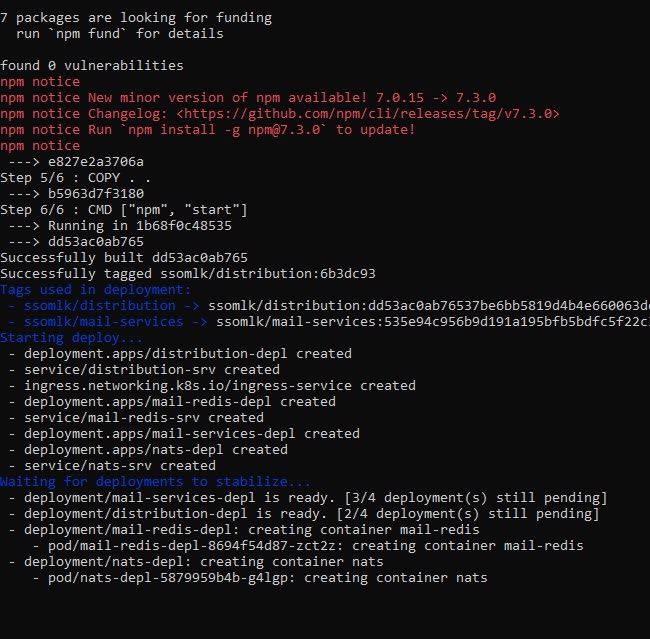
它不应该运行npm install -g npm@7.3.0来更新!就像你在下面看到的,它仍然在运行。
Stack Overflow用户
发布于 2021-09-19 05:22:23
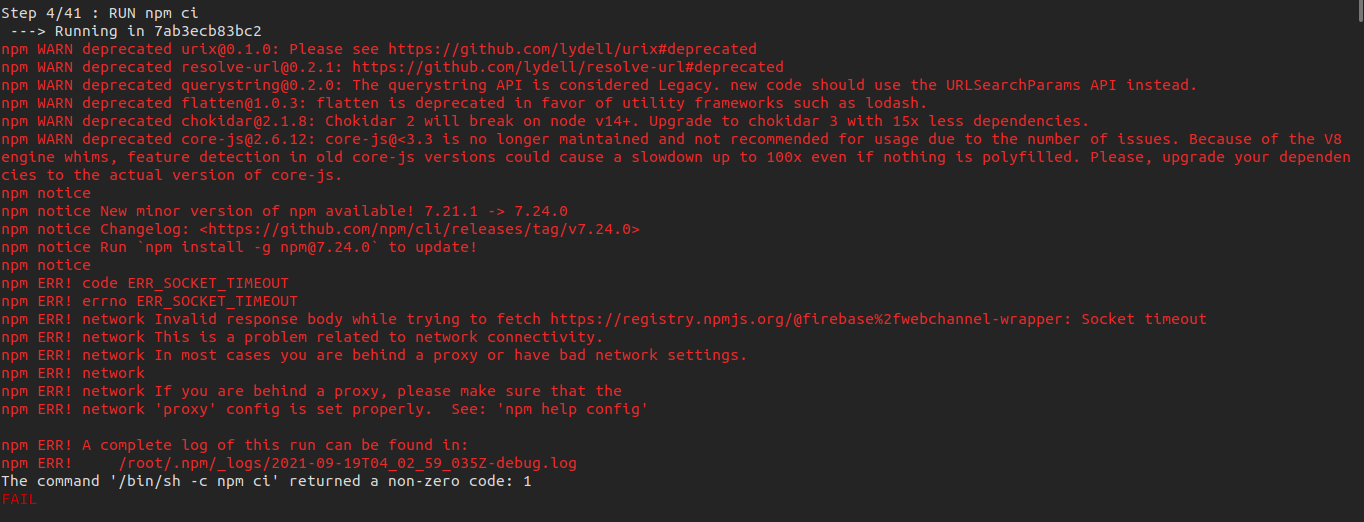
我是如何解决这个问题的。
我注意到,在package-lock.json以这种方式修补之后,问题就开始了。
当您尝试在PC上本地安装时,您将得到:
pm WARN old lockfile
npm WARN old lockfile The package-lock.json file was created with an old version of npm,
npm WARN old lockfile so supplemental metadata must be fetched from the registry.
npm WARN old lockfile
npm WARN old lockfile This is a one-time fix-up, please be patient...
npm WARN old lockfile
....
# installs packages and finish在码头,npm ci一直在计时。
溶液
NB:确保您在PC上运行最新的npm和node版本。
sudo apt install npm nodejs不会割断它。
升级节点版本:
- 安装软件包:
sudo apt install npm nodejs - 运行:
curl -sL https://deb.nodesource.com/setup_14.x | sudo -E bash - - 然后:
sudo apt-get install -y nodejs - 然后升级NPM:
sudo npm install -g npm@latest
升级后的重新安装包如下所示:
- 删除
package-lock.json - 删除node_modules
- 用
npm install重新安装软件包
现在管理好你的码头。
https://stackoverflow.com/questions/65396537
复制相似问题
腾讯云开发者

Copyright © 2013 - 2026 Tencent Cloud. All Rights Reserved. 腾讯云 版权所有
深圳市腾讯计算机系统有限公司 ICP备案/许可证号:粤B2-20090059  粤公网安备44030502008569号
腾讯云计算(北京)有限责任公司 京ICP证150476号 | 京ICP备11018762号