
离子复选框不能正确检查
我对角质/离子型很陌生
我有父复选框,在单击它时,我希望启用它的所有子项的勾选,反之亦然。
下面是我的代码,我已经很累了,但它不起作用:
home.html
<form [formGroup]="form">
<ion-item>
    <ion-checkbox slot="start" formControlName="AllBulkhead" (ionChange)="checkBoxAllLongiClick($event)">
    </ion-checkbox>
    <ion-label>All longitudinal bulkheads</ion-label>
  </ion-item>
  <div class="subCheckbox">
    <ion-item>
      <ion-checkbox slot="start" formControlName="longiBulkhead" (ionChange)="checkBoxLongiClick($event)">
      </ion-checkbox>
      <ion-label>Longitudinal bulkheads</ion-label>
    </ion-item>
    <ion-item>
      <ion-checkbox slot="start" formControlName="outerBulkhead" (ionChange)="checkBoxOuterLongiClick($event)">
      </ion-checkbox>
      <ion-label>Outer longitudinal bulkheads</ion-label>
    </ion-item>
    <ion-item>
      <ion-checkbox slot="start" formControlName="innerBulkhead" (ionChange)="checkBoxInnerLongiClick($event)">
      </ion-checkbox>
      <ion-label>Inner longitudinal bulkheads</ion-label>
    </ion-item>
  </div>
</form>
home.ts
constructor(private _fb: FormBuilder){
this.form = this._fb.group({
      AllBulkhead: false,
      longiBulkhead: false,
      outerBulkhead: false,
      innerBulkhead: false,
});
}

checkBoxAllLongiClick(e) {
    if (e.currentTarget.checked) {
      this.form.controls['longiBulkhead'].patchValue(true);
      this.form.controls['outerBulkhead'].patchValue(true);
      this.form.controls['innerBulkhead'].patchValue(true);
    }
    else {
      this.form.controls['longiBulkhead'].patchValue(false);
      this.form.controls['outerBulkhead'].patchValue(false);
      this.form.controls['innerBulkhead'].patchValue(false);
    }
  }

  checkBoxLongiClick(e){
    this.checkBoxSubLongiClick();
  }

  checkBoxOuterLongiClick(e){
    this.checkBoxSubLongiClick();
  }

  checkBoxInnerLongiClick(e){
    this.checkBoxSubLongiClick();
  }

  checkBoxSubLongiClick() {
    if (this.form.get('longiBulkhead').value &&
      this.form.get('outerBulkhead').value &&
      this.form.get('innerBulkhead').value) {
      this.form.controls['AllBulkhead'].patchValue(true);
    } else {
      this.form.controls['AllBulkhead'].patchValue(false);
    }
}我想要做的是,当我单击AllBulkhead复选框时,我想选中/取消选中它的所有3个子复选框,即。
下面是我的代码在取消3个子复选框中的任何一个复选框时会产生意外行为,因此它不会取消父复选框,即AllBulkhead复选框。
我在哪里出了错,有人能帮我吗?,提前谢谢你!
回答 3
Stack Overflow用户
发布于 2020-12-25 15:31:58
我认为问题是,更改“所有”选项也会引发其他选项的更改,而其他选项同时试图再次更改“所有”选项。注意到这一点并不容易,但是如果添加几个console.log('...');,就会发现更新选项状态的方法调用的次数比预期的要多几倍。
处理此问题的一个更好的方法是将"all“选项保留在表单之外。这背后的原因是“所有”选项实际上不是一个选项,而是基于其他选项的状态的一个副作用。通过将其置于表单之外,我们可以控制何时以及如何更新它,而不会在幕后触发另一个选项更改的选项上出现任何与更改相关的问题。
还请注意,在离子4.1.0中,ion-checkbox组件具有一个indeterminate状态,对于这种场景可能很有用。一个常见的UI/UX实践是,如果您只选择了几个选项中的一些(但不是所有选项),而不是将" all“选项显示为未选中,它将显示在一个不确定的状态中。
不管怎样,请看一下这个工作Stackblitz演示
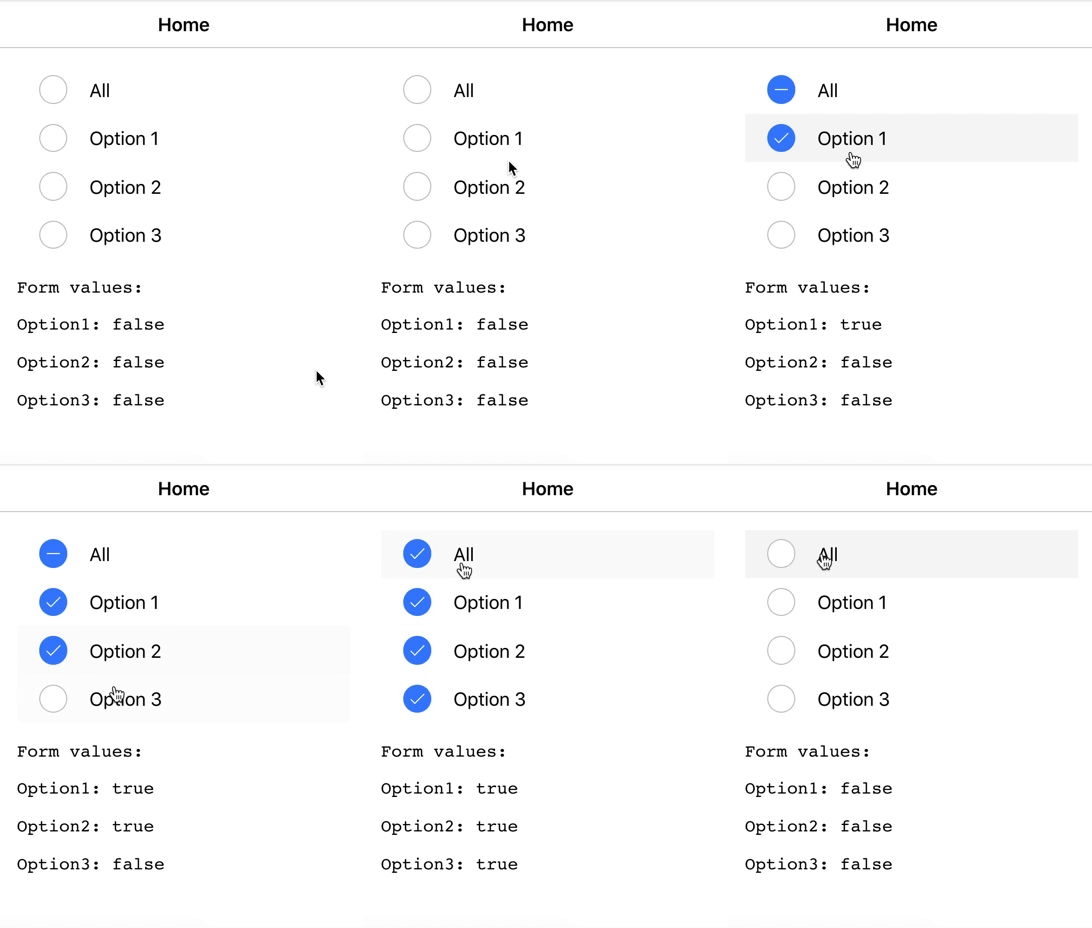
就像您在演示中看到的那样,我将"all“选项的状态保留在表单之外:
  public form: FormGroup;

  public allOptionStateChecked = false;
  public allOptionStateIndeterminate = false;

  constructor(private formBuilder: FormBuilder) {}

  ngOnInit() {
    this.form = this.formBuilder.group({
      option1: false,
      option2: false,
      option3: false
    });
}我使用这些属性手动设置它的状态(也使用click处理程序而不是ionChange):
<ion-item (click)="onAllChange()" lines="none">
  <ion-checkbox
    slot="start"
    [checked]="allOptionStateChecked"
    [indeterminate]="allOptionStateIndeterminate">
  </ion-checkbox>
  <ion-label>All</ion-label>
</ion-item>
我还有一些帮助方法,可以告诉我是否选中了所有或部分选项:
  private allChecked(): boolean {
    const option1Value = this.form.get("option1").value;
    const option2Value = this.form.get("option2").value;
    const option3Value = this.form.get("option3").value;

    return option1Value && option2Value && option3Value;
  }

  private someChecked(): boolean {
    const option1Value = this.form.get("option1").value;
    const option2Value = this.form.get("option2").value;
    const option3Value = this.form.get("option3").value;

    return !this.allChecked() && (option1Value || option2Value || option3Value);
  }
在所有这些情况下,只需要做两件事:
- 更改任何其他选项时,更新“所有”选项状态
- 单击"all“选项时更新其余选项。
  public onAllChange(): void {
    const nextValue = this.allChecked() ? false : true;

    this.form.get("option1").patchValue(nextValue);
    this.form.get("option2").patchValue(nextValue);
    this.form.get("option3").patchValue(nextValue);
  }

  public onOptionChange(): void {
    this.allOptionStateChecked = this.allChecked();
    this.allOptionStateIndeterminate = this.someChecked();
}请注意,我没有在allOptionStateChecked方法中更新onAllChange()和allOptionStateIndeterminate。由于"all“选项的状态是基于其他选项的状态的副作用,因此它的状态将在onOptionChange()中更新。
编辑
基于您的注释,我已经更新了Stackblitz演示,使其还包括"all“选项,作为表单的一部分,但是,与您的代码的不同之处是,我手动设置了"all”选项的状态,而不是使用类似于formControlName="all"的东西将其绑定到视图
  ...

  ngOnInit() {
    this.form = this.formBuilder.group({
      all: false, // <-- added this to the form
      option1: false,
      option2: false,
      option3: false
    });
  }

  ...

  public onOptionChange(): void {
    this.allOptionStateChecked = this.allChecked();
    this.allOptionStateIndeterminate = this.someChecked();

    // Added this line at the end of the method!
    this.form.get("all").patchValue(this.allOptionStateChecked);
}Stack Overflow用户
发布于 2020-12-21 16:51:28
在(click)中使用(ionChange)而不是(ionChange)。由于ionChange是在选中属性更改时发出的,因此更改复选框表单值也会触发它们的ionChange (这是不必要的),并创建这种意外行为。
Stack Overflow用户
发布于 2020-12-22 13:21:14
(ionChange)实际上是一个很好的实践。
作为一种快速解决方案,我将通过每次更改复选框来重新构建表单。
在.ts中:
private AllBulkhead = false;
private ..... [add all your checkbox values here]

constructor(private _fb: FormBuilder){
    this.buildForm();
}

buildForm() {
    this.form = this._fb.group({
          AllBulkhead: this.AllBulkhead,
          longiBulkhead: this.longiBulkhead,
          outerBulkhead: this.outerBulkhead,
          innerBulkhead: this.innerBulkhead,
    });
}

checkboxClickHandler(var, value) {
    // this is called with (ionChange) from html
    // change the value ( this.AllBulkhead = value )
    this.buildForm() // rebuild form with correct values
}
祝好运!
https://stackoverflow.com/questions/65322552
复制相似问题
腾讯云开发者

Copyright © 2013 - 2026 Tencent Cloud. All Rights Reserved. 腾讯云 版权所有
深圳市腾讯计算机系统有限公司 ICP备案/许可证号:粤B2-20090059  粤公网安备44030502008569号
腾讯云计算(北京)有限责任公司 京ICP证150476号 | 京ICP备11018762号