
在Android 6-7中,内阴影有错误的颜色
在Android 6-7中,内阴影有错误的颜色
提问于 2020-12-04 20:28:10
问候所有的我需要帮助,以解决问题的形状,梯度。我将主题与父↓结合使用
<style name="Theme.MaterialComponents.DayNight.NoActionBar.Bridge" parent="Theme.MaterialComponents.Light.NoActionBar.Bridge" />

<style name="Theme.Movie42" parent="Theme.MaterialComponents.DayNight.NoActionBar.Bridge">
我在↓里面有一个渐变的形状
<?xml version="1.0" encoding="utf-8"?><layer-list xmlns:android="http://schemas.android.com/apk/res/android">
<item>
    <shape android:shape="rectangle">

        <gradient
            android:angle="90"
            android:centerColor="@color/center_of_shape"
            android:centerX="0.6"
            android:endColor="@color/end_of_shape"
            android:startColor="@color/start_of_shape"
            android:type="linear" />
    </shape>
</item>
我用它在imageView↓上制作内部阴影
imageView.background =
        ContextCompat.getDrawable(application.applicationContext, itemMovieData.drawable)
imageView.setImageDrawable(
        ContextCompat.getDrawable(
            application.applicationContext,
            R.drawable.shape
        )
)当我在Android 11(仿真器)上运行应用程序时,每个人看起来都很好,但是当它运行在带有、Android 6或7 (可能是其他版本)的真实设备上时,“内阴影”有一个白色,也就是说,我实际上不需要↓。
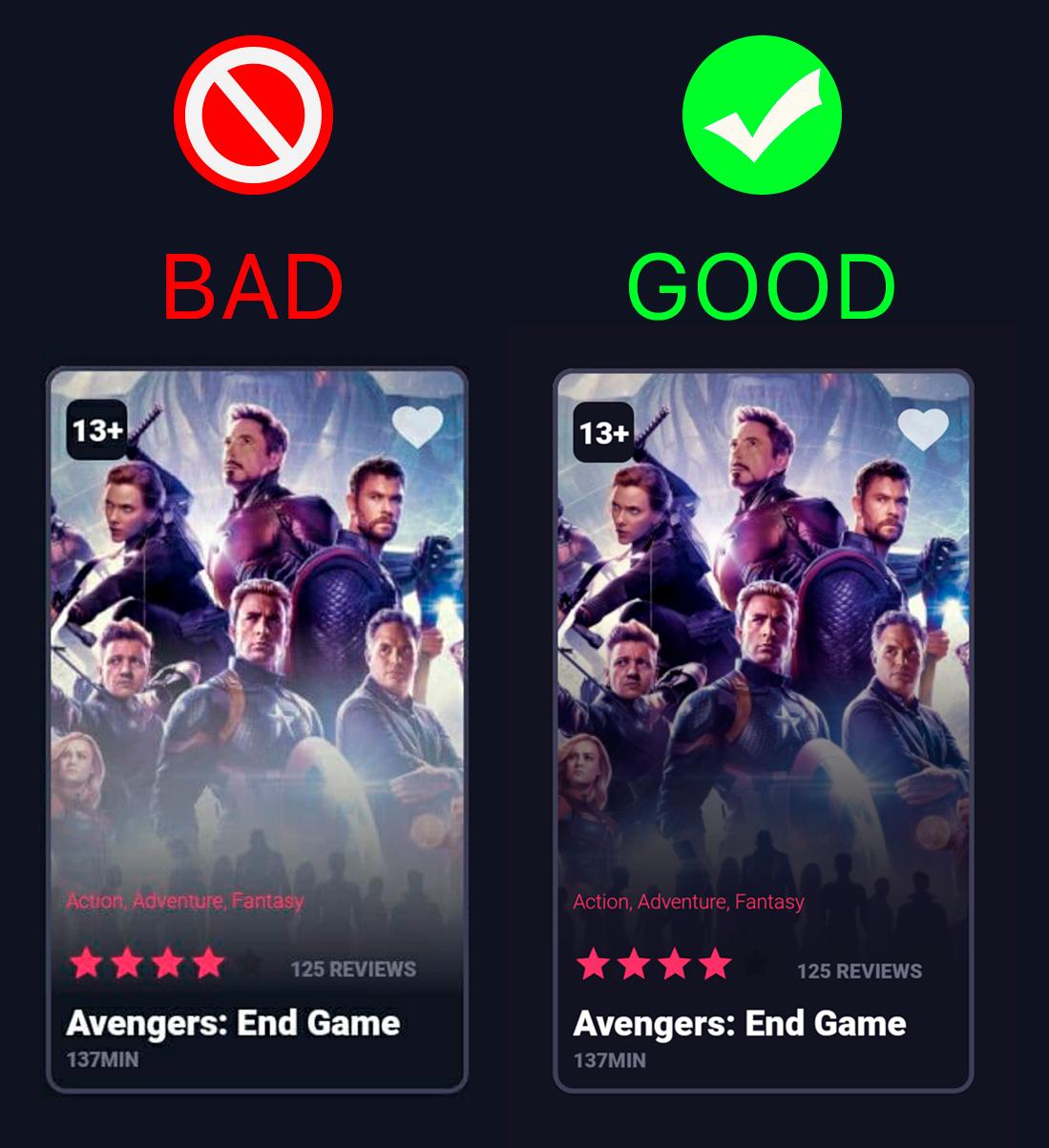
如何解决这个问题?使阴影“再次伟大”,我的意思是在api 23/24↑上使它变暗。
回答 1
Stack Overflow用户
发布于 2020-12-05 23:09:44
这是答案。颜色00FFFFFFF和00000000不是相同的颜色。是的,它们都是100%透明的,在屏幕上看起来是一样的。在android 6-7中,你选择哪一种颜色很重要。所以我选择了错误的颜色,把我的影子变成白色。我很惭愧
页面原文内容由Stack Overflow提供。腾讯云小微IT领域专用引擎提供翻译支持
原文链接:
https://stackoverflow.com/questions/65150280
复制相关文章
相似问题
腾讯云开发者

Copyright © 2013 - 2026 Tencent Cloud. All Rights Reserved. 腾讯云 版权所有
深圳市腾讯计算机系统有限公司 ICP备案/许可证号:粤B2-20090059  粤公网安备44030502008569号
腾讯云计算(北京)有限责任公司 京ICP证150476号 | 京ICP备11018762号