
上下文add_basemap推断缩放级别无效,并且更改缩放参数不会修复问题
上下文add_basemap推断缩放级别无效,并且更改缩放参数不会修复问题
提问于 2020-11-30 10:19:41
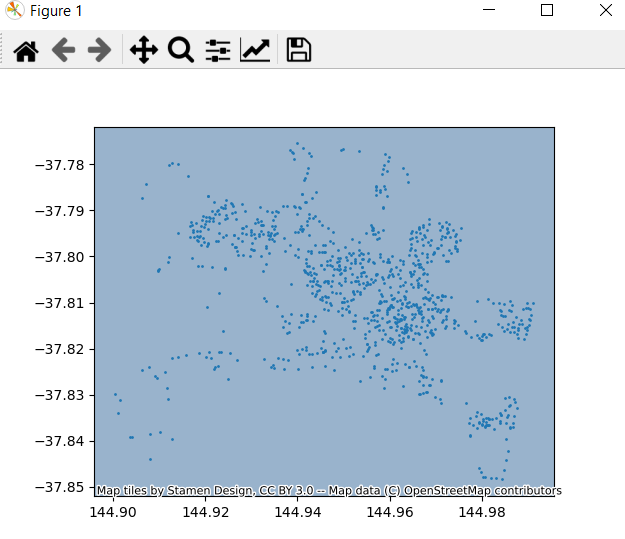
我想把墨尔本的背景地图绘制在地产地址的绘制点后面。。
我使用了以下代码:
import pandas as pd
import geopandas as gpd
from shapely.geometry import shape
import matplotlib.pyplot as plt
import contextily

MELB_PROPERTY_DATA = "https://data.melbourne.vic.gov.au/resource/imwx-szwr.json"

properties = pd.read_json(MELB_PROPERTY_DATA)
properties['the_geom'] = properties['the_geom'].apply(shape)
properties_geo = gpd.GeoDataFrame(properties).set_geometry('the_geom')

ax = properties_geo.plot(markersize=1)
contextily.add_basemap(ax)
plt.show()
在contextily.add_basemap(ax)行中,我得到了以下UserWarning。
contextily\tile.py:632: UserWarning:推断的缩放级别30对于当前的贴片提供程序无效(有效缩放:0-18)。
我读了上下文文档,但他们没有解决我的问题。
将行更改为contextily.add_basemap(ax,zoom=5)将删除UserWarning,但仍未显示背景映射。类似的问题也曾被问过,但我不能把它们改造成我的问题。
我觉得我也为这个简单的任务导入了大量的库,所以如果您有任何建议对它进行微调,这也是值得赞赏的。
回答 1
Stack Overflow用户
回答已采纳
发布于 2020-11-30 21:09:41
我从swatchai的评论中认识到,坐标参考系统(CRS)从来没有被定义过,从而解决了这个问题。
最后的代码,请参见下面的代码,并注释掉错误的行以显示差异。
import pandas as pd
import geopandas as gpd
from shapely.geometry import shape
import matplotlib.pyplot as plt
import contextily

MELB_PROPERTY_DATA = "https://data.melbourne.vic.gov.au/resource/imwx-szwr.json"

properties = pd.read_json(MELB_PROPERTY_DATA)
properties['the_geom'] = properties['the_geom'].apply(shape)

# properties_geo = gpd.GeoDataFrame(properties).set_geometry('the_geom')
properties_geo = gpd.GeoDataFrame(properties, geometry='the_geom', crs='EPSG:4326')

ax = properties_geo.plot(markersize=1)

# contextily.add_basemap(ax)
contextily.add_basemap(ax, crs=properties_geo.crs.to_string())

plt.show()页面原文内容由Stack Overflow提供。腾讯云小微IT领域专用引擎提供翻译支持
原文链接:
https://stackoverflow.com/questions/65071709
复制相关文章
相似问题
腾讯云开发者

Copyright © 2013 - 2026 Tencent Cloud. All Rights Reserved. 腾讯云 版权所有
深圳市腾讯计算机系统有限公司 ICP备案/许可证号:粤B2-20090059  粤公网安备44030502008569号
腾讯云计算(北京)有限责任公司 京ICP证150476号 | 京ICP备11018762号