
手机和平板电脑的不同布局(1 /2列)
手机和平板电脑的不同布局(1 /2列)
提问于 2020-11-23 15:38:24
我试图在运行时有一个不同的布局,这取决于热设备、手机或平板电脑。
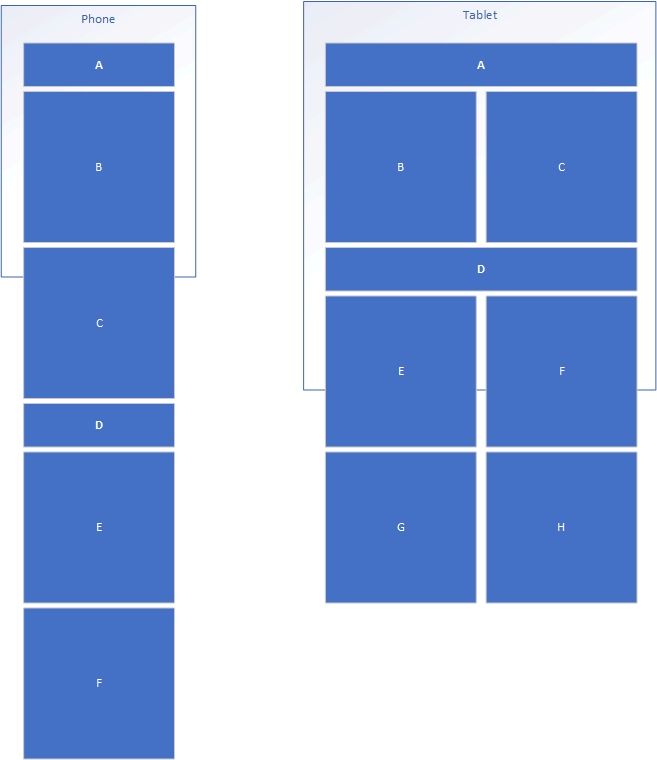
我希望在平板电脑上有2列布局,在手机上保持一列布局。
我还想有一些控件在表设备上跨越2列,而在电话设备上布局应该是单列,我的意思是显示许多元素(3/4整页高度.)。
预期布局:
回答 1
Stack Overflow用户
回答已采纳
发布于 2020-11-23 23:49:37
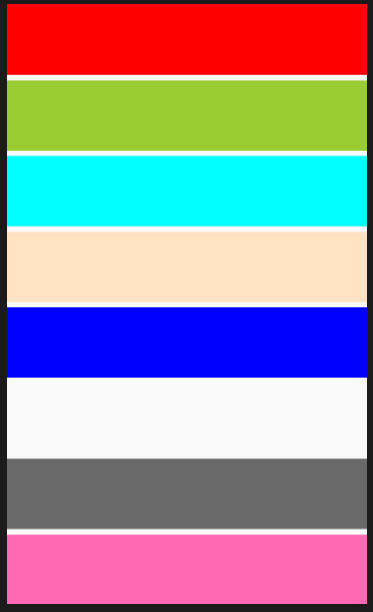
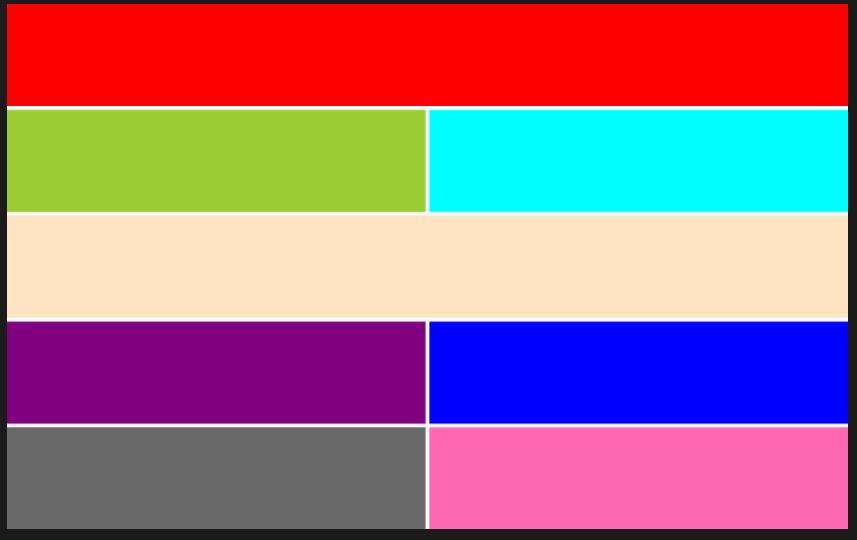
您可以通过利用OnIdiom来实现它,下面是xaml中的一个示例:(还请注意ColumnDefinitions和RowDefinitions的新简化语法)
<Grid RowDefinitions="*,*,*,*,*,*,*,auto"
      ColumnDefinitions="50*,50*">

<BoxView BackgroundColor="Red"
             Grid.Row="0"
             Grid.Column="0"
             Grid.ColumnSpan="2"/>

    <BoxView BackgroundColor="YellowGreen"
             Grid.Row="1"
             Grid.Column="0"
             Grid.ColumnSpan="{OnIdiom Phone=2,
                                       Tablet=1}"/>

    <BoxView BackgroundColor="Aqua"
             Grid.Row="{OnIdiom Phone=2,
                                Tablet=1}"
             Grid.Column="{OnIdiom Phone=0,
                                   Tablet=1}"
             Grid.ColumnSpan="{OnIdiom Phone=2,
                                       Tablet=1}"/>

    <BoxView BackgroundColor="Bisque"
             Grid.Row="{OnIdiom Phone=3,
                                Tablet=2}"
             Grid.Column="0"
             Grid.ColumnSpan="2"/>

    <BoxView BackgroundColor="Purple"
             Grid.Row="{OnIdiom Phone=4,
                                Tablet=3}"
             Grid.Column="0"
             Grid.ColumnSpan="{OnIdiom Phone=2,
                                       Tablet=1}"/>

    <BoxView BackgroundColor="Blue"
             Grid.Row="{OnIdiom Phone=4,
                                Tablet=3}"
             Grid.Column="{OnIdiom Phone=0,
                                   Tablet=1}"
             Grid.ColumnSpan="{OnIdiom Phone=2,
                                       Tablet=1}"/>

    <BoxView BackgroundColor="DimGray"
             Grid.Row="{OnIdiom Phone=6,
                                Tablet=4}"
             Grid.Column="0"
             Grid.ColumnSpan="{OnIdiom Phone=2,
                                       Tablet=1}"/>

    <BoxView BackgroundColor="HotPink"
             Grid.Row="{OnIdiom Phone=7,
                                Tablet=4}"
             Grid.Column="{OnIdiom Phone=0,
                                   Tablet=1}"
             Grid.ColumnSpan="{OnIdiom Phone=2,
                                       Tablet=1}"/>
</Grid>
Phone
片
页面原文内容由Stack Overflow提供。腾讯云小微IT领域专用引擎提供翻译支持
原文链接:
https://stackoverflow.com/questions/64971501
复制相关文章
相似问题
腾讯云开发者

Copyright © 2013 - 2026 Tencent Cloud. All Rights Reserved. 腾讯云 版权所有
深圳市腾讯计算机系统有限公司 ICP备案/许可证号:粤B2-20090059  粤公网安备44030502008569号
腾讯云计算(北京)有限责任公司 京ICP证150476号 | 京ICP备11018762号