
将反应网格布局放入具有标题和行的表中。
将反应网格布局放入具有标题和行的表中。
提问于 2020-11-22 18:25:15
我使用的是与Laravel 7,AdminLTE和我有一个很好的结果的反应网格布局:
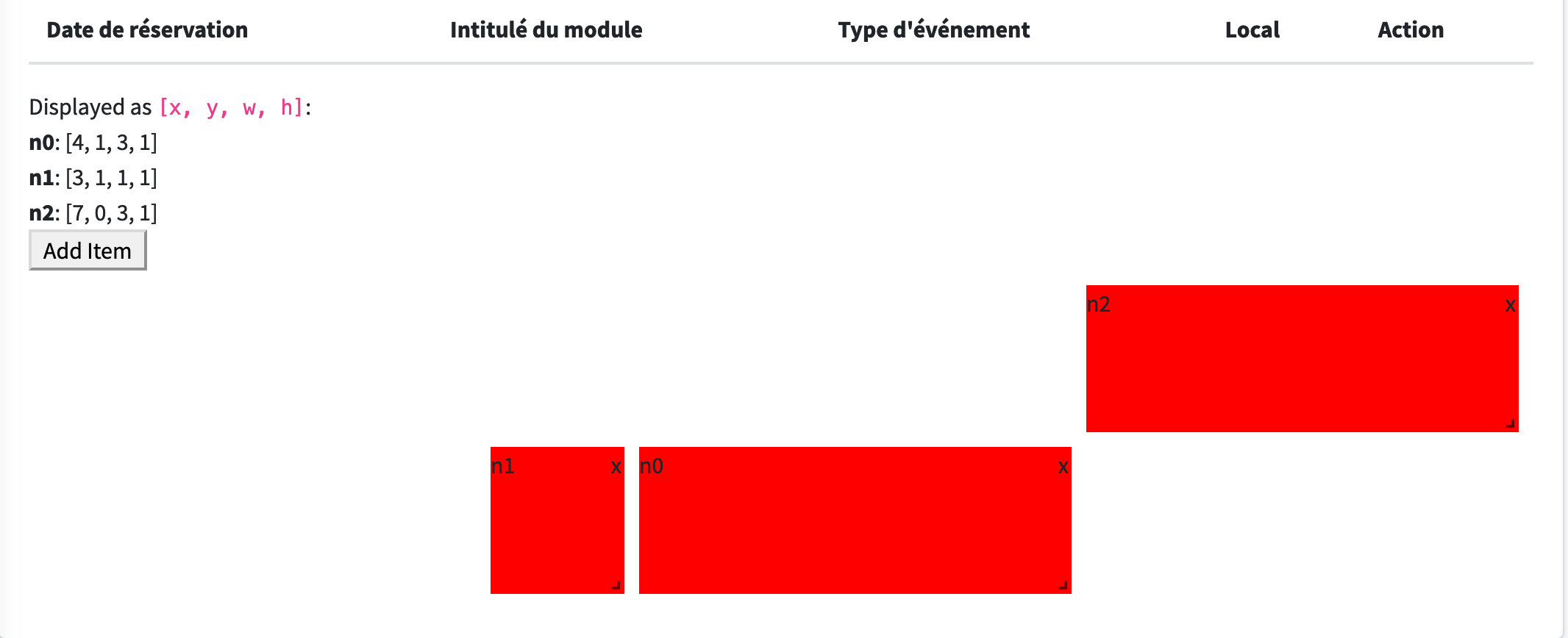
我想把这个结果放在如下所示的表中,以便有标题和行:

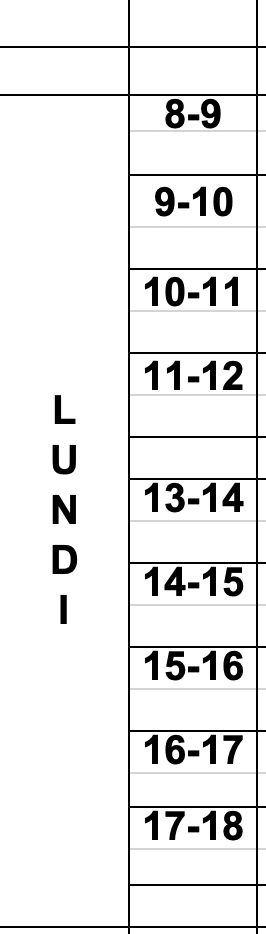
你建议我在reactjs还是简单html中这样做?
如果你有一个样本代码,我很感兴趣。
这是我的密码:
    import React from 'react';
import { WidthProvider, Responsive } from "react-grid-layout";
import _ from "lodash";

const ResponsiveReactGridLayout = WidthProvider(Responsive);
/**
 * This layout demonstrates how to use a grid with a dynamic number of elements.
 */
export class AddRemoveLayout extends React.PureComponent {
    static defaultProps = {
        className: "layout",
        cols: { lg: 7, md: 10, sm: 6, xs: 4, xxs: 2 },
        rowHeight: 100,
        preventCollision: true,
        verticalCompact: false // //you may want to turn off vertical compacting so items can be placed anywhere in the grid. Set the property `verticalCompact` to `false` to achieve this effect.

    };

    onLayoutChange(layout) {
        /*eslint no-console: 0*/
        saveToLS("layout", layout);
        this.setState({ layout });
        this.props.onLayoutChange(layout); // updates status display
        if (global.localStorage) {
            try {
              ls = JSON.parse(global.localStorage.getItem("rgl-7")) || {};
              console.log(ls);
            } catch (e) {
              /*Ignore*/
            }
      }
    }

    constructor(props) {
        super(props);

        this.state = {
            items: [0, 1, 2, 3, 4].map(function (i, key, list) {
                return {
                    i: i.toString(),
                    x: i * 2,
                    y: 0,
                    w: 2,
                    h: 2,
                    //add: false                    //You can add an item by clicking here, too
                };
            }),
            newCounter: 0
        };

        this.onAddItem = this.onAddItem.bind(this);
        this.onBreakpointChange = this.onBreakpointChange.bind(this);
    }

    createElement(el) {
        const removeStyle = {
            position: "absolute",
            right: "2px",
            top: 0,
            cursor: "pointer"
        };
        const i = el.add ? "+" : el.i;
        return (
            <div key={i} data-grid={el}>
                {el.add ? (
                    <span
                        className="add text"
                        onClick={this.onAddItem}
                        title="You can add an item by clicking here, too."
                    >
                        Add +
                    </span>
                ) : (
                        <span className="text">{i}</span>
                    )}
                <span
                    className="remove"
                    style={removeStyle}
                    onClick={this.onRemoveItem.bind(this, i)}
                >
                    x
        </span>
            </div>
        );
    }

    onAddItem() {
        /*eslint no-console: 0*/
        console.log("adding", "n" + this.state.newCounter);
        this.setState({
            // Add a new item. It must have a unique key!
            items: this.state.items.concat({
                i: "n" + this.state.newCounter,
                x: (this.state.items.length * 2) % (this.state.cols || 12),
                y: Infinity,
                w: 2,
                h: 2
            }),
            // Increment the counter to ensure key is always unique.
            newCounter: this.state.newCounter + 1
        });
    }

    // We're using the cols coming back from this to calculate where to add new items.
    onBreakpointChange(breakpoint, cols) {
        this.setState({
            breakpoint: breakpoint,
            cols: cols
        });
    }

    onLayoutChange(layout) {
        this.props.onLayoutChange(layout);
        this.setState({ layout: layout });
    }

    onRemoveItem(i) {
        console.log("removing", i);

        this.setState({ items: _.reject(this.state.items, { i: i }) });
        console.log(this.state);//
    }

    render() {
        return (
            <div>
                <button onClick={this.onAddItem}>Add Item</button>
                <ResponsiveReactGridLayout
                    onLayoutChange={this.onLayoutChange}
                    onBreakpointChange={this.onBreakpointChange}
                    {...this.props}
                >
                    {_.map(this.state.items, el => this.createElement(el))}
                </ResponsiveReactGridLayout>
            </div>
        );
    }
}
提前谢谢你。
回答 1
Stack Overflow用户
回答已采纳
发布于 2020-11-22 19:13:53
没有任何css或主题,有样例有效载荷。这通常是生成一个非常基本的表的方式。
 const dates = [ '14/9', '16/9', '20/9', '30/0' ]

 return ( <table>
           <tr>
              {dates.map((date, index) => <th>{index}</th>}
           </tr>

         <tr>
          { dates.map(date => <td>{item</td> }
         </tr>

</table> )页面原文内容由Stack Overflow提供。腾讯云小微IT领域专用引擎提供翻译支持
原文链接:
https://stackoverflow.com/questions/64957873
复制相关文章
相似问题
腾讯云开发者

Copyright © 2013 - 2026 Tencent Cloud. All Rights Reserved. 腾讯云 版权所有
深圳市腾讯计算机系统有限公司 ICP备案/许可证号:粤B2-20090059  粤公网安备44030502008569号
腾讯云计算(北京)有限责任公司 京ICP证150476号 | 京ICP备11018762号