
Powershell从日志文件中提取TCP端口以更新防火墙规则
Powershell从日志文件中提取TCP端口以更新防火墙规则
提问于 2020-11-18 00:18:36
每次我们的FlexLm服务器重新启动时,许可服务都会重置它们的输入TCP端口。我希望从日志文件中提取新的TCP端口,以更新防火墙规则。我可以提取端口号,但是脚本不喜欢单引号分隔符。
$IdeateLog = "C:\Autodesk\Network License Manager\ideate.log"
$LogTxt= "*(lmgrd) ideate using TCP-port*"

$content = Get-Content $IdeateLog
$content | foreach {
        if ($_ -ilike $LogTxt){
        $IdeatePortTxt = $_ -replace "ideate using TCP-port ",""
        $IdeatePortTxtLen = $IdeatePortTxt.Length - 17
        $IdeatePortNo = "'"+ $IdeatePortTxt.Substring(17, $IdeatePortTxtLen) + "'"
        }
      }
$tempPort = '65443'

get-netfirewallrule -DisplayName "*LMtools - Ideate*" | where {$_.Direction -eq "Inbound"} | set-netfirewallrule -Action Allow -Protocol TCP -LocalPort @($IdeatePortNo)
如果使用$tempPort变量,防火墙规则将更新,但在使用$IdeatePortNo变量时返回错误。
设置网络防火墙规则:端口无效。当协议是TCP或UDP时,允许单独的端口或范围。另外,防火墙规则允许使用以下端口关键字: RPC、RPCEPMap、Teredo、IPHTTPSIn、IPHTTPSOut、PlayToDiscovery。U:\Scripts\UpdateIdeateFirewallRule.ps1:15 char:94
- ..。入站“}_
- CategoryInfo          : InvalidArgument: (MSFT\_NetFirewal...ystemName = ""):root/standardcimv2/MSFT\_NetFirewallRule) [Set-NetFirewallRule], CimException
- FullyQualifiedErrorId : HRESULT 0x80070057,Set-NetFirewallRule
日志文件摘录
7:21:56 (lmgrd) -----------------------------------------------
 7:21:56 (lmgrd)   Please Note:
 7:21:56 (lmgrd)
 7:21:56 (lmgrd)   This log is intended for debug purposes only.
 7:21:56 (lmgrd)   In order to capture accurate license
 7:21:56 (lmgrd)   usage data into an organized repository,
 7:21:56 (lmgrd)   please enable report logging. Use Flexera's
 7:21:56 (lmgrd)   software license administration  solution,
 7:21:56 (lmgrd)   FlexNet Manager, to  readily gain visibility
 7:21:56 (lmgrd)   into license usage data and to create
 7:21:56 (lmgrd)   insightful reports on critical information like
 7:21:56 (lmgrd)   license availability and usage. FlexNet Manager
 7:21:56 (lmgrd)   can be fully automated to run these reports on
 7:21:56 (lmgrd)   schedule and can be used to track license
 7:21:56 (lmgrd)   servers and usage across a heterogeneous
 7:21:56 (lmgrd)   network of servers including Windows NT, Linux
 7:21:56 (lmgrd)   and UNIX.
 7:21:56 (lmgrd)
 7:21:56 (lmgrd) -----------------------------------------------
 7:21:56 (lmgrd)
 7:21:56 (lmgrd)
 7:21:56 (lmgrd) Server's System Date and Time: Mon Nov 16 2020 07:21:56 Pacific Standard Time
 7:21:56 (lmgrd) pid 6432
 7:21:56 (lmgrd) SLOG: Summary LOG statistics is enabled.
 7:21:56 (lmgrd) Detecting other license server manager (lmgrd) processes...
 7:21:59 (lmgrd) Done rereading
 7:21:59 (lmgrd) FlexNet Licensing (v11.16.2.0 build 242433 x64_n6) started on PANIC (IBM PC) (11/16/2020)
 7:21:59 (lmgrd) Copyright (c) 1988-2018 Flexera. All Rights Reserved.
 7:21:59 (lmgrd) World Wide Web:  http://www.flexerasoftware.com
 7:21:59 (lmgrd) License file(s): C:\Licenses\Ideate\Rushing_07-16_PANIC.lic
 7:21:59 (lmgrd) lmgrd tcp-port #####
 7:21:59 (lmgrd) (@lmgrd-SLOG@) ===============================================
 7:21:59 (lmgrd) (@lmgrd-SLOG@) === LMGRD ===
 7:21:59 (lmgrd) (@lmgrd-SLOG@) Start-Date: Mon Nov 16 2020 07:21:59 Pacific Standard Time
 7:21:59 (lmgrd) (@lmgrd-SLOG@) PID: 6432
 7:21:59 (lmgrd) (@lmgrd-SLOG@) LMGRD Version: v11.16.2.0 build 242433 x64_n6 ( build 242433 (ipv6))
 7:21:59 (lmgrd) (@lmgrd-SLOG@)
 7:21:59 (lmgrd) (@lmgrd-SLOG@) === Network Info ===
 7:21:59 (lmgrd) (@lmgrd-SLOG@) Listening port: #####
 7:21:59 (lmgrd) (@lmgrd-SLOG@)
 7:21:59 (lmgrd) (@lmgrd-SLOG@) === Startup Info ===
 7:21:59 (lmgrd) (@lmgrd-SLOG@) Is LS run as a service: Yes
 7:21:59 (lmgrd) (@lmgrd-SLOG@) Server Configuration: Single Server
 7:21:59 (lmgrd) (@lmgrd-SLOG@) Command-line options used at LS startup: -c C:\Licenses\Ideate\Rushing_07-16_#####.lic -l C:\Autodesk\Network License Manager\ideate.log -z -s
 7:21:59 (lmgrd) (@lmgrd-SLOG@) License file(s) used:  C:\Licenses\Ideate\Rushing_07-16_#####.lic
 7:21:59 (lmgrd) (@lmgrd-SLOG@) ===============================================
 7:21:59 (lmgrd) SLOG: FNPLS-INTERNAL-VL1-4096
 7:21:59 (lmgrd) Starting vendor daemons ...
 7:21:59 (lmgrd) Started ideate (pid 7552)
 7:21:59 (ideate) FLEXnet Licensing version v11.9.1.0 build 89952 x64_n6
 7:21:59 (ideate) lmgrd version 11.16, ideate version 11.9

 7:21:59 (ideate) Server started on ##### for:
 7:21:59 (ideate) IBL (consisting of:       BIMLink_2012
 7:21:59 (ideate) BIMLink_2013  BIMLink_2014    BIMLink_2015
 7:21:59 (ideate) BIMLink_2016  BIMLink_2017    BIMLink_2018
 7:21:59 (ideate) BIMLink_2019  BIMLink_2020    BIMLink_2021
 7:21:59 (ideate) BIMLink_2022)
 7:21:59 (ideate) IEX (consisting of:       Explorer_2012
 7:21:59 (ideate) Explorer_2013 Explorer_2014   Explorer_2015
 7:21:59 (ideate) Explorer_2016 Explorer_2017   Explorer_2018
 7:21:59 (ideate) Explorer_2019 Explorer_2020   Explorer_2021
 7:21:59 (ideate) Explorer_2022)
 7:21:59 (ideate) ISB (consisting of:       Sticky_2014
 7:21:59 (ideate) Sticky_2015   Sticky_2016 Sticky_2017
 7:21:59 (ideate) Sticky_2018   Sticky_2019 Sticky_2020
 7:21:59 (ideate) Sticky_2021   Sticky_2022)
 7:21:59 (ideate) Apps (consisting of:      IdeateApps_2015
 7:21:59 (ideate) IdeateApps_2016 IdeateApps_2017 IdeateApps_2018
 7:21:59 (ideate) IdeateApps_2019 IdeateApps_2020 IdeateApps_2021
 7:21:59 (ideate) IdeateApps_2022)
 7:21:59 (ideate) STL (consisting of:       StyleManager_2016
 7:21:59 (ideate) StyleManager_2017 StyleManager_2018 StyleManager_2019
 7:21:59 (ideate) StyleManager_2020 StyleManager_2021 StyleManager_2022)
 7:21:59 (ideate) EXTERNAL FILTERS are OFF
 7:21:59 (lmgrd) ideate using TCP-port 65443
 8:01:40 (ideate) TCP_NODELAY NOT enabled
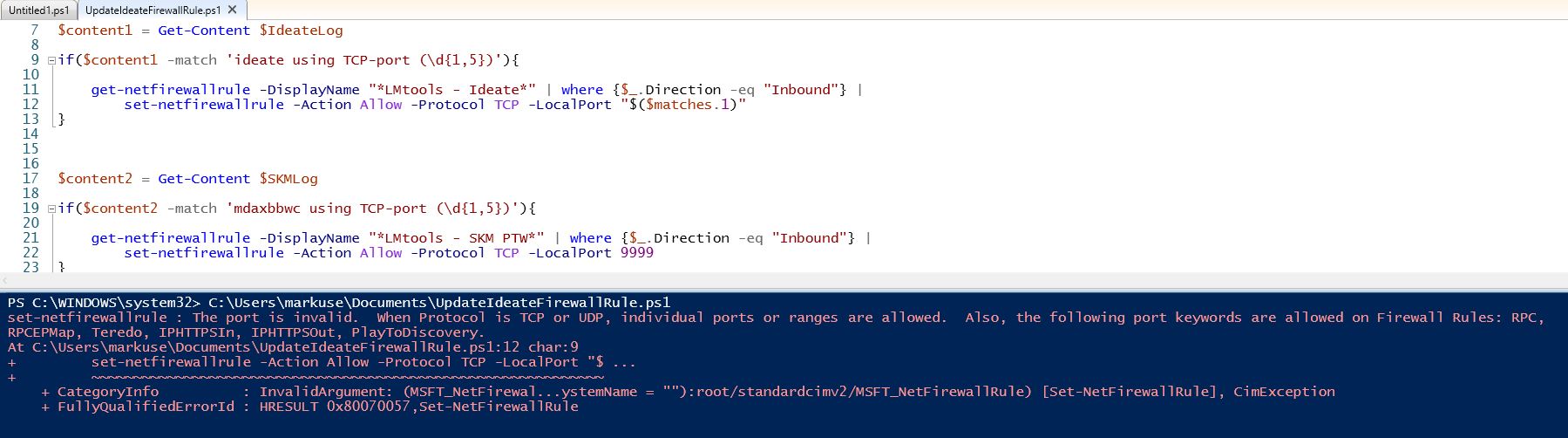
以下是我尝试"$($matches.1)“时的错误
回答 1
Stack Overflow用户
发布于 2020-11-18 04:21:21
因为您要查找的唯一值是端口号,所以可以将代码简化为
$IdeateLog = "C:\Autodesk\Network License Manager\ideate.log"

$content = Get-Content $IdeateLog

if($content -match 'ideate using TCP-port (\d{1,5})')
{
    get-netfirewallrule -DisplayName "*LMtools - Ideate*" | where {$_.Direction -eq "Inbound"} |
        set-netfirewallrule -Action Allow -Protocol TCP -LocalPort "$($matches.1)"
}该模式将只匹配线与ideate using TCP-port和模式\d{1,5}将匹配和数字,即1至5位长。
编辑
查看Set-NetFirewallrule的帮助,它显示本地端口为字符串数组。这很可能是数字本身无法工作的原因。我编辑了答案,强迫数字是一个字符串。
页面原文内容由Stack Overflow提供。腾讯云小微IT领域专用引擎提供翻译支持
原文链接:
https://stackoverflow.com/questions/64885255
复制相关文章
相似问题
腾讯云开发者

Copyright © 2013 - 2026 Tencent Cloud. All Rights Reserved. 腾讯云 版权所有
深圳市腾讯计算机系统有限公司 ICP备案/许可证号:粤B2-20090059  粤公网安备44030502008569号
腾讯云计算(北京)有限责任公司 京ICP证150476号 | 京ICP备11018762号