
反应导航5:固定headerRight间距
反应导航5:固定headerRight间距
提问于 2020-11-17 09:04:38
--这就是我的标题现在的样子:
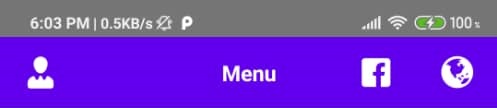
--这就是我要实现的目标:

代码片段:
<Stack.Navigator initialRouteName="MenuRoute">
        <Stack.Screen
          name={'MenuRoute'}
          component={Menu}
          options={({navigation, route}) => ({
            headerTitle: () => (
              <Text
                style={{
                  ...styles.headerTitle,
                }}>
                <Translatable value="Menu" />
              </Text>
            ),
            headerLeft: () => <AuthMenuPicker {...navigation} {...route} />,
            headerRight: () => (
              <View style={styles.row}>
                <FacebookButton {...navigation} {...route}/>
                <LanguagePicker />
              </View>
            ),
            headerStyle,
          })}
        />

        .....
        .....
        .....

</Stack.Navigator>

const styles = StyleSheet.create({
  row: {
    flexDirection: 'row',
  }
});
如何将Facebook标志移向右侧(如图所示)?
我试过marginLeft和paddingLeft,但似乎没有什么能奏效。
所有的帮助将不胜感激,因为我是新的问题和反应导航5在一般情况下。
UPDATE#1:
添加了borderWidth:1 和 borderColor: 'red' ,以清楚地显示 headerLeft 区域:
const styles = StyleSheet.create({
  row: {
    flexDirection: 'row',
    borderWidth: 1,
    borderColor:  'red',
  }
});
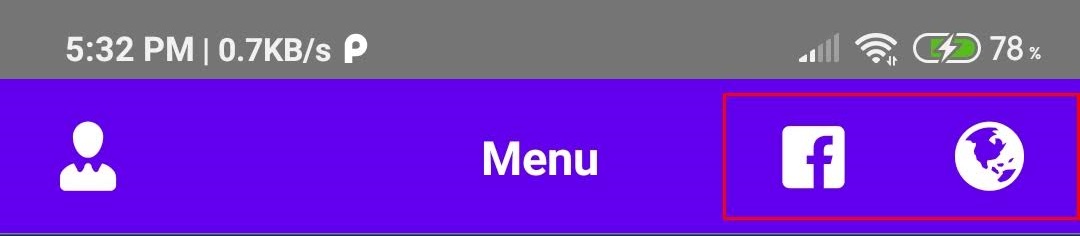
UPDATE#2 -添加了组件代码段:
代码片段(**FacebookButton** 组件):
import React, { Component } from 'react';
import { StyleSheet } from 'react-native';
import { Button } from 'react-native-paper';
import Entypo from 'react-native-vector-icons/Entypo';
import {FACEBOOK} from '../constants';

class FacebookButton extends Component {
    constructor(props) {
        super(props);
    }

    componentDidMount() { }

    render() {
        return (
            <>
                <Button
                    //onPress={() => alert()}
                    onPress={() => {
                        this.props.navigate(
                            'FacebookMenuWebviewRoute',
                            {
                                url: FACEBOOK.FACEBOOK_PAGE,
                            },
                        );
                    }}
                >
                    <Entypo
                        name="facebook"
                        size={this.props.iconSize || 25}
                        style={{ ...styles.icon, ...this.props.iconStyle }}
                    />
                </Button>
            </>
        );
    }
}

export const styles = StyleSheet.create({
    icon: {
        color: 'white',
    },
});

export default FacebookButton;代码片段(**LanguagePicker** 组件):
    import React, {Component} from 'react';
    import {StyleSheet} from 'react-native';
    import {Menu, Button, withTheme} from 'react-native-paper';
    import Fontisto from 'react-native-vector-icons/Fontisto';
    import {IntlContext} from '../utility/context/Internationalization';

    class LanguagePicker extends Component {

      ...
      ...
      ...

      renderPicker() {
        return (
          <IntlContext.Consumer>
            {(context) => {
              return (
                <Menu
                  visible={this.state.showMenu}
                  onDismiss={() => this.showMenu(false)}
                  anchor={
                    <Button
                      onPress={() => this.showMenu(true)}
                      style={{
                        ...styles.menuButton,
                        ...this.props.menuButtonStyle,
                      }}>
                      <Fontisto
                        name="earth"
                        size={this.props.iconSize || 25}
                        style={{...styles.icon, ...this.props.iconStyle}}
                      />
                    </Button>
                  }>
                  {this.renderPickerItems(context)}
                </Menu>
              );
            }}
          </IntlContext.Consumer>
        );
      }

      render() {
        return <>{this.renderPicker()}</>;
      }
    }

    export const styles = StyleSheet.create({
      menuButton: {},
      icon: {
        color: 'white',
      },
    });

export default withTheme(LanguagePicker);回答 1
Stack Overflow用户
发布于 2020-11-17 10:25:11
谢谢你@GuruparanGiritharan指出包装的事。
解决方案:
FacebookButton 代码片段组件:
 <TouchableOpacity
          style={{ justifyContent: 'center' }}
          onPress={() => { ... }
    >
              <Entypo
                 name="facebook"
                 size={this.props.iconSize || 25}
                 style={{ ...styles.icon, ...this.props.iconStyle }}
              />
</TouchableOpacity>
新标题:

Explanation:
我使用的是来自Button的react-native-paper组件,该组件有自己固定的间距。这导致Facebook图标的间距过大。
因此,删除Button组件并从react-native中简单地添加TouchableOpacity有助于减少标题上两个图标之间的空间。
页面原文内容由Stack Overflow提供。腾讯云小微IT领域专用引擎提供翻译支持
原文链接:
https://stackoverflow.com/questions/64872199
复制相关文章
相似问题
腾讯云开发者

Copyright © 2013 - 2026 Tencent Cloud. All Rights Reserved. 腾讯云 版权所有
深圳市腾讯计算机系统有限公司 ICP备案/许可证号:粤B2-20090059  粤公网安备44030502008569号
腾讯云计算(北京)有限责任公司 京ICP证150476号 | 京ICP备11018762号