
如何在运行时更改UIAction在UIMenu中的状态?
如何在运行时更改UIAction在UIMenu中的状态?
提问于 2020-11-08 12:24:04
如何更改UIAction的状态?目标是在UIAction内部UIMenu中切换一个状态标记。
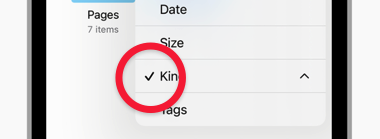
通过存储在视图控制器中的引用更改UIAction的state似乎根本不改变状态。我有遗漏什么吗?
// View Controller
internal var menuAction: UIAction!

private func generatePullDownMenu() -> UIMenu {
    menuAction = UIAction(
        title: "Foo",
        image: UIImage(systemName: "chevron.down"),
        identifier: UIAction.Identifier("come.sample.action"),
        state:  .on
    ) { _ in self.menuAction.state = .off } // <--- THIS LINE


    let menu = UIMenu(
        title: "Sample Menu",
        image: nil,
        identifier: UIMenu.Identifier("com.sample.menu"),
        options: [],
        children: [menuAction]
    )

    return menu
}

// Inside UI setup code block
let buttonItem = UIBarButtonItem(
    title: "",
    image: UIImage(systemName: "chevron.down"),
    primaryAction: nil,
    menu: generatePullDownMenu()
)尝试从闭包中直接更改action状态,并得到"Action,因为它是菜单的子程序“的错误。现在,我怀疑动作对象总是不可变的对象。
menuAction = UIAction(
    title: "Foo",
    image: UIImage(systemName: "chevron.down"),
    identifier: UIAction.Identifier("come.sample.action"),
    state:  .on
) { action in action.state = .off } // <--- THIS LINE回答 4
Stack Overflow用户
回答已采纳
发布于 2020-11-08 14:21:15
在状态更改时替换整个UIMenu对象就可以了。
// view controller
internal var barButton: UIBarButtonItem!

// UI setup function
barButton = UIBarButtonItem(
    image: UIImage(systemName: "arrow.up.arrow.down.square"),
    primaryAction: nil,
    menu: generatePullDownMenu()
)

// On state change inside UIAction
let actionNextSeen = UIAction(
    title: "foo",
    image: UIImage(systemName: "hourglass", )
    state: someVariable ? .off : .on
) { _ in
    someVariable = false
    self.barButton.menu = self.generatePullDownMenu()
}
参考
Stack Overflow用户
发布于 2021-03-18 18:33:55
您需要重新创建菜单。此示例还将正确选择被点击的项:
private func setupViews()
    timeFrameButton = UIBarButtonItem(
        image: UIImage(systemName: "calendar"),
        menu: createMenu()
    )
    navigationItem.leftBarButtonItem = timeFrameButton
}

private func createMenu(actionTitle: String? = nil) -> UIMenu {
    let menu = UIMenu(title: "Menu", children: [
        UIAction(title: "Yesterday") { [unowned self] action in
            self.timeFrameButton.menu = createMenu(actionTitle: action.title)
        },
        UIAction(title: "Last week") { [unowned self] action in
            self.timeFrameButton.menu = createMenu(actionTitle: action.title)
        },
        UIAction(title: "Last month") { [unowned self] action in
            self.timeFrameButton.menu = createMenu(actionTitle: action.title)
        }
    ])

    if let actionTitle = actionTitle {
        menu.children.forEach { action in
            guard let action = action as? UIAction else {
                return
            }
            if action.title == actionTitle {
                action.state = .on
            }
        }
    } else {
        let action = menu.children.first as? UIAction
        action?.state = .on
    }

    return menu
}Stack Overflow用户
发布于 2020-11-08 13:21:25
不要试图在菜单显示时更改它。通过更改数据来响应选择。同时,菜单会消失,因为用户已经选择了一个操作。但是现在,当用户下次显示菜单时,您可以使用这些数据来构造菜单。
页面原文内容由Stack Overflow提供。腾讯云小微IT领域专用引擎提供翻译支持
原文链接:
https://stackoverflow.com/questions/64738005
复制相关文章
相似问题
腾讯云开发者

Copyright © 2013 - 2026 Tencent Cloud. All Rights Reserved. 腾讯云 版权所有
深圳市腾讯计算机系统有限公司 ICP备案/许可证号:粤B2-20090059  粤公网安备44030502008569号
腾讯云计算(北京)有限责任公司 京ICP证150476号 | 京ICP备11018762号